
ricambigrossclima.com LCD-5S
LAE LCD-5S REMOTE DISPLAY ELECTRONIC CONTROLLER
User Manual
Brand: ricambigrossclima.com
Product Overview
The LAE LCD-5S is a remote display electronic controller designed for professional refrigeration systems. It provides a clear digital display for monitoring and controlling various parameters. This unit is typically connected via a flat cable, ensuring reliable communication with the main system.
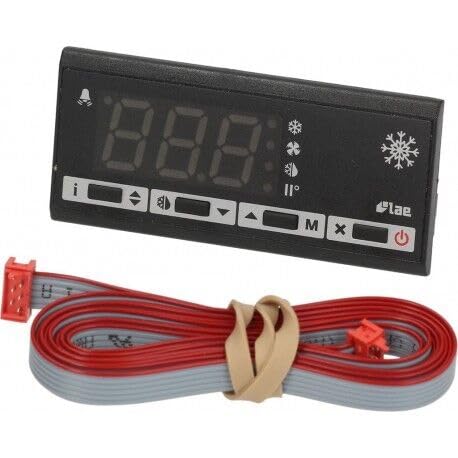
Figure 1: LAE LCD-5S Remote Display Electronic Controller. This image shows the black rectangular display unit with a digital readout and several control buttons below it. A grey and red flat cable, bundled with a beige tie, extends from the unit, indicating its connection method.
Specifications
| Feature | Value |
|---|---|
| Brand | ricambigrossclima.com |
| Model | LCD-5S |
| Voltage | 230 Volts |
| Backlight | Yes |
| Item Weight | 199.58 g (0.44 Pounds) |
| ASIN | B073JPLQ2H |
| Date First Available | May 23 2023 |
Setup and Installation
Proper installation is crucial for the optimal performance and longevity of the LAE LCD-5S controller. It is recommended that installation be performed by qualified personnel.
- Mounting: Choose a suitable location for the remote display unit, ensuring it is easily accessible for viewing and operation, and protected from excessive moisture or direct sunlight.
- Cable Connection: Connect the provided flat cable to the designated port on the LAE LCD-5S controller and the corresponding port on the main refrigeration system's control board. Ensure the cable is securely seated and oriented correctly to prevent damage to the pins.
- Power Supply: Verify that the main refrigeration system is powered off before making any electrical connections. Once all connections are secure, power on the main system. The LCD-5S display should illuminate.
- Initial Check: After power-up, observe the display for any error codes or unusual readings. Refer to the troubleshooting section if issues arise.
Note: Always consult the specific wiring diagrams and instructions provided with your main refrigeration unit for precise connection details.
Operating Instructions
The LAE LCD-5S controller provides intuitive control and monitoring capabilities. Familiarize yourself with the display and button functions.
Display Indicators:
- Digital Readout: Displays the current temperature or parameter value.
- Snowflake Symbol: Indicates that the cooling function is active.
- Bell Symbol: Indicates an active alarm condition.
- Degree Symbol (°): Denotes temperature units (e.g., °C or °F, depending on configuration).
Button Functions:
- Power Button (⏻): Used to turn the display unit on or off, or to enter/exit standby mode.
- 'i' Button (Information): Press to view additional information or current status parameters.
- Arrow Buttons (◀ ▶): Used to navigate through menus or adjust parameter values.
- 'M' Button (Menu/Mode): Used to access the main menu or switch between operating modes.
- 'X' Button (Exit/Cancel): Used to exit a menu or cancel an operation.
- Set Button (often represented by a symbol like a checkmark or 'SET'): Used to confirm selections or save changes.
For detailed programming and parameter adjustment, refer to the comprehensive manual of your specific refrigeration system, as the LCD-5S acts as a remote interface.
Maintenance
Regular maintenance helps ensure the longevity and accuracy of your LAE LCD-5S controller.
- Cleaning: Gently wipe the display and casing with a soft, dry cloth. For stubborn marks, a slightly damp cloth with mild soap can be used, but ensure no liquid enters the unit. Do not use abrasive cleaners or solvents.
- Inspection: Periodically check the flat cable for any signs of wear, kinks, or damage. Ensure connections remain secure.
- Environment: Ensure the controller is operating within its specified environmental conditions (temperature, humidity) to prevent premature failure.
Troubleshooting
If you encounter issues with your LAE LCD-5S controller, refer to the following common problems and solutions:
- Display is Blank:
- Check if the main refrigeration system is powered on.
- Verify the flat cable connection is secure at both ends.
- Ensure the power button on the LCD-5S is pressed (if applicable for standby).
- Incorrect Temperature Reading:
- This display unit shows readings from the main system. Check the temperature sensor connected to the main refrigeration unit for proper placement and function.
- Ensure no obstructions are affecting the sensor's ability to read ambient temperature accurately.
- Alarm Bell Symbol is On:
- An alarm indicates a condition outside of normal operating parameters (e.g., high temperature, sensor error).
- Consult the main refrigeration system's manual for specific alarm codes and their meanings.
- Address the underlying issue causing the alarm.
- Buttons Not Responding:
- Ensure the unit is not in a locked mode (if such a feature exists, refer to the main system manual).
- Try power cycling the main refrigeration system.
For persistent issues or complex problems, it is recommended to contact a qualified service technician or the manufacturer.
Warranty and Support
Specific warranty terms for the LAE LCD-5S Remote Display Electronic Controller are typically provided by the seller or the manufacturer, ricambigrossclima.com, at the time of purchase. Please retain your proof of purchase for warranty claims.
For technical support, service, or to inquire about replacement parts, please contact the vendor or the manufacturer directly. Refer to the contact information provided with your purchase documentation.
Ask a question about this manual
Ask about setup, troubleshooting, compatibility, parts, safety, or missing instructions. Manuals+ will review the question and use this page’s manual context to help answer it.