
1. Overview
The EVCO EVK214 N9 is an advanced electronic controller designed for industrial and scientific applications, offering precise control over various parameters. This device integrates multiple relay outputs for managing components such as air compressors, defrosting systems, and fans, alongside digital inputs for comprehensive system monitoring. Its robust design and feature set make it suitable for demanding environments requiring reliable process control.
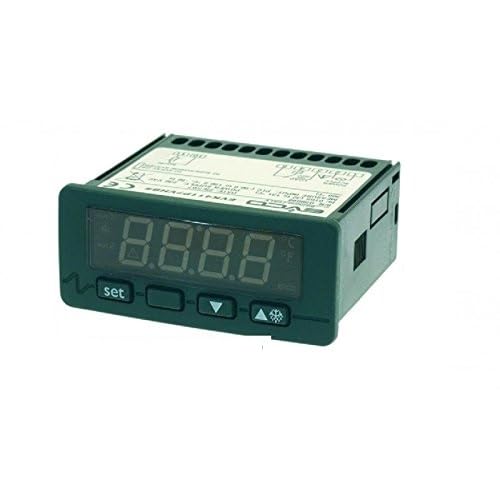
Figure 1: Front view of the EVCO EVK214 N9 Electronic Controller, showing its digital display and control buttons. The display shows "8.8.8.8" and indicators for Celsius/Fahrenheit. Buttons include 'set', down arrow, up arrow, and a snowflake icon.
2. Key Features
- Versatile Power Input: Operates on 115 – 230 V, 50/60Hz.
- Multiple Relay Outputs:
- 1 x 16 A relay output for air compressor control.
- 1 x 8 A relay output for defrosting functions.
- 1 x 8 A relay output for fan control.
- 1 x 8 A low configurable relay output for flexible applications.
- Digital Inputs: Includes 1 x Micro port digital input and 1 x low configurable digital input.
- Probe Compatibility: Supports 2 x PTC/NTC probes (probes not included).
- RTC Function: Real-Time Clock for precise scheduling and Energy Saving features.
- Defrost Management: Advanced defrost management based on temperature and time.
- HACCP Alarm Storage: Capable of storing up to 9 HACCP alarms for critical event logging.
- Compact Design: Front size of 75 x 33 mm with a depth of 59 mm, and a drilling template of 71 x 29 mm for easy integration.
- LCD Display: Clear Liquid Crystal Display for easy reading of parameters.
3. Setup and Installation
The EVCO EVK214 N9 controller is designed for panel mounting. Proper installation is crucial for optimal performance and safety.
3.1 Physical Installation
- Panel Cutout: Prepare a panel cutout with dimensions of 71 mm x 29 mm. Ensure the cutout is clean and free of burrs.
- Mounting: Insert the controller into the prepared cutout from the front. Secure it using the provided mounting clips or brackets, ensuring a snug fit.
- Dimensions: The controller's front measures 75 mm x 33 mm, with a depth of 59 mm. Allow sufficient space behind the panel for wiring and ventilation.
3.2 Electrical Connections
All electrical connections should be performed by a qualified technician in accordance with local electrical codes and regulations. Ensure power is disconnected before making any connections.
- Power Supply: Connect the 115 – 230 V, 50/60Hz power supply to the designated terminals. Verify correct voltage and frequency before powering on.
- Relay Outputs: Connect the compressor, defrost, fan, and configurable load circuits to their respective relay output terminals (16 A for compressor, 8 A for others).
- Probes: Connect the PTC/NTC temperature probes (not included) to the designated probe input terminals. Ensure correct polarity if applicable.
- Digital Inputs: Connect any external switches or sensors to the Micro port digital input and the low configurable digital input as required by your application.
Note: PTC/NTC probes are essential for temperature sensing and are not supplied with the controller. Please acquire compatible probes separately.
4. Operating Instructions
The EVCO EVK214 N9 controller features an intuitive LCD display and front-panel buttons for configuration and operation.
4.1 Basic Operation
- Power On: Once correctly wired, apply power to the controller. The LCD display will illuminate, showing the current temperature or status.
- Display Reading: The primary display shows the measured temperature or other configured parameters. Indicators on the display will show active functions (e.g., compressor running, defrost active).
4.2 Setting Parameters
Use the 'SET' button to access and modify parameters. The arrow buttons (up/down) are used to navigate through menus and adjust values.
- Accessing Setpoint: Press the 'SET' button briefly to view or adjust the main temperature setpoint.
- Menu Navigation: Press and hold the 'SET' button to enter the parameter programming menu. Use the up/down arrows to scroll through parameters.
- Adjusting Values: Once a parameter is selected, press 'SET' again to view its value. Use the up/down arrows to change the value. Press 'SET' to confirm and save.
- Exiting Menu: To exit the programming menu, wait for a timeout or press a specific combination (refer to detailed programming manual for specific sequences).
4.3 Advanced Functions
- Defrost Management: The controller automatically manages defrost cycles based on configured temperature and time parameters. Manual defrost can typically be initiated via a button combination (e.g., holding the snowflake button).
- RTC and Energy Saving: Utilize the Real-Time Clock function to program specific operating schedules, enabling energy-saving modes during off-peak hours.
- HACCP Alarms: The controller logs up to 9 HACCP alarms. These alarms indicate critical events or deviations from set parameters. Consult the detailed programming manual for alarm codes and reset procedures.
For detailed programming and advanced configuration, refer to the comprehensive programming manual provided by EVCO or ricambigrossclima.com.
5. Maintenance
Regular maintenance ensures the longevity and reliable operation of your EVCO EVK214 N9 controller.
- Cleaning: Periodically clean the front panel and display with a soft, damp cloth. Do not use abrasive cleaners or solvents. Ensure no liquid enters the controller.
- Connections Check: Annually, or as part of your system's maintenance schedule, inspect all electrical connections for tightness and signs of corrosion. Loose connections can lead to erratic behavior or damage.
- Environmental Conditions: Ensure the operating environment remains within the specified temperature and humidity ranges to prevent damage to internal components.
- Probe Inspection: If applicable, regularly inspect temperature probes for physical damage or buildup that might affect accuracy.
Always disconnect power to the controller before performing any maintenance or inspection.
6. Troubleshooting
This section provides basic troubleshooting steps for common issues. For more complex problems, contact technical support.
| Problem | Possible Cause | Solution |
|---|---|---|
| Controller display is blank. | No power supply; incorrect wiring; internal fault. | Check power connections and circuit breaker. Verify wiring according to diagram. If problem persists, contact support. |
| Incorrect temperature reading. | Faulty probe; incorrect probe type; probe not connected properly. | Check probe connections. Ensure correct PTC/NTC probe type is used. Replace probe if damaged. |
| Relay output not activating. | Incorrect setpoint; parameter misconfiguration; faulty relay. | Verify setpoint and differential settings. Check relay output wiring. Review programming parameters. |
| HACCP alarm active. | System deviation; parameter breach. | Identify the alarm code from the display. Address the underlying issue (e.g., temperature out of range). Reset alarm as per programming manual. |
7. Specifications
| Parameter | Value |
|---|---|
| Model Number | EVCO EVK214N9 |
| Brand | ricambigrossclima.com |
| Product Type | Electronic Controller |
| Power Supply | 115 – 230 V, 50/60Hz |
| Compressor Relay Output | 1 x 16 A |
| Defrost Relay Output | 1 x 8 A |
| Fan Relay Output | 1 x 8 A |
| Configurable Relay Output | 1 x 8 A (low configurable) |
| Digital Inputs | 1 x Micro port, 1 x low configurable |
| Probe Inputs | 2 x PTC/NTC (probes not included) |
| Special Functions | RTC, Energy Saving, Defrost Management (temperature-time), HACCP Alarm Storage (up to 9) |
| Front Dimensions (W x H) | 75 mm x 33 mm |
| Depth | 59 mm |
| Drilling Template Dimensions (W x H) | 71 mm x 29 mm |
| Item Weight | 199.58 grams |
| Display Type | LCD |
| UPC | 619084188476 |
| ASIN | B073H9Y4F2 |
8. Warranty and Support
Information regarding the specific warranty period and terms for the EVCO EVK214 N9 Electronic Controller should be obtained directly from the manufacturer, EVCO, or the seller, ricambigrossclima.com, at the time of purchase.
Spare parts availability information is currently unavailable. For technical support, service, or inquiries about spare parts, please contact ricambigrossclima.com or an authorized EVCO service center.
It is recommended to retain your purchase receipt or invoice as proof of purchase for any warranty claims.