
Introduction
This manual provides essential information for the safe operation, maintenance, and troubleshooting of your Milwaukee M18 18-Volt FUEL Lithium-Ion Cordless Brushless 10 in. Dual Bevel Sliding Compound Miter Saw. Please read this manual thoroughly before initial use and keep it for future reference.
The Milwaukee M18 FUEL Miter Saw is designed for professional use, offering exceptional power, run-time, and durability. It features a POWERSTATE Brushless Motor and REDLITHIUM Battery Pack technology for optimal performance.

Figure 1: Milwaukee M18 FUEL 10-inch Dual Bevel Sliding Compound Miter Saw Kit.
Safety Information
Always follow basic safety precautions to reduce the risk of fire, electric shock, and personal injury when operating power tools. Keep this manual handy for quick reference.
- Work Area Safety: Keep the work area clean and well-lit. Cluttered or dark areas invite accidents. Do not operate power tools in explosive atmospheres, such as in the presence of flammable liquids, gases, or dust.
- Electrical Safety: Avoid body contact with earthed or grounded surfaces. Do not expose power tools to rain or wet conditions.
- Personal Safety: Always wear eye protection (safety glasses or goggles) and hearing protection. Use a dust mask if operations create dust. Dress properly; avoid loose clothing or jewelry.
- Tool Use and Care: Do not force the power tool. Use the correct power tool for your application. Disconnect the plug from the power source and/or remove the battery pack before making any adjustments, changing accessories, or storing power tools.
- Miter Saw Specific Safety: Ensure the blade is sharp and clean. Secure the workpiece firmly. Keep hands clear of the blade path. Allow the blade to reach full speed before cutting.
What's Included
Your Milwaukee M18 FUEL Dual Bevel Sliding Compound Miter Saw Kit typically includes the following components:
- (1) M18 FUEL Dual Bevel Sliding Compound Miter Saw (2734-20)
- (2) M18 REDLITHIUM HIGH DEMAND 9.0 Battery Pack (48-11-1890)
- (1) M18 & M12 Rapid Charger (48-59-1808)
- (1) Blade Wrench
- (1) Carbide Tipped Blade
- (1) Clamp
- (1) Dust Bag

Figure 2: Main components of the Milwaukee M18 FUEL Miter Saw kit.

Figure 3: M18 REDLITHIUM HIGH DEMAND Battery Packs.

Figure 4: M18 & M12 Rapid Charger.
Setup
Before operating the miter saw, ensure it is properly set up and secured.
1. Unpacking and Assembly
- Carefully remove all components from the packaging.
- Inspect the tool for any damage that may have occurred during shipping.
- Place the miter saw on a stable, level surface or a compatible miter saw stand. Ensure the stand is securely locked.
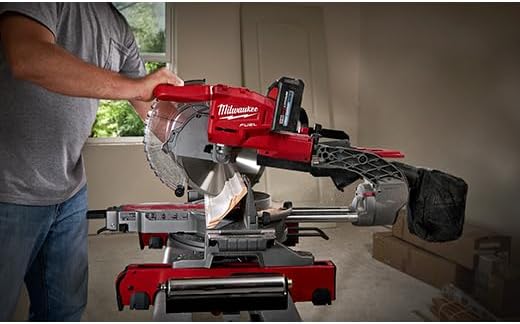
Figure 5: The miter saw features top and side carrying handles for portability.
2. Blade Installation (if not pre-installed)
- Ensure the battery pack is removed from the saw.
- Refer to the blade change instructions in the maintenance section. Use the provided blade wrench.
- Ensure the blade is installed with the teeth pointing in the correct direction (usually indicated by an arrow on the blade and saw).
3. Battery Charging and Installation
- Insert the M18 REDLITHIUM battery pack into the M18 & M12 Rapid Charger. The charger indicator lights will show charging status.
- Once fully charged, remove the battery from the charger.
- Slide the charged battery pack into the battery port on the miter saw until it clicks into place.
Operating Instructions
Familiarize yourself with the controls and adjustments before making cuts.
1. Adjusting Miter and Bevel Angles
- Miter Angle: Loosen the miter lock knob. Rotate the turntable to the desired angle. The saw features an adjustable stainless steel miter detent plate with 11 detent locations for common angles. Tighten the lock knob.
- Bevel Angle: Loosen the bevel lock lever. Tilt the saw head to the desired bevel angle. The saw has dual bevel capability with 9 detents. Tighten the lever.

Figure 6: Adjusting the miter angle for precise cuts.
2. Making a Cut
- Secure Workpiece: Place the workpiece firmly against the fence and the miter table. Use the provided clamp to secure it if necessary.
- Align Cut Line: Utilize the Shadow Cut Line Indicator to precisely align the blade with your marked cut line.
- Start Saw: Depress the trigger to start the saw. Allow the blade to reach full speed before engaging the material.
- Perform Cut: Slowly and steadily lower the blade through the workpiece. For sliding cuts, pull the saw head forward, lower the blade, and push it smoothly through the material.
- Retract Blade: Once the cut is complete, release the trigger and allow the blade to stop spinning before raising the saw head.

Figure 7: Demonstrating a straight cut on a wooden board.

Figure 8: The saw is capable of precise cuts on various materials, including trim.
Maintenance
Regular maintenance ensures optimal performance and extends the life of your tool.
1. Cleaning
- Always remove the battery pack before cleaning.
- Use a soft brush or compressed air to remove dust and debris from the motor vents and around the blade guard.
- Empty the dust bag regularly.

Figure 9: The integrated dust bag helps manage sawdust during operation.
2. Blade Care and Replacement
- A dull blade can cause kickback and poor cut quality. Replace blades when they become dull or damaged.
- To replace the blade, ensure the battery is removed. Use the blade wrench to loosen the arbor nut while holding the blade still. Remove the old blade and install the new one, ensuring the rotation direction is correct. Tighten the arbor nut securely.
3. Lubrication
- Periodically apply a light coat of machine oil to the sliding rails to ensure smooth operation.
Troubleshooting
| Problem | Possible Cause | Solution |
|---|---|---|
| Saw does not start. | Battery not charged or not properly inserted. | Charge battery fully and ensure it is securely clicked into place. |
| Poor cut quality (rough edges, splintering). | Dull or incorrect blade; workpiece not secured. | Replace with a sharp, appropriate blade for the material. Ensure workpiece is clamped firmly. |
| Saw bogs down during cut. | Overloading the motor; dull blade. | Reduce cutting speed. Replace blade. Ensure battery is fully charged. |
| Sliding mechanism is stiff. | Accumulated dust or lack of lubrication. | Clean rails and apply a light lubricant. |
Specifications
| Feature | Detail |
|---|---|
| Brand | Milwaukee |
| Model Number | 2734-21HDP |
| Power Source | Battery Powered (M18 REDLITHIUM) |
| Voltage | 18 Volts |
| Blade Diameter | 10 inches |
| Blade Material | Carbide |
| Vertical Capacity (Base Board) | 5-3/4 inches |
| Horizontal Capacity (at 90°) | 2x12 inches |
| Miter Detent Locations | 11 |
| Bevel Detents | 9 |
| Item Weight | 45 Pounds |
| Special Feature | Brushless Motor, Shadow Cut Line Indicator |
Warranty and Support
This Milwaukee M18 FUEL Miter Saw comes with a manufacturer's warranty. For specific warranty terms and conditions, please refer to the documentation included with your product or visit the official Milwaukee website.
For technical support, service, or to inquire about replacement parts, please contact Milwaukee customer service directly. Keep your model number (2734-21HDP) and purchase date available when contacting support.
You can find more information and contact details on the official Milwaukee website: www.milwaukeetool.com