
1. Introduction
Welcome to the Alcatel Idol 5S (Model 6060S) user manual. This guide provides essential information to help you set up, operate, and maintain your smartphone. The Alcatel Idol 5S features a vibrant 5.2-inch 1080p HD display, a powerful Qualcomm Snapdragon 625 Octa-core processor, and runs on Android 7.1 Nougat. It is designed for seamless connectivity and multimedia experiences.
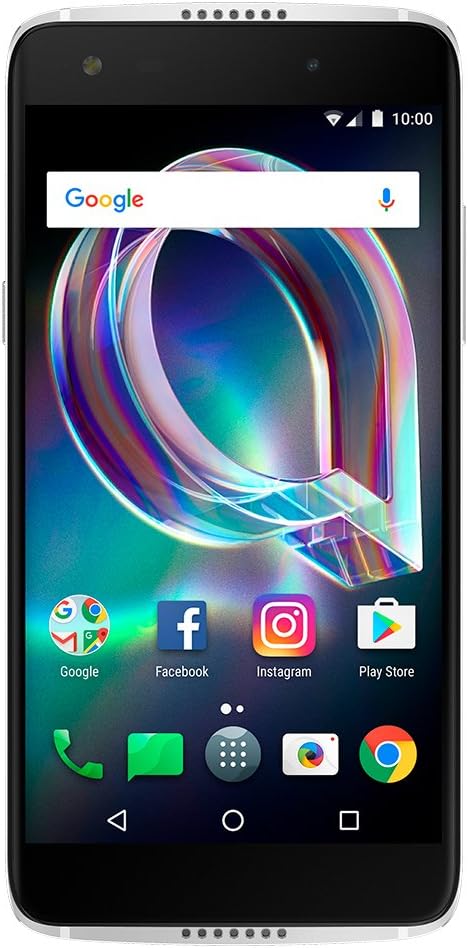
Figure 1: Front view of the Alcatel Idol 5S smartphone.
2. Setup
2.1 Unboxing Your Device
Upon opening the package, you should find the following items:
- Alcatel Idol 5S Device
- SIM Tool
- Quick Start Guide (QSG)
- Data Cable
2.2 Inserting SIM and MicroSD Cards
The Alcatel Idol 5S uses a Nano-SIM card. It also supports expandable storage up to 512GB via a MicroSD card. The SIM card holder also accommodates the memory card.
- Locate the SIM/MicroSD card tray on the side of the device.
- Insert the provided SIM tool into the small hole next to the tray to eject it.
- Place your Nano-SIM card into the designated slot.
- If desired, insert a MicroSD card into its dedicated slot on the same tray.
- Carefully push the tray back into the device until it clicks into place.

Figure 2: Side view of the Alcatel Idol 5S, highlighting the SIM/MicroSD card tray.
2.3 Initial Power-On and Charging
To power on your device, press and hold the power button located on the left side. Follow the on-screen prompts to complete the initial setup, including connecting to Wi-Fi, setting up your Google account, and configuring security features. The device supports quick charge via its USB Type-C port.
3. Operating Your Device
3.1 Basic Navigation and Interface
The Alcatel Idol 5S runs on Android 7.1 Nougat, offering a smooth and intuitive user experience. Navigate through the interface by swiping across the screen, tapping icons, and using the on-screen navigation buttons (Back, Home, Recent Apps).
3.2 Audio Features
Experience immersive sound with the dual 3.6-watt front-facing speakers. For private listening, connect headphones via the 3.5mm audio jack located on the top of the device.
3.3 Camera Functionality
The Idol 5S is equipped with a 12 MP rear-facing camera and an 8 MP front-facing camera, both featuring LED flash for optimal lighting. The camera supports various modes including video stabilization, 360-degree panorama photos, and a unique time-lapse mode. The camera automatically adjusts for depth of field to enhance your photos.

Figure 3: Rear view of the Alcatel Idol 5S, showing the camera and fingerprint sensor.
3.4 Fingerprint Sensor
For enhanced security and quick access, the device features a built-in fingerprint sensor located on the back. Register your fingerprints in the device settings for secure unlocking and app access.
3.5 Pre-installed Applications
The device comes with several pre-installed applications. You have the option to uninstall any unwanted applications to free up storage space and customize your device experience.
3.6 Connectivity
The Alcatel Idol 5S supports ultra-fast 4G LTE connectivity and Wi-Fi. It is compatible with major US carriers including AT&T, T-Mobile, and Verizon networks.
3.7 Google Assistant
Utilize Google Assistant, powered by Android 7.1 Nougat, for voice commands, information retrieval, and smart device control.
4. Maintenance
4.1 Battery Management
The device is powered by a 2620 mAh Lithium Ion battery, providing up to 20 hours of talk time. To optimize battery life, manage background app usage and adjust screen brightness. Regular charging with the provided data cable is recommended.
4.2 Storage Management
The Idol 5S comes with 32 GB of internal storage, expandable up to 512 GB using a MicroSD card. Regularly review and manage your files, photos, and applications to maintain optimal performance.
4.3 General Care
The phone features a durable aluminum frame and glass on both the front and back. To protect your device, consider using a protective case and screen protector. Avoid exposing the device to extreme temperatures or moisture.
5. Troubleshooting
5.1 Common Issues
- Device not responding: Press and hold the power button for approximately 10-15 seconds to force a restart.
- Connectivity problems: Ensure Wi-Fi and mobile data are enabled. Try toggling Airplane Mode on and off.
- App performance: Close unused background applications. Clear app cache in Settings > Apps.
- Missing app search: Note that the default app tray on this device may not include a dedicated search function for applications, which can be frustrating for some users. You may need to manually scroll through your app list or use the Google search bar on the home screen to find specific apps.
5.2 Factory Reset
If you encounter persistent software issues, a factory reset may resolve them. Warning: A factory reset will erase all data on your device. Back up important information before proceeding. To perform a factory reset, go to Settings > Backup & reset > Factory data reset.
6. Specifications
| Feature | Specification |
|---|---|
| Model Number | 6060S |
| Operating System | Android 7.1 Nougat |
| Processor | Qualcomm Snapdragon 625 Octa-Core (2.0 GHz) |
| RAM | 3 GB |
| Internal Storage | 32 GB |
| Expandable Storage | Up to 512 GB (MicroSD) |
| Display | 5.2 Inches, 1920 x 1080 pixels (1080p HD), Dragontrail 2.5D glass |
| Rear Camera | 12 MP with LED flash, video stabilization |
| Front Camera | 8 MP with LED flash |
| Battery Capacity | 2620 mAh Lithium Ion |
| Talk Time | Up to 20 Hours |
| Connectivity | 4G LTE, Wi-Fi, USB Type-C |
| Special Features | Fingerprint Scanner, Dual Front-Facing Stereo Speakers |
| Dimensions | 5.85 x 0.29 x 2.83 inches |
| Weight | 14.4 ounces |
7. Product Overview Video
Watch this official product video for a visual overview of the Alcatel Idol 5S features and design.
Video 1: Official overview of the Alcatel Idol 5S smartphone, showcasing its design and key functionalities.
8. Warranty and Support
For detailed warranty information and customer support, please refer to the warranty card included in your product packaging or visit the official Alcatel website. You can also find additional support resources and FAQs there.