
1. Introduction
This manual provides detailed instructions for the endlessparts DS-316 Momentary Push Button Switch. This is a normally open (N/O) switch designed for various electrical applications requiring a temporary contact closure. Please read this manual thoroughly before installation and operation to ensure safe and correct usage.
2. Safety Information
- Always disconnect power to the circuit before attempting any installation, wiring, or maintenance.
- Ensure all wiring connections are secure and comply with local electrical codes.
- Do not exceed the specified current rating of 10 Amps to prevent damage to the switch or connected devices.
- Keep the switch away from water, moisture, and extreme temperatures.
- This product is not a toy. Keep out of reach of children.
3. Package Contents
- 1 x endlessparts DS-316 Momentary Push Button Switch (Black)
4. Specifications
| Feature | Specification |
|---|---|
| Brand | endlessparts |
| Model Number | DS-316 |
| Operation Mode | ON-OFF (Momentary) |
| Current Rating | 10 Amps |
| Switch Type | Push Button |
| Mounting Type | Snap In Mount |
| Actuator Type | Push Button |
| Controller Type | Push Button |
| Connectivity Protocol | X-10 |
| Color | Black |
| Unit Count | 1 Count |
| UPC | 748296473633 |
| ASIN | B072PZ8H7C |
5. Product Overview
A visual representation of the DS-316 Momentary Push Button Switch is provided below:
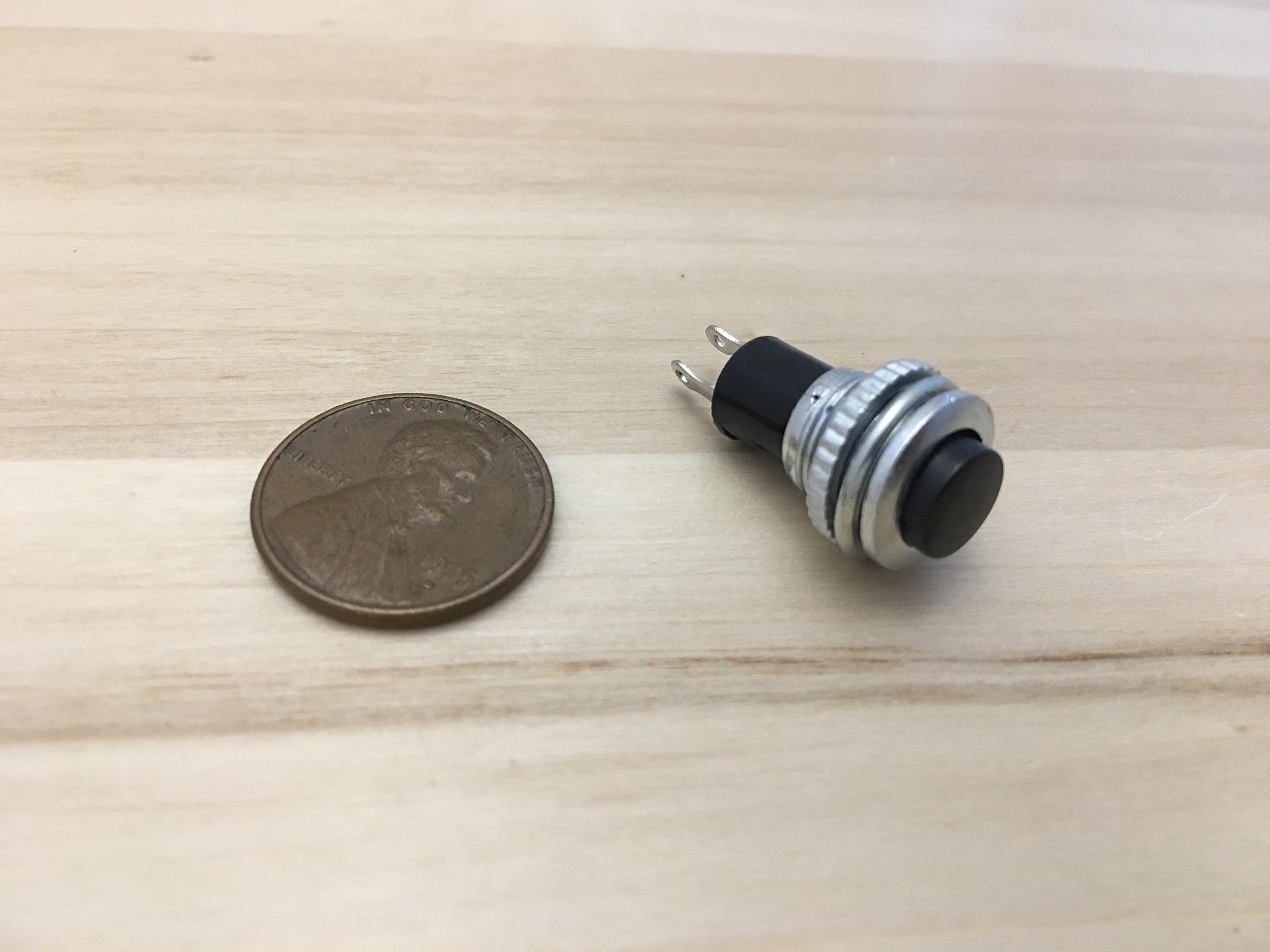
This image shows the endlessparts DS-316 momentary push button switch next to a US penny for scale. The switch features a black button, a silver threaded body for mounting, and two spade terminals at the base for electrical connections.
6. Setup and Installation
Follow these steps to properly install your DS-316 Momentary Push Button Switch:
- Step 1: Prepare the Mounting Hole. Identify the desired mounting location. Drill a circular hole approximately 10mm (0.39 inches) in diameter in the mounting surface. Ensure the surface thickness is suitable for the switch's threaded body.
- Step 2: Insert the Switch. Carefully push the switch body through the prepared mounting hole from the front side of your panel or enclosure.
- Step 3: Secure the Switch. From the rear side of the panel, thread the included securing nut onto the switch's threaded body. Tighten the nut firmly by hand or with an appropriate tool until the switch is securely mounted and does not rotate.
- Step 4: Wire the Switch. Connect your electrical circuit wires to the two spade terminals located at the base of the switch. As a normally open (N/O) switch, the circuit will be completed (closed) only when the button is pressed. Ensure connections are tight and insulated if necessary.
- Step 5: Test Functionality. Once installation and wiring are complete, restore power to the circuit and test the switch operation. Press the button to activate the circuit and release it to deactivate.
7. Operating Instructions
The endlessparts DS-316 is a momentary push button switch. This means its electrical contacts are closed (completing the circuit) only for the duration that the button is physically pressed. Upon release, the button returns to its original position, and the contacts open, breaking the circuit.
- To Activate: Press and hold the black button. The circuit will remain closed as long as the button is depressed.
- To Deactivate: Release the black button. The button will spring back to its original position, opening the circuit.
8. Maintenance
The DS-316 switch requires minimal maintenance to ensure long-term performance:
- Cleaning: Keep the switch surface clean and free from dust, dirt, and debris. Use a soft, dry cloth for cleaning. Avoid using harsh chemicals or abrasive materials.
- Environmental Protection: Protect the switch from excessive moisture, direct water spray, and extreme temperatures, which can degrade its performance and lifespan.
- Connection Check: Periodically inspect the wiring connections to ensure they remain tight and free from corrosion.
9. Troubleshooting
If you encounter issues with your DS-316 switch, consider the following:
Switch Not Activating
- No Power: Verify that power is correctly supplied to the circuit the switch is controlling.
- Incorrect Wiring: Double-check all wiring connections against your circuit diagram. Ensure the switch is correctly integrated into the circuit.
- Overload: Confirm that the connected load does not exceed the switch's 10 Amp current rating. An overload can prevent proper operation or damage the switch.
- Loose Connections: Ensure all wire terminals are securely fastened to the switch's spade connectors.
Button Sticking or Not Returning
- Physical Obstruction: Check for any foreign objects or debris around the button or within the mounting hole that might be impeding its movement.
- Damage: Inspect the switch for any visible physical damage. If damaged, replacement may be necessary.
10. Warranty Information
For specific warranty details regarding your endlessparts DS-316 Momentary Push Button Switch, please refer to the purchase documentation, the seller's return policy, or contact endlessparts customer support directly. Warranty terms typically cover manufacturing defects under normal use conditions.
11. Customer Support
Should you require further assistance, technical support, or have questions not covered in this manual, please contact endlessparts customer service. Refer to your product packaging or the endlessparts official website for contact information.