
Introduction
This manual provides essential instructions for the safe and effective operation, setup, and maintenance of your Merits Health Vision Sport Power Chair. Please read this manual thoroughly before using the power chair to ensure proper understanding and to prevent injury or damage.
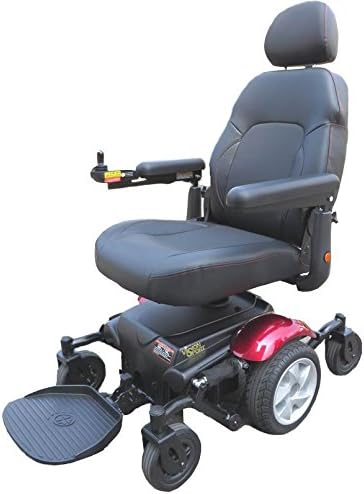
Image Description: A front-side view of the Merits Health Vision Sport Power Chair. It is black with red accents on the wheel fenders. The chair features a high-back, padded seat, a joystick control on the left armrest, and robust wheels designed for stability and maneuverability.
Setup and Assembly
Follow these steps to prepare your Vision Sport Power Chair for initial use:
- Unpack the Wheelchair: Carefully remove all components from the packaging. Inspect for any shipping damage.
- Adjust Seat and Backrest: Adjust the seat height, depth, and backrest angle to a comfortable and supportive position. Refer to the adjustment mechanisms located on the seat and backrest frame.
- Secure Wheels: Ensure all wheels are securely fastened and properly aligned.
- Install Footrest: Attach the footrest assembly. The footrest is designed to fold for convenience.
- Charge Batteries: The power chair is equipped with two 12V/U1 batteries. Fully charge the batteries before the first use. Connect the 4A off-board charger to the charging port and a standard electrical outlet. The charging indicator will show when charging is complete.
- Familiarize Controls: Before operating, spend time familiarizing yourself with the joystick, power button, and horn controls.
- User Positioning: Ensure proper user positioning in the seat and secure the safety belt.
Operating Instructions
The Vision Sport Power Chair is designed for ease of use. Follow these guidelines for safe operation:
- Power On/Off: Press the power button on the joystick control panel to turn the chair on or off.
- Steering: Use the joystick to control direction and speed. Pushing the joystick forward moves the chair forward, pulling back moves it backward, and moving it left or right steers the chair in those directions.
- Speed Control: The chair has a maximum speed of 5 mph. Adjust the speed setting on the control panel as needed for different environments.
- Horn: Use the horn button on the control panel to alert others when necessary.
- Safety Belt: Always wear the safety belt while operating the power chair to ensure stability and security.
- Footrest: The footrest can be folded in for easier transfers or storage. Ensure it is securely in place during operation.
- Reclining Feature: The backrest can be reclined for user comfort. Adjust as desired, ensuring stability before moving.
- Brake Lights: The chair is equipped with brake lights at the rear for increased visibility and safety.
- Disassembly for Transport: For transport, the chair can be disassembled into two main pieces (seat and base) and the footrest can be folded. This facilitates easier loading into a vehicle.
Maintenance
Regular maintenance ensures the longevity and safe operation of your power chair:
- Cleaning: Clean the chair regularly with a damp cloth and mild soap. Avoid harsh chemicals.
- Battery Care: Keep batteries fully charged. Avoid deep discharges. Store the chair with fully charged batteries if not in use for extended periods.
- Tire Inspection: Regularly check the solid tires for wear and tear. While solid tires do not require air pressure checks, ensure they are free from debris.
- Fastener Checks: Periodically check all nuts, bolts, and fasteners to ensure they are tight.
- Professional Servicing: It is recommended to have your power chair professionally serviced annually by an authorized technician.
Troubleshooting
If you encounter issues with your power chair, consider these common troubleshooting steps:
- Chair Does Not Power On:
- Ensure the batteries are fully charged.
- Check all battery connections for looseness or corrosion.
- Verify the power button is fully depressed.
- Chair Moves Erratically or Not at All:
- Check joystick connections.
- Ensure no obstructions are blocking the wheels.
- Confirm the chair is not in freewheel mode (if applicable).
- Reduced Range or Speed:
- Batteries may need a full charge or may be nearing the end of their lifespan.
- Operating on inclines or rough terrain will reduce range.
For persistent issues, contact Merits Health customer support or an authorized service center.
Specifications

Image Description: A table displaying the technical specifications of the Merits Health Vision Sport Power Chair. It includes details such as seat dimensions, overall length, height, width, total weight, capacity, max speed, range, turning radius, ground clearance, motor type, controller, battery type, charger, gradient capability, caster size, drive wheel size, and brake type.
| Feature | Specification |
|---|---|
| Model | Vision Sport (P326A) |
| Max Speed | 5 mph |
| Range | Up to 18 miles |
| Turning Radius | 20 inches |
| Ground Clearance | 2 inches |
| Motor | DC 24V, 160W |
| Controller | Dynamic LINX |
| Battery | 12V/U1 x 2 pcs |
| Charger | 4A off-board |
| Gradient | 6° |
| Casters | 6" front and rear solid tires |
| Drive Wheels | 10" solid tires |
| Brakes | Intelligent, regenerative, electromagnetic |
| Seat Width | 18 inches |
| Seat Depth | 18 inches |
| Seat Height | 21.5 - 23.5 inches |
| Backrest Height | 20 inches |
| Overall Length | 34 inches |
| Overall Height | 48.5 inches |
| Overall Width | 24 inches |
| Total Weight | 184 lbs |
| Capacity | 300 lbs |
| Material | Aluminum |
| Color | Black |
Warranty and Support
For detailed warranty information, please refer to the documentation provided with your purchase or contact Merits Health directly. Warranty terms and conditions may vary.
Manufacturer: Merits Health
For technical support, parts, or service inquiries, please contact Merits Health customer service through their official website or contact information provided at the time of purchase.
Legal Disclaimer: Statements regarding dietary supplements have not been evaluated by the FDA and are not intended to diagnose, treat, cure, or prevent any disease or health condition. This disclaimer is provided as part of the product's general information and is not directly related to the power chair's function or warranty.