
1. Introduction
This manual provides detailed instructions for the Neewer Pro Camera Backpack, designed to protect and transport your photography and drone equipment. It features a waterproof and shockproof design, adjustable padded compartments, and an integrated anti-theft combination lock. The backpack is suitable for various equipment, including DSLR cameras, lenses, flashes, tripods, and DJI Phantom series drones.

Figure 1.1: Front view of the Neewer Pro Camera Backpack, showcasing its sleek design and external features.
2. Setup and Customization
2.1. Adjustable Padded Dividers
The interior of the backpack features removable and adjustable fastening-taped padded dividers. These allow you to customize the internal layout to securely fit your specific camera bodies, lenses, and accessories. You can create up to eight individual partitions to organize your gear efficiently.

Figure 2.1: The backpack's interior, illustrating the customizable padded dividers and examples of equipment storage, including a DSLR, various lenses, and a DJI Phantom drone.
2.2. Setting the Combination Lock
The backpack is equipped with a 3-dial combination lock to secure the main compartment zippers. The initial password is '000'.
- Rotate the number dials to the previous password (default is 0-0-0) to unlock the zippers.
- With the lock open, locate the small 'push' button on the side of the lock mechanism.
- Press and hold the 'push' button using a pen or a similar pointed object.
- While holding the button, rotate the number dials to set your desired new three-digit combination.
- Release the 'push' button. Your new combination is now set.
Note: Please remember your new combination. If you forget the digit combination, the password cannot be changed again.

Figure 2.2: Visual guide for resetting the 3-dial combination lock, from initial password to setting a new one.
3. Operating the Backpack
3.1. Quick Access for Photography
The backpack is designed for convenient access to your camera without needing to fully remove it. This feature allows for quick shooting opportunities.
- Unbuckle the chest strap.
- Remove the shoulder straps from your shoulders.
- Rotate the backpack to the front of your body.
- Open the rear access pocket.
- Retrieve your camera for immediate use.

Figure 3.1: Step-by-step instructions for quick camera access, showing the process from wearing the backpack to taking out the camera for shooting.
3.2. External Attachments and Storage
The backpack offers multiple external attachment points and pockets for additional gear.
- Tripod/Monopod Holders: Two buckles on both sides of the backpack securely hold your tripod or monopod.
- Side Pockets: Elastic side pockets are suitable for holding mini tripods, water bottles, or other small items.
- Trekking Pole Strap: A dedicated strap allows for attachment of a trekking pole.
- Front Pocket: A dedicated front pocket provides storage for a laptop and other accessories.
- Small Item Pockets: Additional pockets are available for small items like cell phones.

Figure 3.2: Detailed view of the backpack's side, showing the side pocket, straps for tripods or trekking poles, and the portable handle.
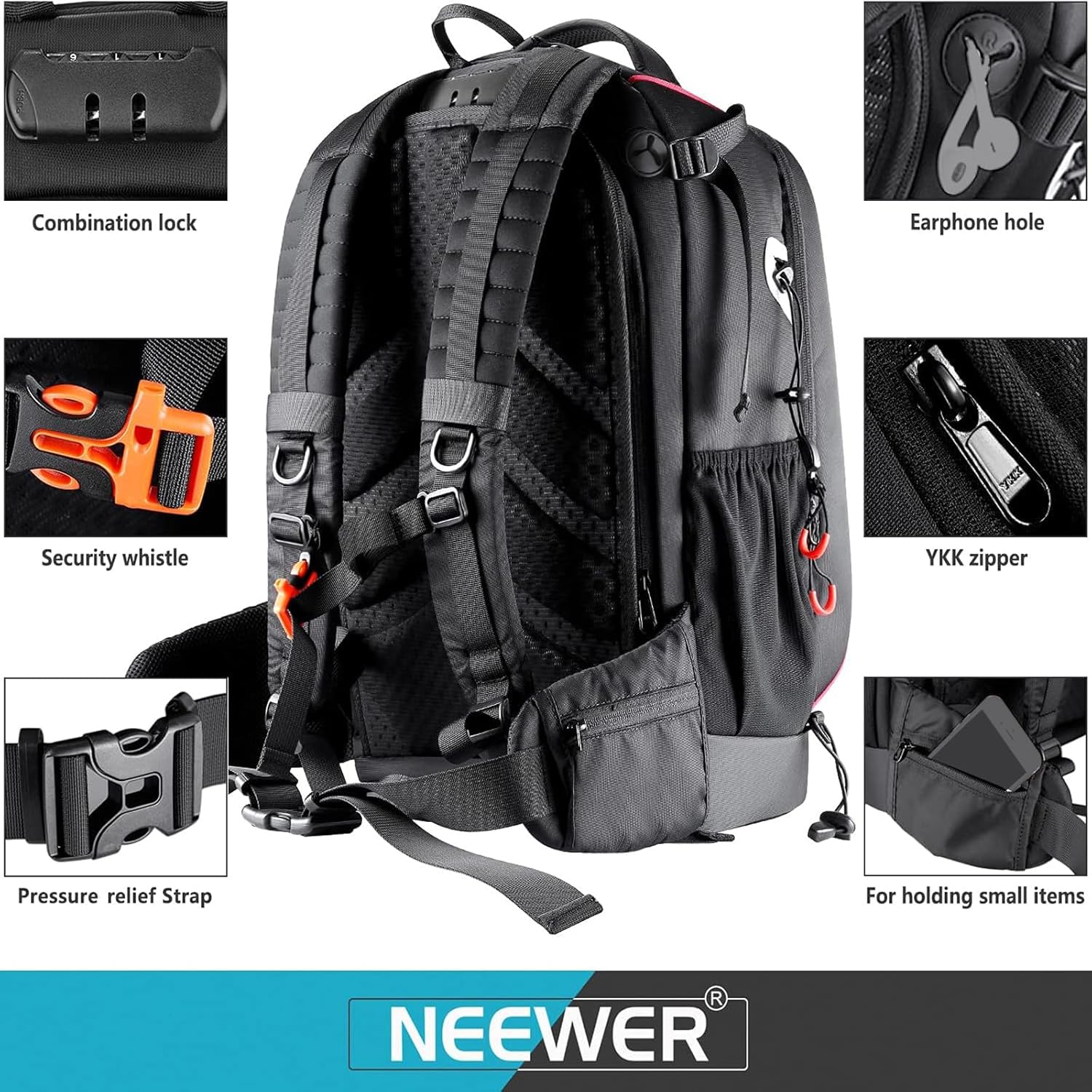
Figure 3.3: Overview of the backpack's rear and various functional details, including the combination lock, earphone port, security whistle, YKK zippers, and ergonomic straps.

Figure 3.4: Detailed images showcasing the front laptop compartment, the breathable mesh back panel, the waterproof exterior fabric, and the ergonomic shoulder straps.
4. Maintenance
4.1. Cleaning and Care
To ensure the longevity and performance of your Neewer Pro Camera Backpack, follow these maintenance guidelines:
- Exterior Cleaning: The backpack is made of waterproof polyester and durable nylon. For general cleaning, wipe the exterior with a damp cloth and mild soap. Avoid harsh chemicals or abrasive cleaners.
- Interior Cleaning: Remove all equipment and dividers. Use a soft brush or vacuum cleaner to remove dust and debris. Spot clean any stains on the fabric with a damp cloth.
- Drying: Allow the backpack to air dry completely in a well-ventilated area, away from direct sunlight or heat sources. Ensure it is fully dry before storing equipment.
- Storage: Store the backpack in a cool, dry place when not in use.

Figure 4.1: Cross-section diagram detailing the multi-layered construction for sturdiness, shock absorption, and waterproof protection, including the exterior nylon fabric and internal padding.
5. Troubleshooting
5.1. Forgotten Combination Lock Password
If you have forgotten your combination lock password, please refer to Section 2.2, 'Setting the Combination Lock'. The lock can only be reset if you know the current combination. If the combination is completely forgotten and the lock is engaged, it cannot be reset and may require professional assistance to open, potentially damaging the lock mechanism.
6. Specifications
6.1. Product Details
| Material | Nylon, Waterproof Polyester |
| Color | Black |
| Exterior Dimensions | 13.4 x 10.2 x 20.5 inches (34 x 26 x 52 cm) |
| Item Weight | 4.93 pounds |
| Model Number | 10087473 |
7. Warranty and Support
For warranty information or technical support regarding your Neewer Pro Camera Backpack, please refer to the documentation included with your purchase or contact Neewer customer service directly. Contact details can typically be found on the official Neewer website or through your retailer.