
Remotec ZTS-500
Remotec ZTS-500 Z-Wave Smart Thermostat User Manual
Model: ZTS-500 | Brand: Remotec
1. Introduction
The Remotec ZTS-500 is a Z-Wave enabled smart thermostat designed for controlling your HVAC system. This device requires a Z-Wave gateway or hub for remote control and smart home integration. It aims to provide efficient temperature management for various heating and cooling systems.
2. Safety Information
- Always disconnect power to your HVAC system at the circuit breaker before installing or servicing the thermostat.
- Installation should be performed by a qualified electrician or HVAC technician if you are unsure about the wiring process.
- Ensure all wiring connections are secure and comply with local electrical codes.
- Do not expose the thermostat to excessive moisture or extreme temperatures.
3. Package Contents
- Remotec ZTS-500 Z-Wave Smart Thermostat
- Mounting Hardware
- User Manual (this document)
4. Setup
4.1 Wiring
The ZTS-500 thermostat is compatible with a variety of HVAC systems. It can be powered by 4 AA batteries or a 24V AC C-wire connection. For optimal performance and to avoid frequent battery replacement, a C-wire connection is recommended.
Compatible HVAC Systems:
- 24 VAC single and two-stage conventional heating systems (gas, oil, electric)
- Heat pump systems with two-stage heating (electric/gas)
- Zoned forced air and zoned hot water (2 or 3 wire)
- Millivolt systems (12-24Vac or DC source)
- One or two-stage cooling systems
Wiring Terminals: RH, RC, C, Y2, Y1, G2, G1, B, O, W2, W1
Refer to your existing thermostat's wiring and your HVAC system's manual for specific connections. Ensure the power to your HVAC system is OFF before connecting any wires.
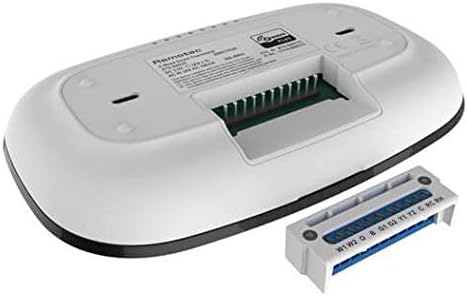
Image: Rear view of the Remotec ZTS-500 thermostat, displaying the removable wiring terminal block with labeled connections for HVAC systems.
4.2 Mounting
Mount the thermostat to a wall using the provided hardware. Ensure the mounting location is away from direct sunlight, drafts, or heat sources that could affect temperature readings.
4.3 Z-Wave Inclusion (Pairing)
To integrate the ZTS-500 with your Z-Wave network:
- Put your Z-Wave gateway/hub into inclusion (pairing) mode. Refer to your hub's manual for specific instructions.
- On the ZTS-500 thermostat, follow the device-specific instructions (usually involving a button press sequence) to initiate Z-Wave inclusion. The display may indicate pairing status.
- Once successfully paired, the thermostat will appear in your Z-Wave controller's device list.
The ZTS-500 supports Z-Wave Plus and offers advanced configuration options and Over-The-Air (OTA) update capability, depending on your Z-Wave hub's support.
5. Operating the Thermostat
5.1 Basic Controls
The ZTS-500 features a minimalist digital display and touch-sensitive buttons for local control.
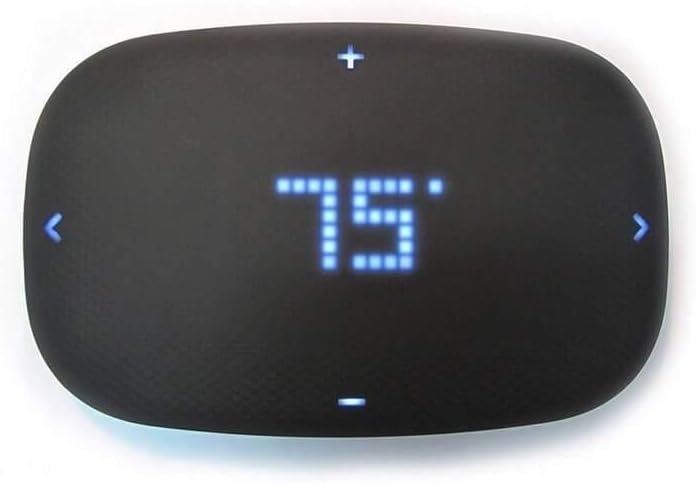
Image: Front view of the Remotec ZTS-500 thermostat, showing a digital display set to 75 degrees Fahrenheit, with touch controls for adjustment.
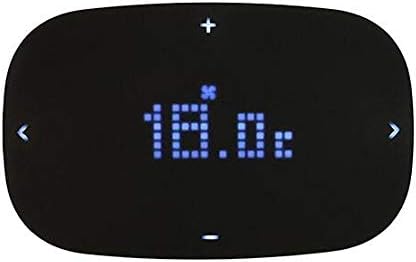
Image: Front view of the Remotec ZTS-500 thermostat, showing a digital display set to 18.0 degrees Celsius, with a fan icon indicating fan operation.
- Temperature Adjustment: Use the + and - buttons on the top and bottom of the display to increase or decrease the set temperature.
- Mode Selection: Use the < and > buttons on the sides to cycle through operating modes (e.g., Heat, Cool, Auto, Off) or fan settings, depending on the thermostat's current configuration.
5.2 Z-Wave Control
Once paired with a Z-Wave hub, you can control the thermostat remotely through your smart home application. This typically includes:
- Setting the target temperature.
- Changing operating modes (Heat, Cool, Auto, Off).
- Adjusting fan settings (On, Auto).
- Receiving temperature reports (functionality may vary by Z-Wave hub).
Note that some Z-Wave hubs may have limited support for advanced features or reporting capabilities of the ZTS-500. Consult your Z-Wave hub's documentation for specific integration details.
6. Maintenance
6.1 Battery Replacement
If the thermostat is powered by batteries (4 AA batteries required), they will need to be replaced periodically. The thermostat may display a low battery indicator. To replace batteries:
- Carefully remove the thermostat from its wall mount.
- Locate the battery compartment on the back of the unit.
- Remove the old batteries and insert 4 new AA batteries, ensuring correct polarity.
- Reattach the thermostat to its wall mount.
Note: Battery life can vary significantly based on usage and whether a C-wire is connected. If not using a C-wire, expect to replace batteries more frequently (e.g., every 2-3 months).
6.2 Cleaning
To clean the thermostat, gently wipe the surface with a soft, dry cloth. Avoid using abrasive cleaners, solvents, or spraying liquids directly onto the unit.
7. Troubleshooting
- Thermostat not powering on: Check battery installation and charge. If using a C-wire, ensure it is correctly connected and receiving 24V AC power. Verify power to the HVAC system is on.
- Short battery life: If not using a C-wire, frequent battery replacement is expected. Consider installing a C-wire for continuous power.
- Difficulty with C-wire power: Ensure the C-wire is properly connected to both the thermostat and the HVAC system. Some HVAC systems may require specific wiring configurations or adapters for a stable C-wire connection.
- Limited Z-Wave control/reporting: The ZTS-500's Z-Wave capabilities, such as mode changes or detailed temperature reporting, can be dependent on the specific Z-Wave hub and its device handler. Some hubs may only support basic temperature setting.
- Physical buttons unresponsive or stuck: Ensure the thermostat is clean and free from debris around the buttons. If issues persist, contact support.
- Loud internal relays: The thermostat uses internal relays to control the HVAC system, which may produce an audible click when switching on/off. This is a normal operational characteristic.
- Rapid HVAC cycling: The ZTS-500 may not have built-in minimum runtime or rest time settings. Consult your HVAC system's specifications and consider if rapid cycling is detrimental to your specific equipment.
- Thermostat not responding to Z-Wave commands: Ensure the thermostat is within range of your Z-Wave hub and that the hub is functioning correctly. Try re-including the device if necessary.
8. Specifications
| Feature | Detail |
|---|---|
| Brand | Remotec |
| Model Name | Z-Wave Plus Thermostat |
| Product Dimensions | 1"D x 6.33"W x 4"H |
| Controller Type | SmartThings (compatible) |
| Special Feature | Smart, compatible with home automation systems, energy-saving features |
| Color | Black |
| Specific Uses | Air Conditioner, Heat Pump |
| Temperature Control Type | Smart/Remote |
| Connectivity Technology | Z-Wave |
| Included Components | Thermostat |
| Power Source | Battery Powered or C Wire |
| Voltage | 24 Volts |
| Display Type | Digital |
| Control Type | Button Control |
| Control Method | App |
| Connectivity Protocol | Bluetooth, Z-Wave |
| Mounting Type | Wall Mount |
| Style | Smart |
| Backlight | Yes |
| Number of Batteries | 4 AA batteries required |
| Item Weight | 9.6 ounces |
9. Warranty and Support
For warranty information and technical support, please refer to the documentation provided with your purchase or visit the official Remotec website. Keep your proof of purchase for warranty claims.
Related documentsZTS-500


Ask a question about this manual
Ask about setup, troubleshooting, compatibility, parts, safety, or missing instructions. Manuals+ will review the question and use this page’s manual context to help answer it.