
1. Important Safety Instructions
Please read all instructions carefully before operating this device. Retain this manual for future reference.
- Electrical Safety: Ensure the power supply voltage matches the device's requirements (AC86-265V). Always disconnect power before installation, maintenance, or cleaning.
- Ventilation: Do not block ventilation openings. Ensure adequate airflow around the unit to prevent overheating.
- Environment: This device is intended for indoor use. Avoid exposure to moisture, extreme temperatures, or corrosive environments.
- Handling: Handle the unit with care. Do not drop or subject it to strong impacts.
- Professional Installation: For complex DMX setups, professional installation is recommended.
2. Package Contents
Verify that all items listed below are included in your package:
- 1x 45W RGB Light Engine
- 1x 28-Key RF Remote Controller
- 1x Adapter Plug
- 1x User Manual (this document)

Figure 2.1: Package Contents Diagram. This image illustrates the light engine, PG connector, remote control, instruction manual, and power adapter included in the box.

Figure 2.2: Product Components. A photograph showing the 45W light engine, a PG connector, the RF remote controller, and the power adapter.
3. Product Overview
The AMKI DMX 45W Light Source Engine Driver is designed to create dynamic and colorful fiber optic lighting effects. It features multiple color options, dynamic modes, and can be controlled via an RF remote or a DMX512 console.
Key Features:
- Multicolor & Dynamic Modes: Offers seven colors (red, green, blue, white, yellow, cyan, purple) with jump, flash, fade, and DIY dynamic modes.
- DMX512 Control: Compatible with DMX512 consoles and decoders for advanced lighting control.
- RF Remote Control: Includes a 28-key RF remote for convenient wireless operation.
- High Power Output: 45W LED for bright illumination, suitable for various applications like starry ceilings, curtains, and art installations.
- Match Code Function: Allows one-to-one control between the remote and specific light engines.

Figure 3.1: Multicolor and Dynamic Effects. This image displays the light engine producing various colors and dynamic lighting patterns through fiber optic cables.
4. Product Components and Dimensions
Familiarize yourself with the physical components and dimensions of the light engine:

Figure 4.1: Product Dimensions and Labeled Ports. The diagram shows the light engine with its length (227mm / 8.93in), width (195mm / 7.67in), and height (80mm / 3.14in). Key ports are labeled: 1. Power Input, 2. DMX512 IN, 3. DMX512 OUT, 4. RF Signal Receiver, 5. Fan, 6. DMX address (DIP switches).
- Power Input: Connects to the provided adapter plug.
- DMX512 IN/OUT: XLR ports for connecting to a DMX512 console or other DMX devices.
- RF Signal Receiver: Internal receiver for the wireless remote control.
- Fan: Cooling fan to dissipate heat during operation.
- DMX Address: DIP switches for setting the DMX start address.
- Fiber Head Inner Diameter: 29mm, for connecting fiber optic bundles.
5. Installation
5.1 Fiber Optic Cable Connection
Insert the fiber optic cables into the fiber head opening on the front of the light engine. Ensure the cables are securely fastened. A PG connector (if included) can be used to secure the fiber bundle.
5.2 Power Connection
Connect the provided adapter plug to the 'Power Input' port on the light engine. Then, plug the adapter into a suitable AC power outlet (AC86-265V).
5.3 DMX512 Console Connection (DMX Mode)
To control the light engine via DMX512, connect a DMX512 console or PC DMX512 console to the 'DMX512 IN' port using an XLR cable. If connecting multiple light engines or DMX decoders, use the 'DMX512 OUT' port to daisy-chain them.

Figure 5.1: DMX and RF Model Connection Diagrams. The top section shows how to connect the light engine to a DMX512 console, either directly or through a DMX512 decoder. The bottom section illustrates connecting multiple light engines in an RF control setup (master/slave configuration).
5.4 Built-in Effects Mode Connection
For built-in effects mode, the light engine can operate standalone or in a master/slave configuration. Ensure the DMX address switches are set appropriately (refer to Section 6.3).

Figure 5.2: Built-in Model Connection Diagrams. This image shows how to connect multiple light engines in a master/slave setup for built-in effects, both directly and with DMX512 decoders.
6. Operation
6.1 RF Remote Control Operation
The included 28-key RF remote control allows for easy adjustment of colors, brightness, and dynamic modes.
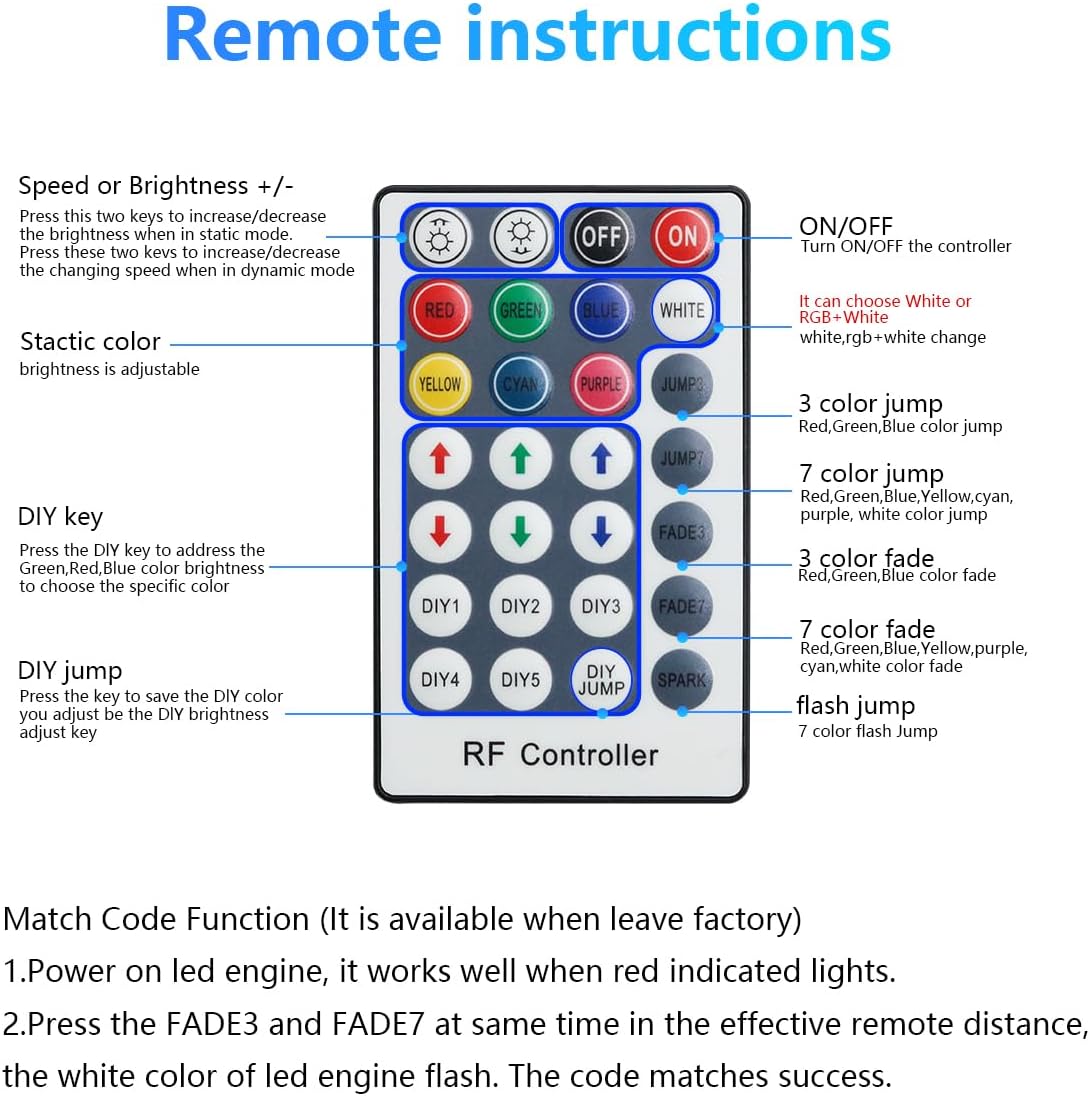
Figure 6.1: RF Remote Control Instructions. This diagram details the function of each button on the 28-key RF remote, including ON/OFF, color selection, speed/brightness adjustment, jump/fade modes, and DIY settings.
- ON/OFF: Turns the light engine on or off.
- Speed or Brightness +/-: Adjusts brightness in static color mode or speed in dynamic modes.
- Static Color Buttons (RED, GREEN, BLUE, WHITE, YELLOW, CYAN, PURPLE): Selects a single static color.
- Jump Modes (3 Color Jump, 7 Color Jump): Cycles through colors with abrupt transitions.
- Fade Modes (3 Color Fade, 7 Color Fade): Cycles through colors with smooth transitions.
- Flash Jump: A rapid flashing mode.
- DIY Keys (DIY1-DIY5, DIY Jump): Allows users to customize and save specific color and brightness settings.
Match Code Function:
By default, one remote can control multiple light sources. To achieve one-to-one control:
- Power on the LED engine. It will indicate readiness with a red light.
- Within the effective remote distance, simultaneously press the FADE3 and FADE7 buttons. The LED engine's white color will flash, indicating successful code matching.
6.2 DMX Mode Operation
When operating in DMX mode, the light engine accepts DMX512 signals from a DMX console. The DMX address is set using the DIP switches on the unit.
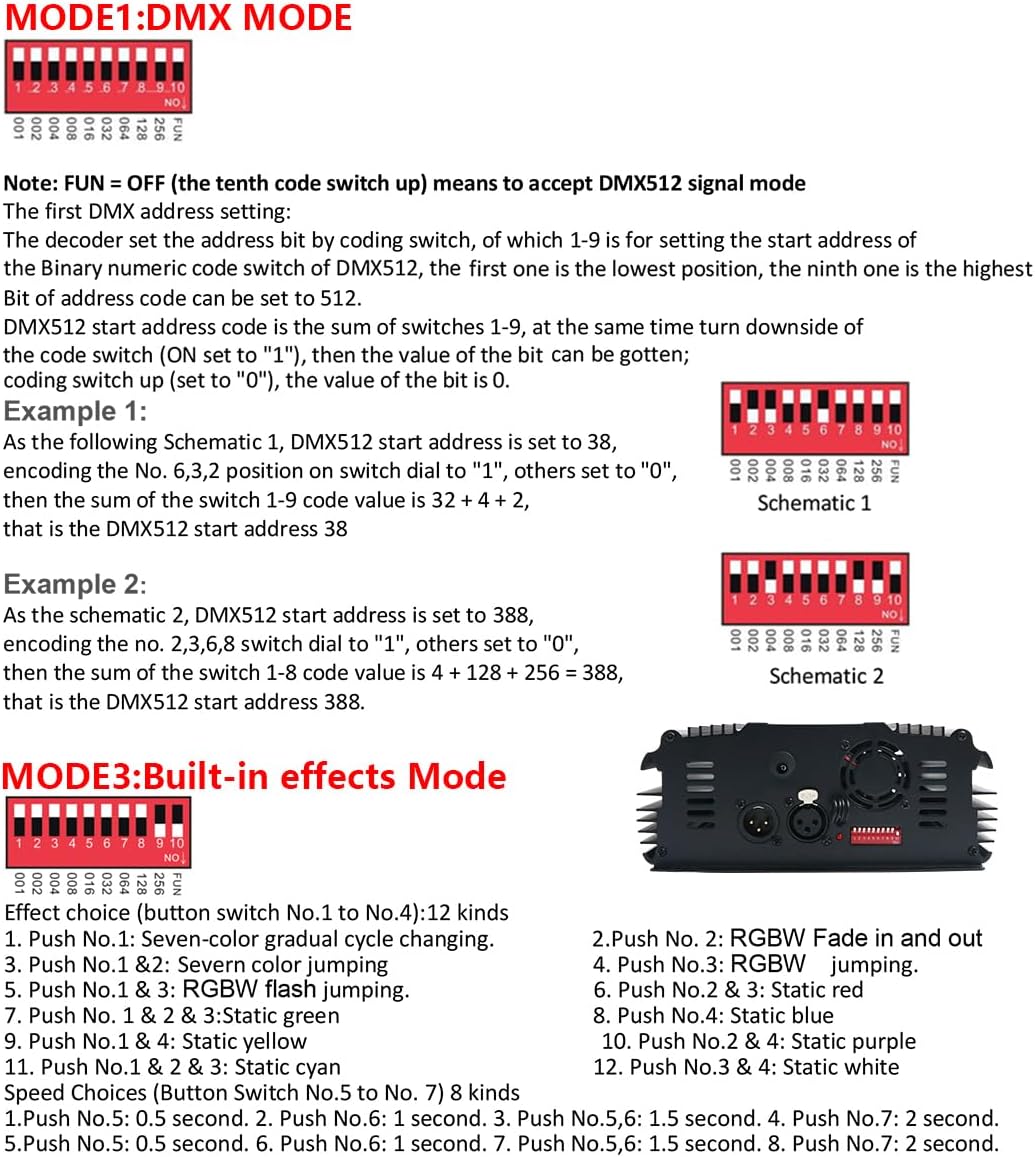
Figure 6.2: DMX Mode and Built-in Effects Settings. This image provides instructions for setting the DMX address using DIP switches and lists the available built-in effects and speed choices.
Setting DMX Address:
- Ensure the 'FUN' switch (the tenth switch) is set to OFF to enable DMX512 signal mode.
- The DMX address is set by the binary numeric code switches (1-9). Switch 1 is the lowest position, and switch 9 is the highest.
- To set a switch to 'ON', push it up. To set it to 'OFF', push it down.
- The DMX512 start address is the sum of the values of switches 1-9 that are set to 'ON'.
DMX Address Examples:
- Example 1 (Address 38): Set switches 6, 3, 2 to 'ON', and others to 'OFF'. The sum is 32 + 4 + 2 = 38.
- Example 2 (Address 388): Set switches 8, 6, 3, 2 to 'ON', and others to 'OFF'. The sum is 256 + 128 + 4 + 2 = 388.
DMX Channel Assignment (3 Channels):
- Channel 1: Red (R)
- Channel 2: Green (G)
- Channel 3: Blue (B)
6.3 Built-in Effects Mode
The light engine has several pre-programmed effects. To activate built-in effects, set the 'FUN' switch (the tenth switch) to ON. The DMX address switches (1-9) can then be used to select specific effects and speeds.
Effect Choices (Button Switch No.1 to No.4):
- Push No.1: Seven-color gradual cycle changing
- Push No.1 & 2: Seven-color jumping
- Push No.1 & 3: RGBW flash jumping
- Push No.1 & 2 & 3: Static green
- Push No.1 & 4: Static yellow
- Push No.1 & 2 & 4: Static cyan
- Push No.2: RGBW Fade in and out
- Push No.3: RGBW jumping
- Push No.2 & 3: Static red
- Push No.4: Static blue
- Push No.2 & 4: Static purple
- Push No.3 & 4: Static white
Speed Choices (Button Switch No.5 to No.7):
- Push No.5: 0.5 second
- Push No.6: 1 second
- Push No.5,6: 1.5 second
- Push No.7: 2 second
- Push No.5,7: 0.5 second
- Push No.6,7: 1 second
- Push No.5,6,7: 1.5 second
- Push No.8: 2 second
7. Maintenance
To ensure the longevity and optimal performance of your AMKI Light Source Engine Driver, follow these maintenance guidelines:
- Cleaning: Use a soft, dry cloth to clean the exterior of the unit. Do not use harsh chemicals or abrasive cleaners.
- Ventilation: Regularly check that the fan and ventilation openings are free from dust and debris. Blocked vents can lead to overheating.
- Storage: When not in use for extended periods, store the unit in a cool, dry place, away from direct sunlight and moisture.
- Fiber Optic Care: Handle fiber optic cables carefully to prevent kinking or damage. Keep the fiber head clean.
8. Troubleshooting
If you encounter issues with your light engine, refer to the following common problems and solutions:
- Remote Controller Not Working:
- Ensure the remote has working batteries (not included with the product).
- Check if the remote is within effective range of the light engine.
- Perform the 'Match Code Function' as described in Section 6.1 to re-pair the remote with the light engine.
- No Light Output:
- Verify that the power adapter is securely connected to both the light engine and a working power outlet.
- Ensure the unit is powered on using the remote or DMX signal.
- Check if fiber optic cables are properly inserted into the fiber head.
- Incorrect DMX Control:
- Confirm that the 'FUN' switch on the DMX address panel is set to 'OFF'.
- Double-check the DMX start address settings on the DIP switches according to Section 6.2.
- Ensure your DMX console is sending signals on the correct channels.
- Overheating:
- Ensure the fan and ventilation openings are not obstructed.
- Operate the unit in a well-ventilated area.
9. Technical Specifications
| Feature | Specification |
|---|---|
| Input Voltage | AC86-265V |
| Power | 45W |
| Color Output | RGB (Multicolor) |
| Output DMX Channels | 3 channels (RGB) |
| Output Gray Level | 256 |
| Input Signal | DMX512/1990 |
| DMX512 Socket Standard | XLR |
| LED Type | CREE CHIP LED |
| Net Weight | 1.68 kg (3.7 lbs) |
| Dimensions (L*W*H) | 227mm * 195mm * 80mm (8.93" * 7.67" * 3.14") |
| Fiber Head Inner Diameter | 29mm |
| Light Body Material | Aluminum |
| Remote Type | RF 28-key remote control |
| Lifetime | 50,000 hours |
| Item Model Number | Driver-APP |
| Mounting Type | Ceiling Mount |
| Batteries Included | No |
10. Warranty Information
This AMKI product comes with a 2-year warranty from the date of purchase. This warranty covers manufacturing defects and malfunctions under normal use. Please retain your proof of purchase for warranty claims. The warranty does not cover damage caused by misuse, unauthorized modifications, accidents, or improper installation.
11. Customer Support
For further assistance, technical support, or warranty inquiries, please contact AMKI customer service through the retailer where the product was purchased or refer to the official AMKI website for contact information.