
1. Introduction
This manual provides detailed instructions for the proper use and maintenance of your Avantree HF027 Long Cord Earbuds. Please read this manual thoroughly before using the product to ensure optimal performance and longevity.
2. Package Contents
Please verify that all items listed below are included in your package:
- Avantree HF027 Long Cord Earbuds
- 2-meter (6.5ft) Extension Cable
- Cable Clip
- Spare Ear Tips (various sizes)

Figure 2.1: All included accessories for the Avantree HF027 earbuds.
3. Product Overview
The Avantree HF027 earbuds are designed for extended listening with a long wired connection. Key components include:
- Earbuds: In-ear design with soft silicone tips for comfort and noise isolation.
- Main Coiled Cable: Approximately 3.5 meters (11.5 feet) in length, providing flexibility.
- Extension Cable: An additional 2 meters (6.5 feet) for increased reach.
- 3.5mm Audio Jack: Standard connector for audio output devices.
- In-line Microphone: For hands-free communication.
- Multifunction Button: Controls playback and calls (no volume control).
- Collar Clip: Helps secure the cable and reduce strain.

Figure 3.1: Overview of the Avantree HF027 Long Cord Earbuds.

Figure 3.2: Detail of the multifunction button and microphone.
4. Setup and Connection
Follow these steps to set up and connect your Avantree HF027 earbuds:
- Insert Earbuds: Gently place the earbuds into your ears. Choose the most comfortable ear tip size from the included spares for a secure fit.
- Connect to Audio Source: Insert the 3.5mm audio jack of the earbuds into the 3.5mm audio output port of your device (e.g., TV, PC, laptop, tablet, mobile phone).
- Use Extension Cable (Optional): If additional length is required, connect the 2-meter extension cable between the earbud's main cable and your audio source.
- Attach Cable Clip: Use the provided cable clip to secure the cable to your clothing, reducing cable pull and ensuring the earbuds stay in place.
Important Notes:
- For optimal microphone performance during calls, it is recommended to unplug the extension cable.
- If connecting to a PC with separate audio and microphone jacks, an audio mic splitter (not included) will be required to use the microphone function.
- When connecting to a TV, ensure your TV's 3.5mm audio output allows for volume adjustment. Test with any wired earphone if unsure.
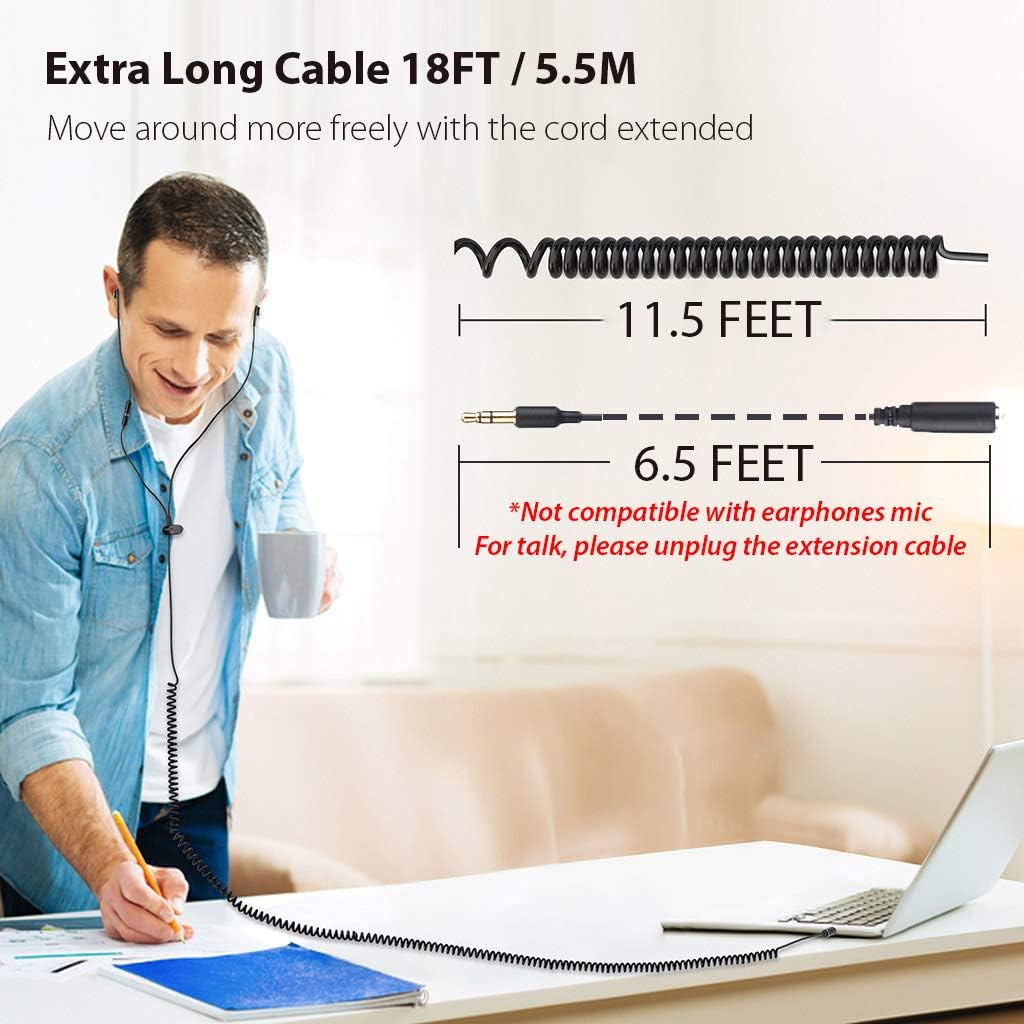
Figure 4.1: Connecting earbuds to a TV's 3.5mm audio output.

Figure 4.2: Illustrating extended cable length in use.
5. Operating Instructions
Once connected, you can control audio playback and calls using the in-line multifunction button:
- Play/Pause Audio: Press the multifunction button once.
- Answer/End Call: Press the multifunction button once during an incoming call or an active call.
- Next Track: Press the multifunction button twice quickly.
- Previous Track: Press the multifunction button three times quickly.
- Activate Voice Assistant: Press and hold the multifunction button for approximately 2 seconds.
Note: The Avantree HF027 earbuds do not feature in-line volume control. Volume must be adjusted directly on your connected audio device.

Figure 5.1: Using the built-in microphone for hands-free communication.
6. Compatibility
The Avantree HF027 earbuds are broadly compatible with devices featuring a standard 3.5mm audio output jack.
6.1 Compatible Devices
- Televisions (TVs)
- Personal Computers (PCs) and Laptops
- Electronic Keyboards and Electronic Drum Sets
- Tablets and Mobile Phones
- Gaming Consoles (with 3.5mm audio output)
6.2 Important Compatibility Notes
- TVs with Optical/Coaxial Output Only: These earbuds will NOT work with TVs that ONLY have optical and/or coaxial audio output.
- TVs with Fixed Volume 3.5mm Output: These earbuds will NOT work for TVs with a fixed volume 3.5mm output. Ensure your TV's 3.5mm output volume can be adjusted.
- 6.35mm (1/4 inch) Phone Jack: TVs or audio equipment with only a large 6.35mm (1/4 inch) phone jack will require a 6.35mm to 3.5mm adapter (not included).
- RCA Output: TVs or audio equipment with only an RCA output will require an RCA to 3.5mm adapter (not included).
- Android Devices with Type C Audio Output: Android devices with a Type C audio output will require a Type C to 3.5mm adapter (not included).
7. Maintenance
Proper care ensures the longevity and performance of your earbuds:
- Cleaning: Gently wipe the earbuds and cables with a soft, dry cloth. Remove ear tips periodically and clean them with mild soap and water, ensuring they are completely dry before reattaching.
- Storage: Store the earbuds in a clean, dry place away from direct sunlight and extreme temperatures. Avoid tightly coiling or tangling the cables to prevent damage.
- Avoid Moisture: These earbuds are not water-resistant. Avoid exposure to liquids.
8. Troubleshooting
If you encounter issues with your Avantree HF027 earbuds, refer to the following common solutions:
- No Sound:
- Ensure the 3.5mm audio jack is fully inserted into your device's audio output port.
- Check the volume level on your connected device.
- Verify that your device has a functional 3.5mm audio output.
- Test the earbuds with another audio device to rule out a device-specific issue.
- Microphone Not Working:
- If using the extension cable, unplug it for optimal microphone performance during calls.
- For PCs with separate audio and microphone jacks, an audio mic splitter is required.
- Check your device's audio settings to ensure the external microphone is selected.
- Earbuds Do Not Stay In:
- Try different sizes of the included spare ear tips to find the best fit for your ears.
- Use the cable clip to secure the cable to your clothing, which can reduce tension and help keep the earbuds in place.
- Audio Interference (Humming/Buzzing):
- Move the earbuds and connected device away from other electronic devices that may be causing electromagnetic interference.
9. Specifications
| Feature | Specification |
|---|---|
| Model Number | HF027 |
| Connectivity Technology | Wired |
| Cable Length (Main) | 3.5 Meters (11.5 feet) |
| Cable Length (Extension) | 2 Meters (6.5 feet) |
| Total Cable Length | 5.5 Meters (18 feet) |
| Headphones Jack | 3.5 mm Jack |
| Ear Placement | In Ear |
| Impedance | 32 Ohm |
| Frequency Range | 20Hz - 20kHz |
| Noise Control | Sound Isolation |
| Control Type | Call Control (Multifunction Button) |
| Microphone | Built-in |
| Included Components | Earbuds, Extension cable, Cable clip, Spare ear tips |
| Item Weight | 40.82 grams (approx.) |
10. Safety Information
- Hearing Safety: To prevent possible hearing damage, do not listen at high volume levels for long periods.
- General Use: Keep the product away from water, fire, and high temperatures. Do not attempt to disassemble or modify the product.
- Proposition 65 Warning: WARNING: This product can expose you to chemicals which are known to the State of California to cause cancer and birth defects or other reproductive harm. For more information go to www.P65Warnings.ca.gov.
11. Warranty and Support
Avantree products come with a manufacturer's warranty. For detailed warranty information, technical support, or to register your product, please visit the official Avantree website or contact Avantree customer service directly. Contact information can typically be found on the Avantree website or product packaging.