
1. Introduction
The Cobra F394 is a high-quality front parking sensor kit designed to enhance safety and convenience during parking maneuvers. This kit includes four ultrasonic sensors that are installed flush with your vehicle's front bumper, providing a discreet and integrated appearance. The system detects obstacles in front of your vehicle and provides audible alerts to help you gauge distances and avoid collisions.
Please read this manual thoroughly before installation and use to ensure proper functionality and to maximize the lifespan of your parking sensor system.
2. Package Contents
Before beginning installation, verify that all components are present in the package:
- 4 x Ultrasonic Front Parking Sensors (flush-mount)
- 1 x Control Unit (Main Module)
- 1 x Buzzer/Speaker
- Wiring Harnesses
- Mounting Accessories (e.g., drill bit for sensor holes, cable ties)
- Instruction Manual (this document)

Image 2.1: Overview of the Cobra F394 front parking sensor kit components.
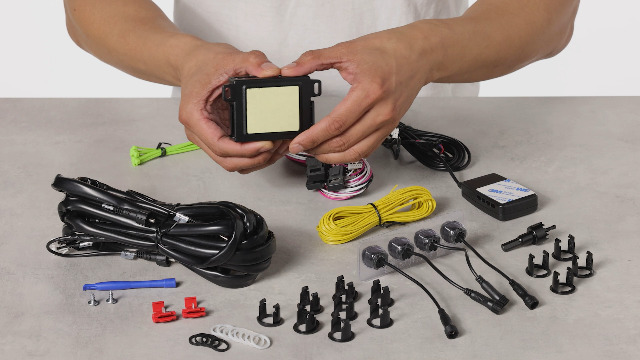
Image 2.2: A closer look at the main components of the parking sensor kit.
3. Setup and Installation
Installation of the Cobra F394 front parking sensor kit requires technical knowledge and tools. It is highly recommended that installation be performed by a qualified professional to ensure correct wiring, sensor placement, and system calibration. Incorrect installation may lead to system malfunction or damage to your vehicle.
3.1. General Installation Steps (Professional Installation Recommended)
- Sensor Placement: Determine optimal locations on the front bumper for the four sensors. Ensure they are evenly spaced and at a consistent height, avoiding obstructions.
- Drilling: Use the provided drill bit to create precise holes in the bumper for the flush-mount sensors. Deburr edges carefully.
- Sensor Mounting: Insert the sensors into the drilled holes, ensuring a secure and flush fit.
- Wiring: Route the sensor cables to the control unit, typically located inside the vehicle's engine bay or dashboard area. Connect the sensors to the control unit according to the wiring diagram (refer to the detailed diagram provided with the physical product).
- Power Connection: Connect the control unit to the vehicle's power supply. Front parking sensors are typically activated when the vehicle is moving at low speeds or when the brake pedal is pressed. Ensure proper grounding.
- Buzzer Installation: Mount the buzzer in a location within the cabin where the audible alerts can be clearly heard by the driver.
- Testing: After installation, perform thorough testing to verify that all sensors are functioning correctly and providing accurate alerts.
Video 3.1: This video provides a visual overview of the kit components and their general appearance, which can be helpful during the setup phase. (Duration: 0:17)
Video 3.2: A product summary video showcasing the kit's contents, useful for identifying parts during installation. (Duration: 0:35)
4. Operating Instructions
The Cobra F394 front parking sensor system is designed for intuitive operation. Once correctly installed and powered, the system will automatically activate under specific conditions, typically when the vehicle is in reverse gear or when driving at very low speeds (e.g., below 10-15 km/h).
4.1. Activation and Deactivation
Depending on your vehicle's wiring and the specific configuration by the installer, the sensors may activate automatically or via a dedicated switch. When active, the system continuously monitors the area in front of your vehicle.
4.2. Audible Alerts
As your vehicle approaches an obstacle, the buzzer will emit a series of beeps. The frequency of these beeps increases as the distance to the obstacle decreases. A continuous tone indicates that the obstacle is very close, typically within 30 cm (approximately 1 foot).
- Slow Beeps: Obstacle detected at a moderate distance (e.g., 100-60 cm).
- Faster Beeps: Obstacle detected at a closer distance (e.g., 60-30 cm).
- Continuous Tone: Obstacle is very close (e.g., less than 30 cm).
Video 4.1: This short video demonstrates the activation and deactivation of front parking sensors, showing a button press and indicator light. (Duration: 0:07)
5. Maintenance
To ensure optimal performance and longevity of your Cobra F394 parking sensor system, follow these simple maintenance guidelines:
- Sensor Cleaning: Regularly clean the surface of the sensors on your bumper. Dirt, mud, ice, or snow can obstruct the ultrasonic waves and lead to inaccurate readings or false alarms. Use a soft cloth and mild soap solution. Avoid abrasive cleaners or high-pressure washers directly on the sensors.
- Visual Inspection: Periodically inspect the sensors for any physical damage or loose connections. Ensure they are still flush with the bumper.
- Wiring Check: If you experience issues, a professional can check the wiring connections to the control unit and sensors for any signs of wear or corrosion.
6. Troubleshooting
If you encounter issues with your Cobra F394 parking sensor system, consider the following common troubleshooting steps:
- No Detection / Inconsistent Detection:
- Check if sensors are clean and free from obstructions (dirt, ice, etc.).
- Verify that the system is activated (if manual activation is required).
- Ensure all sensor cables are securely connected to the control unit.
- Confirm the control unit is receiving power.
- False Alarms / Constant Beeping:
- Clean sensors thoroughly.
- Check for any objects (e.g., license plate frames, tow hooks, aftermarket accessories) that might be too close to the sensors and causing interference.
- Ensure sensors are correctly mounted and not angled towards the ground or sky.
- System Not Activating:
- Check the power connection to the control unit.
- Verify the vehicle's ignition is on and the conditions for activation (e.g., low speed, reverse gear) are met.
- If a dedicated switch is present, ensure it is in the "ON" position.
Important Note: As mentioned by some users, these systems may require programming or calibration via computer after installation. If basic troubleshooting does not resolve the issue, it is advisable to consult with the professional installer or a qualified automotive electrician.
7. Specifications
| Feature | Detail |
|---|---|
| Brand | Cobra |
| Model | F394 |
| Product Type | Front Parking Sensor Kit |
| Sensor Type | Ultrasonic, Flush-Mount |
| Number of Sensors | 4 |
| Control Unit Dimensions (approx.) | 9 x 7 x 2 cm |
| Sensor Cable Length (approx.) | 200 cm |
| Sensor Diameter (approx.) | 2.2 cm |
| Total Weight (approx.) | 350 g |
| Batteries Required | No |
| ASIN | B072FKWFMF |
8. Warranty Information
Specific warranty terms and conditions for the Cobra F394 parking sensor kit may vary depending on your region and point of purchase. Please refer to the warranty card included with your product, your purchase receipt, or contact Cobra customer support for detailed warranty information.
9. Customer Support
For technical assistance, installation queries, or any other support needs regarding your Cobra F394 front parking sensor kit, please contact Cobra customer support through their official website or the contact information provided in your product packaging.
You may also find helpful resources and FAQs on the manufacturer's support pages.