
1. Introduction
This manual provides essential information for the safe and effective use of your Accessory USA 12V 1A AC DC Adapter. This power supply is designed to convert AC power to 12V DC power, suitable for compatible electronic devices requiring 12V and up to 1A current. Please read this manual thoroughly before using the adapter.
2. Safety Information
Your safety is paramount. Observe the following precautions:
- Over Voltage Protection (OVP): The adapter is designed to prevent damage from excessive output voltage.
- Over Current Protection (OCP): The adapter includes safeguards against excessive output current.
- Short Circuit Protection (SCP): Protection is integrated to prevent damage in case of a short circuit.
- Certifications: This product is CE, FCC, and RoHS certified, indicating compliance with relevant safety and environmental standards.
- Ensure the adapter is used with devices that match its voltage (12V) and current (1A or less) specifications.
- Do not expose the adapter to water, moisture, or extreme temperatures.
- Avoid dropping or subjecting the adapter to strong impacts.
- Do not attempt to open or modify the adapter. Refer servicing to qualified personnel.
- Unplug the adapter from the power outlet when not in use for extended periods.
3. Product Overview
The Accessory USA 12V 1A AC DC Adapter is a compact and reliable power supply unit. It features a standard 2-pin main power connector for wall mounting and a barrel connector for device compatibility. Its design emphasizes safety and efficiency for various electronic applications.
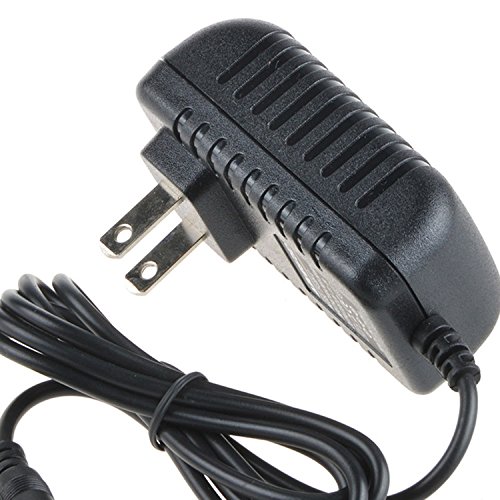
Image of the Accessory USA 12V 1A AC DC Adapter, showing its compact design and barrel connector.
4. Setup
Follow these steps to set up your AC DC adapter:
- Verify Compatibility: Before connecting, ensure your device requires a 12V DC input and draws no more than 1A of current. Check your device's specifications or original power adapter.
- Connect to Device: Insert the barrel connector end of the adapter firmly into the power input port of your electronic device.
- Connect to Power Outlet: Plug the 2-pin main power connector of the adapter into a standard AC wall outlet (100-240V AC, 60Hz).
- Power On Device: Once connected, power on your device as usual.
Note: Always ensure the model of your device is compatible with this adapter before buying and connecting.
5. Operating Instructions
The adapter operates automatically once connected to a power source and a compatible device. It provides a stable 12V DC output. No user intervention is required during operation. Disconnect the adapter from the wall outlet when not in use to conserve energy and for safety.
6. Maintenance
Proper maintenance ensures the longevity and performance of your adapter:
- Cleaning: Disconnect the adapter from both the power outlet and your device before cleaning. Use a soft, dry cloth to wipe the exterior. Do not use liquid cleaners or solvents.
- Storage: Store the adapter in a cool, dry place away from direct sunlight and moisture when not in use. Avoid wrapping the cord too tightly around the adapter.
- Inspection: Periodically inspect the adapter and its cord for any signs of damage, such as frayed wires or cracked casing. Discontinue use if damage is observed.
7. Troubleshooting
If you encounter issues with your adapter, consider the following:
- Device not powering on:
- Ensure the adapter is securely plugged into both the wall outlet and the device.
- Verify the wall outlet is functional by testing it with another appliance.
- Confirm that your device's power requirements (voltage and current) match the adapter's specifications.
- Check the device's power input port for any obstructions or damage.
- Adapter feels hot:
- It is normal for adapters to feel warm during operation. However, if it is excessively hot to the touch, disconnect it immediately. This could indicate an overload or internal fault.
- Ensure the device connected does not exceed the adapter's 1A current rating.
- Intermittent power:
- Check for loose connections at both ends of the adapter.
- Inspect the adapter cord for any visible damage.
If troubleshooting steps do not resolve the issue, discontinue use and contact customer support.
8. Specifications
| Feature | Specification |
|---|---|
| Brand | Accessory USA |
| Model | JENTEC AH1212-B |
| Input Voltage | 100-240V AC |
| Frequency Range | 60 Hz |
| Output Voltage | 12 Volts DC |
| Current Rating | 1 Amps |
| Connector Type | Barrel Connector |
| Main Power Connector Type | 2 Pin |
| Mounting Type | Wall Mount |
| Compatible Devices | Adapter (devices requiring 12V 1A) |
| Specification Met | CE, FCC, RoHS |
| Special Feature | Travel |
| ASIN | B072FD9SZZ |
| GTIN/UPC | 650234621771 |
9. Warranty and Support
This Accessory USA product comes with a comprehensive warranty:
- 30 Days Money Back Guarantee: If you are not satisfied, you may return the product within 30 days for a full refund.
- 60 Days Free Exchange: Enjoy a free exchange within 60 days with a paid return label.
- 365 Days Anytime Worry-Free Warranty: This product is covered by a 365-day warranty against manufacturing defects.
For warranty claims, technical support, or any inquiries, please contact Accessory USA customer service through your purchase platform or the official Accessory USA website.