
1. Product Overview
The Snap-On 18V 1/2" Drive Green MonsterLithium Impact Wrench Kit (Part #CT8850GK2) is a high-performance cordless tool designed for professional use in automotive, industrial, and general maintenance applications. This kit provides powerful fastening and loosening capabilities for various bolts and nuts, offering portability and efficiency with its MonsterLithium battery technology.
The kit includes the impact wrench, two 5 Ah MonsterLithium batteries, a dual-charger, and this instruction manual, ensuring you have everything needed for immediate operation.
2. Safety Information
Always observe basic safety precautions when using power tools to reduce the risk of fire, electric shock, and personal injury.
- Read all instructions: Familiarize yourself with the tool's operation and safety guidelines before use.
- Wear eye protection: Always wear ANSI-approved safety goggles or safety glasses with side shields.
- Wear hearing protection: Prolonged exposure to noise from power tools can cause hearing damage.
- Keep work area clean and well-lit: Cluttered or dark areas invite accidents.
- Do not operate in explosive atmospheres: Do not use power tools in the presence of flammable liquids, gases, or dust.
- Secure workpiece: Always clamp or otherwise secure the workpiece to prevent movement during operation.
- Use correct tool for the job: Do not force a small tool or attachment to do the work of a heavy-duty tool.
- Maintain tools with care: Keep cutting tools sharp and clean for better and safer performance. Follow instructions for lubricating and changing accessories.
- Battery Safety: Use only specified chargers and batteries. Do not short-circuit, incinerate, or expose batteries to high temperatures.
3. Package Contents
Your Snap-On 18V 1/2" Drive Green MonsterLithium Impact Wrench Kit (Part #CT8850GK2) should include the following items:
- 1 x Snap-On 18V 1/2" Drive MonsterLithium Impact Wrench
- 2 x Snap-On 5 Ah MonsterLithium Batteries
- 1 x Snap-On Dual-Charger
- 1 x Instruction Manual
- 1 x Carry Bag
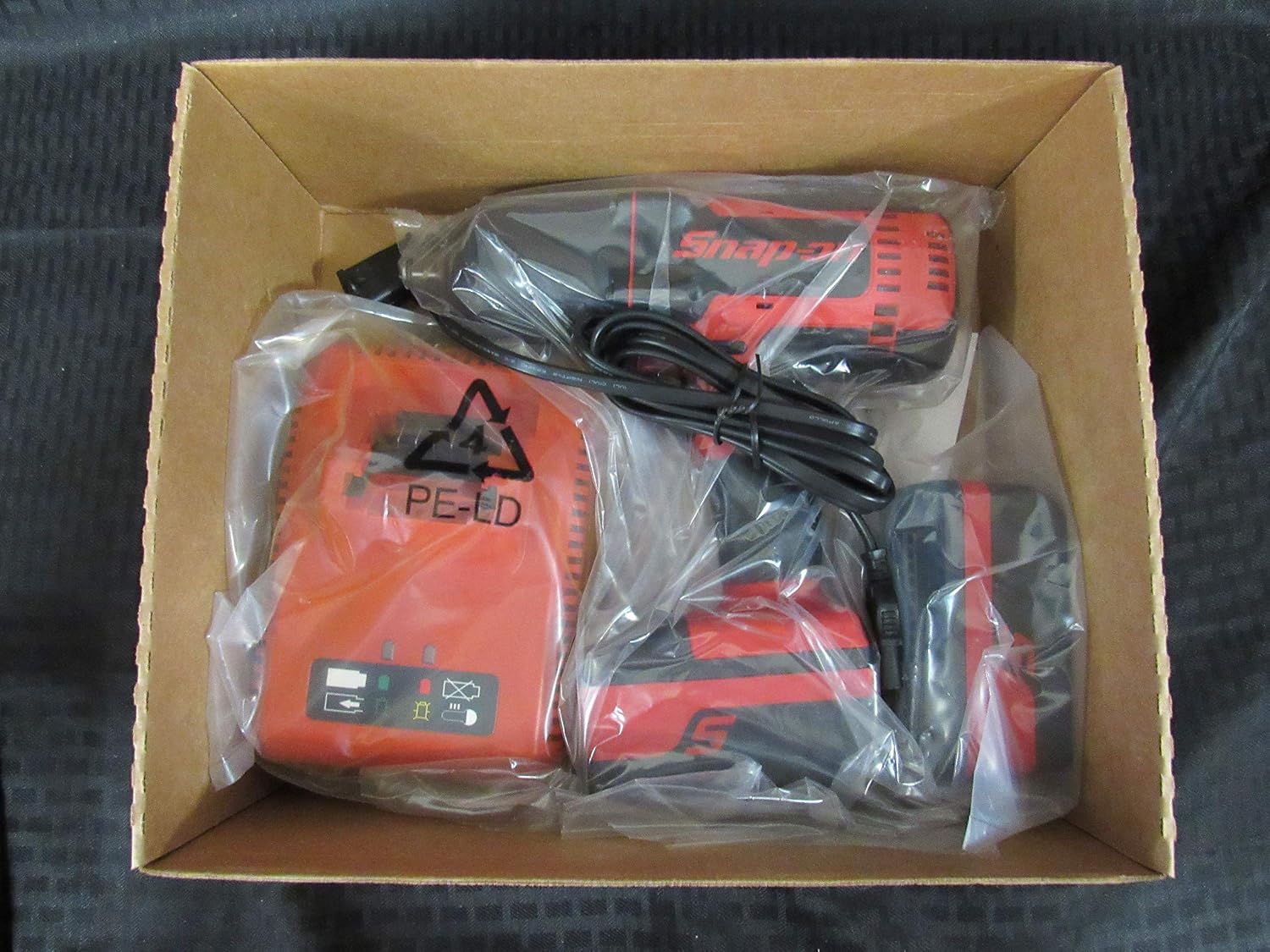
Image 1: The Snap-On 18V 1/2" Drive Green MonsterLithium Impact Wrench Kit contents, including the impact wrench, batteries, and charger, neatly packed in the box.

Image 2: The black Snap-On branded carry bag, designed for convenient storage and transport of the impact wrench kit components.
4. Setup
4.1 Charging the Batteries
- Connect the dual-charger to a standard electrical outlet.
- Slide the 5 Ah MonsterLithium batteries into the charging slots on the dual-charger. Ensure they are fully seated.
- The charger's indicator lights will show the charging status. Refer to the charger's specific manual for detailed light indications.
- Once fully charged, remove the batteries from the charger.
4.2 Installing/Removing Batteries
- To Install: Align the battery with the battery port on the impact wrench and slide it in until it clicks securely into place.
- To Remove: Press the battery release button(s) on the side of the battery and slide the battery out of the tool.
4.3 Attaching/Removing Sockets
- To Attach: Push the desired 1/2" drive socket onto the square drive anvil of the impact wrench until it locks securely.
- To Remove: Pull the socket firmly off the anvil. Some sockets may require a slight twist while pulling.
5. Operating Instructions
5.1 Powering On/Off
The impact wrench is activated by pressing the variable speed trigger. The tool will turn off when the trigger is released.
5.2 Forward/Reverse Selection
A forward/reverse selector switch is located above the trigger. Push the switch to the left for forward (tightening) rotation and to the right for reverse (loosening) rotation. Ensure the switch is in the center position for trigger lock-off when not in use or when changing accessories.
5.3 Operating the Impact Wrench
- Select the appropriate socket for the fastener.
- Ensure the battery is fully charged and properly installed.
- Set the forward/reverse selector to the desired direction.
- Place the socket firmly onto the fastener.
- Press the variable speed trigger to begin operation. The speed is controlled by the amount of trigger depression.
- Apply steady pressure to the tool to prevent it from jumping off the fastener.
- For tightening, stop when the fastener is snug or reaches the desired torque. For loosening, continue until the fastener is free.
6. Maintenance and Care
6.1 Cleaning
- Regularly clean the ventilation openings of the tool to prevent overheating.
- Use a soft, damp cloth to wipe down the tool's exterior. Do not use harsh chemicals or abrasive cleaners.
- Keep the drive anvil clean and free of debris.
6.2 Storage
- Store the tool and batteries in a cool, dry place, away from direct sunlight and extreme temperatures.
- Ensure the forward/reverse selector is in the center (locked) position before storing.
- Store batteries with a partial charge (around 50%) if storing for extended periods to prolong battery life.
- Utilize the provided carry bag for organized and protected storage.
6.3 Battery Care
- Do not allow batteries to fully discharge before recharging.
- Avoid exposing batteries to water or extreme heat.
- If a battery is damaged or no longer holds a charge, dispose of it properly according to local regulations.
7. Troubleshooting
| Problem | Possible Cause | Solution |
|---|---|---|
| Tool does not start | Battery not charged Battery not properly installed Forward/reverse switch in center (locked) position | Charge battery Reinstall battery securely Move switch to forward or reverse position |
| Reduced power/performance | Battery low on charge Overheating Worn carbon brushes (if applicable) | Recharge battery Allow tool to cool down Contact authorized service center |
| Socket not staying on anvil | Incorrect socket size Worn anvil or socket retention pin | Ensure 1/2" drive socket is used Inspect anvil and retention pin; contact service if damaged |
If you encounter issues not listed here or if the suggested solutions do not resolve the problem, please contact Snap-On customer support or an authorized service center.
8. Technical Specifications
| Feature | Specification |
|---|---|
| Model Number | CT8850 |
| Part Number | CT8850GK2 |
| Voltage | 18 Volts |
| Drive Size | 1/2 Inch |
| Battery Type | MonsterLithium |
| Battery Capacity | 5 Ah |
| Operation Mode | Electric |
| Head Style | Fixed Square |
| Finish Type | Powder Coated |
| Color | Green, Red |
| Item Length | 8.2 Inches |
| Material | TOOL |
| UPC | 635133722569 |
9. Warranty and Customer Support
Specific warranty information for the Snap-On 18V 1/2" Drive Green MonsterLithium Impact Wrench Kit is typically provided with the product at the time of purchase or can be found on the official Snap-On website. Please retain your proof of purchase for warranty claims.
For customer support, technical assistance, or to locate an authorized service center, please visit the official Snap-On website or contact their customer service department directly. Contact information can usually be found on the manufacturer's website or on the product packaging.