
Introduction
These Buildalot carbon brushes are designed as replacement parts for the SKIL 736 H Hammer. Carbon brushes are essential components in electric motors, facilitating the transfer of electrical current to the rotating armature. Regular inspection and timely replacement ensure optimal performance and longevity of your power tool.
Safety Information
- Always disconnect the power tool from the electrical outlet before performing any maintenance or part replacement.
- Wear appropriate personal protective equipment (PPE), such as safety glasses, to prevent injury.
- Ensure the work area is well-lit and clear of obstructions.
- If you are unsure about any step, consult a qualified technician.
Installation (Replacing Carbon Brushes)
Follow these steps to replace the carbon brushes in your SKIL 736 H Hammer. The exact procedure may vary slightly depending on the specific tool model, but the general principles remain the same.
- Prepare the Tool: Disconnect the SKIL 736 H Hammer from its power source. Place the tool on a stable, clean surface.
- Locate Brush Caps: Identify the brush caps on the motor housing. These are typically small, often slotted or hexagonal, and located on opposite sides of the motor.
- Remove Old Brushes: Using a screwdriver or appropriate tool, carefully unscrew and remove the brush caps. The old carbon brushes, along with their springs, will then be accessible. Gently pull them out.
- Inspect Brush Holders: Clean any carbon dust or debris from the brush holders using compressed air or a soft brush. Ensure the holders are clear for the new brushes.
- Insert New Brushes: Carefully insert the new Buildalot carbon brushes into the brush holders. Ensure the carbon block slides smoothly and the spring applies even pressure. The wire lead should be correctly positioned.
- Replace Brush Caps: Screw the brush caps back into place, ensuring they are tightened securely but not overtightened.
- Test the Tool: Reconnect the power tool to the electrical outlet and perform a brief test run to ensure proper operation. Listen for unusual noises and observe for excessive sparking.
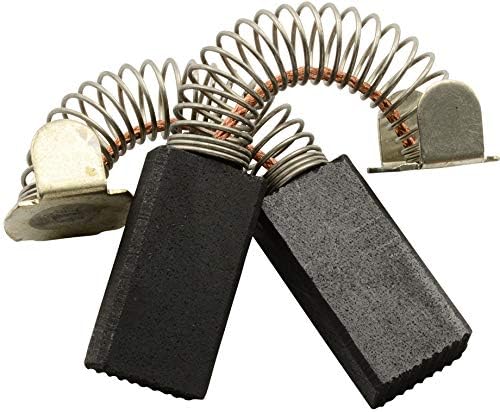
Image 1: A pair of new Buildalot carbon brushes, showing the carbon block, spring, and terminal.

Image 2: Diagram illustrating the components of a carbon brush, including the carbon block, spring, and cap.
Operating Considerations
Once installed, the carbon brushes function automatically as part of the motor system. No specific operational steps are required for the brushes themselves. The tool's operation will return to normal, provided the brushes were the cause of any previous issues.
Maintenance
Carbon brushes are wear-and-tear components and will gradually shorten with use. Regular maintenance involves:
- Periodic Inspection: Every few months, or if you notice a decrease in tool performance, excessive sparking, or intermittent operation, inspect the carbon brushes.
- Replacement: Replace brushes when they are worn down to approximately one-quarter of their original length, or if they appear chipped or damaged. Always replace both brushes at the same time to ensure balanced motor operation.
- Cleanliness: Keep the motor's ventilation slots clean to prevent overheating, which can accelerate brush wear.
Troubleshooting
| Symptom | Possible Cause | Solution |
|---|---|---|
| Tool not starting or intermittent operation | Worn or damaged carbon brushes | Replace both carbon brushes. |
| Excessive sparking from motor | Worn brushes, dirty commutator, or incorrect brush seating | Inspect and replace brushes. Clean commutator if accessible. Ensure brushes are seated correctly. |
| Reduced power or speed | Worn carbon brushes not making full contact | Replace both carbon brushes. |
Specifications
- Dimensions: 6.4 x 10 x 19.5 mm (0.25 x 0.39 x 0.77 inches)
- Material: Carbon Steel
- Compatibility: SKIL 736 H Hammer
- Part Number: 0732_Skil_736 H
- Item Package Quantity: 2 brushes
- Brand: Buildalot
Warranty Information
Specific warranty details for this replacement part are not provided in the product information. Please refer to the original purchase documentation or contact the seller for warranty inquiries.
Customer Support
For further assistance or technical support regarding Buildalot carbon brushes, please contact your retailer or the manufacturer directly. Contact information may be available on the product packaging or the seller's website.