1. Introduction
This manual provides essential information for the proper installation and maintenance of your Buildalot carbon brushes, designed for the Black & Decker SR700 Miter Saw. These carbon brushes are critical components for the electrical motor, ensuring efficient operation and longevity of your tool.
It is recommended to read this manual thoroughly before attempting any installation or replacement procedures.
2. Safety Information
- Disconnect Power: Always disconnect the miter saw from the main power supply before attempting to replace carbon brushes or perform any maintenance. Failure to do so can result in serious injury or electric shock.
- Small Parts: The product contains small parts. Keep out of reach of children under 3 years of age to prevent choking hazards.
- Proper Fit: Ensure that the replacement carbon brushes have the same dimensions and arrangement as the original brushes. Incorrectly sized or installed brushes can damage the motor.
- Post-Installation Check: After reassembling the device, perform a brief test to ensure it functions properly and without excessive sparking. Excessive sparking indicates an issue that needs to be addressed immediately.
- Professional Assistance: If you are unsure about any step of the installation process, consult a qualified technician.

Figure 2.1: Product packaging showing safety warnings regarding small parts and the need to disconnect power.
3. Product Overview
The Buildalot carbon brushes are designed as direct replacements for the Black & Decker SR700 Miter Saw. They are made from graphite and include necessary cables, connectors, and springs for a complete replacement.

Figure 3.1: A pair of Buildalot carbon brushes, showing the graphite block, spring, and connecting wire.
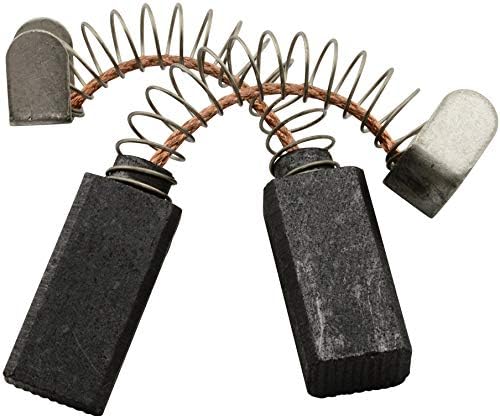
Figure 3.2: An alternative perspective of the carbon brushes, highlighting the spring mechanism.
4. Specifications
| Feature | Detail |
|---|---|
| Brand | Buildalot |
| Compatibility | Black & Decker SR700 Miter Saw |
| Dimensions (L x W x H) | 6 x 8 x 16.5 mm (approx. 2.4 x 3.1 x 6.5 inches) |
| Material | Graphite |
| Package Quantity | 2 carbon brushes |
| Part Number | 0230_Black & Decker_SR700 |
| Item Weight (per pair) | 20 g |

Figure 4.1: Schematic diagram illustrating the components of a single carbon brush.
5. Setup and Installation
Carbon brushes are wear-and-tear parts that require periodic replacement. Worn-out carbon brushes can cause reduced motor performance or complete tool failure. It is recommended to replace both carbon brushes simultaneously to ensure balanced motor operation and extend the tool's lifespan.
5.1. Replacement Procedure
- Prepare the Tool: Ensure the Black & Decker SR700 Miter Saw is completely disconnected from the power source. Place the tool on a stable, clean surface.
- Locate Brush Holders: Identify the carbon brush access points on your miter saw. These are typically small covers on the motor housing, often secured by screws or clips. Refer to your miter saw's original manual for exact locations.
- Remove Old Brushes: Carefully open the brush holder covers. Disconnect the wires from the old carbon brushes and gently pull out the worn brushes and springs. Note their orientation for correct installation of the new brushes.
- Install New Brushes: Insert the new Buildalot carbon brushes into the brush holders, ensuring they slide in smoothly and are oriented correctly. Connect the wires securely. The springs should provide firm contact between the brush and the commutator.
- Secure Covers: Replace the brush holder covers and secure them firmly.
- Test Operation: Reconnect the miter saw to the power supply. Perform a brief test run to ensure the motor operates smoothly without excessive sparking or unusual noises. If excessive sparking occurs, immediately disconnect power and re-check the installation.
6. Operating Considerations
Once new carbon brushes are installed, the miter saw should operate as intended. Carbon brushes are designed to wear down over time as they make contact with the motor's commutator. The Buildalot carbon brushes feature an "automatic stop" mechanism, which means they will automatically switch off when worn out. This design helps protect your tool from potential damage caused by severely worn brushes.
Monitor your tool for signs of wear, such as reduced power, intermittent operation, or increased sparking, which may indicate that the brushes are nearing the end of their lifespan.
7. Maintenance
Regular inspection of the carbon brushes is recommended, especially if the tool is used frequently. The lifespan of carbon brushes varies depending on usage intensity and environmental conditions.
- Visual Inspection: Periodically check the carbon brushes for wear. If they appear significantly shortened or damaged, they should be replaced.
- Commutator Cleaning: While replacing brushes, it is good practice to inspect the motor's commutator for dirt or carbon buildup. Clean gently with a non-abrasive material if necessary.
- Storage: Store replacement carbon brushes in a dry, cool place away from direct sunlight and extreme temperatures.
8. Troubleshooting
| Problem | Possible Cause | Solution |
|---|---|---|
| Motor not starting or intermittent operation | Worn-out carbon brushes (automatic stop activated), loose connections, incorrect brush installation. | Replace both carbon brushes. Check all electrical connections. Ensure brushes are correctly seated. |
| Excessive sparking at the motor | Improperly seated brushes, damaged commutator, incorrect brush type, dirty commutator. | Re-check brush installation. Inspect commutator for damage or dirt and clean if necessary. Ensure correct brush dimensions. |
| Reduced motor power | Partially worn brushes, dirty commutator. | Inspect and replace brushes if significantly worn. Clean commutator. |
| Unusual noises from motor | Incorrect brush installation, foreign object in motor, bearing wear. | Verify brush installation. If problem persists, professional inspection may be required. |
9. Support
For any questions, remarks, or assistance regarding your Buildalot carbon brushes, please contact Buildalot customer support. Your satisfaction is our priority.
Manufacturer: Buildalot BV
Address: Franciscusweg 10-A8, 1216 SK HILVERSUM, Netherlands
Email: info@buildalot.nl