
1. Introduction
This manual provides detailed instructions for the safe and efficient use of your Maclean MCE150 Radio Switch Set. This set includes a remote control and compatible radio sockets (MCE151, MCE153, sold separately) designed for wireless control of electrical appliances. Please read this manual thoroughly before operating the device and retain it for future reference.
The Maclean MCE150 remote control allows you to wirelessly switch connected devices ON or OFF. It features four individual channels (A, B, C, D) and an "ALL" button for simultaneous control. The system operates via radio frequency, enabling control even through walls, up to a maximum range of 30 meters in open areas.
2. Package Contents
- 1x Maclean MCE150 Remote Control
- Batteries for the remote control (if included, check packaging)
- This User Manual
Note: Radio sockets (MCE151, MCE153) are sold separately and are required for full functionality.
3. Product Overview

Figure 1: Front view of the Maclean MCE150 Remote Control. Shows the layout of the channel buttons (A, B, C, D), ALL, ON, and OFF buttons, and the LED indicator.

Figure 2: Side view of the Maclean MCE150 Remote Control, illustrating its ergonomic design.
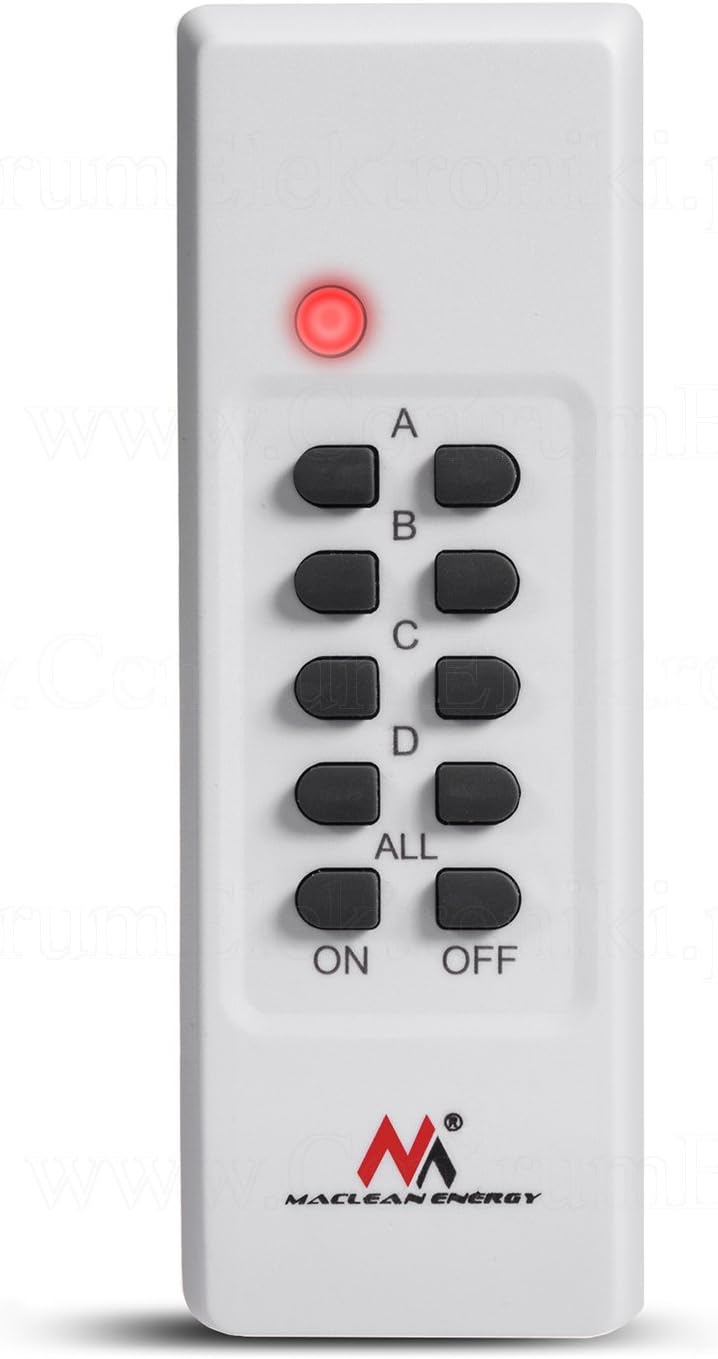
Figure 3: Maclean MCE150 Remote Control with its red LED indicator illuminated, signifying active transmission.
The remote control features a simple button layout:
- A, B, C, D: Individual channel selection buttons. Each channel has an ON and OFF button.
- ALL: Controls all paired sockets simultaneously.
- ON: Activates the selected channel(s) or all channels.
- OFF: Deactivates the selected channel(s) or all channels.
- LED Indicator: Illuminates when a button is pressed, indicating signal transmission.
4. Setup and Pairing
Before using the remote control, you must pair it with compatible Maclean radio sockets (MCE151, MCE153). Ensure batteries are correctly inserted into the remote control.
4.1. Battery Installation (Remote Control)
- Locate the battery compartment on the back of the remote control.
- Open the compartment cover.
- Insert the required batteries (e.g., AAA, as per specifications) ensuring correct polarity (+/-).
- Close the battery compartment cover securely.
4.2. Pairing with Radio Sockets
The pairing process typically involves the following steps. Refer to the specific instructions provided with your Maclean radio sockets (MCE151, MCE153) for exact details, as procedures may vary slightly.
- Plug the radio socket into a wall outlet.
- Press and hold the learning/pairing button on the radio socket (this button is usually small and recessed, sometimes requiring a pen or paperclip). The socket's indicator light should start flashing.
- While the socket's light is flashing, press the desired "ON" button for the channel you wish to assign on your MCE150 remote control (e.g., "A ON").
- The socket's indicator light should stop flashing and remain steadily lit or turn off, indicating successful pairing.
- Repeat this process for each radio socket and desired channel.
The remote control has a built-in memory that allows it to remember the code for up to 10 years, even if batteries are removed.
5. Operating Instructions
Once paired, operating the radio switch set is straightforward.
5.1. Switching Individual Channels
- To turn on a device connected to channel A, press the "A ON" button.
- To turn off a device connected to channel A, press the "A OFF" button.
- Repeat for channels B, C, and D as needed.
5.2. Switching All Channels Simultaneously
- To turn on all paired devices, press the "ALL ON" button.
- To turn off all paired devices, press the "ALL OFF" button.
The LED indicator on the remote control will light up briefly with each button press, confirming signal transmission.
6. Maintenance
The Maclean MCE150 Radio Switch Set requires minimal maintenance.
- Cleaning: Wipe the remote control with a soft, dry cloth. Do not use abrasive cleaners or solvents.
- Battery Replacement: If the remote control's range decreases significantly or the LED indicator does not light up, replace the batteries. Ensure to use the correct battery type (e.g., AAA) and dispose of old batteries responsibly. The remote control has low power consumption, with an estimated battery life of 2 years.
- Storage: Store the remote control in a dry place, away from extreme temperatures and direct sunlight.
7. Troubleshooting
| Problem | Possible Cause | Solution |
|---|---|---|
| Remote control does not work. | Dead or incorrectly inserted batteries. | Check battery polarity and replace batteries if necessary. |
| Socket does not respond to remote. | Socket not paired with remote, or pairing lost. | Re-pair the socket with the remote control (refer to Section 4.2). |
| Reduced operating range. | Low batteries in remote control; excessive interference; physical obstructions. | Replace batteries. Ensure no large metal objects or strong radio sources are between the remote and socket. |
| Socket does not turn on/off. | Device connected to socket is faulty or unplugged; socket itself is faulty. | Check the connected device. Test the socket with another remote or manually if possible. |
8. Specifications
| Feature | Detail |
|---|---|
| Brand | Maclean |
| Model | MCE150 |
| Compatible Devices | Maclean MCE151, MCE153 Radio Sockets |
| Connectivity Technology | Radio Frequency |
| Maximum Range | 30 meters (in open area) |
| Number of Channels | 4 individual (A, B, C, D) + ALL |
| Power Source Type | Battery (for remote control) |
| Battery Type | AAA (check packaging for exact quantity) |
| Battery Life (Remote) | Approximately 2 years |
| Memory Retention | Up to 10 years (code memory) |
| Product Dimensions (Remote) | 12 x 4 x 2 cm |
| Weight (Remote) | 10 g |
| Special Features | Ergonomic design, Random code / coding |
Note: Maximum load for compatible sockets (MCE151, MCE153) is typically 3600 W. Refer to the socket's specific manual for its individual specifications.
9. Warranty and Support
For information regarding warranty terms and conditions, please refer to the documentation provided at the time of purchase or contact your retailer. Maclean products are designed for reliability and performance.
If you encounter issues not covered in the troubleshooting section, or require further assistance, please contact Maclean customer support or your authorized dealer. Please have your product model (MCE150) and purchase details ready.
For the latest information and support, you may visit the official Maclean website (if available, link not provided in source data).