
Introduction
The iHome iAVS16 is a versatile bedside alarm clock system featuring integrated Amazon Alexa Voice Service (AVS). This device allows you to play music, audiobooks, control smart home devices, and access information like weather and news using voice commands. It includes far-field voice activation, Bluetooth connectivity for audio streaming and calls, and a USB port for charging mobile devices. The iAVS16 also features innovative LED accent lighting.
Safety Information
- Read all instructions before operating the device.
- Do not expose the unit to water or moisture.
- Place the unit on a stable, flat surface.
- Use only the provided power adapter.
- Keep the unit away from heat sources and direct sunlight.
- Do not block ventilation openings.
- Do not attempt to service the unit yourself. Refer all servicing to qualified personnel.
Package Contents
Please check that all items are present in your package:
- iHome iAVS16 Alarm Clock System
- Universal AC Adapter (100V-240V)
- Quick Start Guide (not included in this manual)
Product Overview
Front View
The front of the iAVS16 features a large digital display for time, date, and weather information, along with the speaker grille and LED accent lighting at the base.

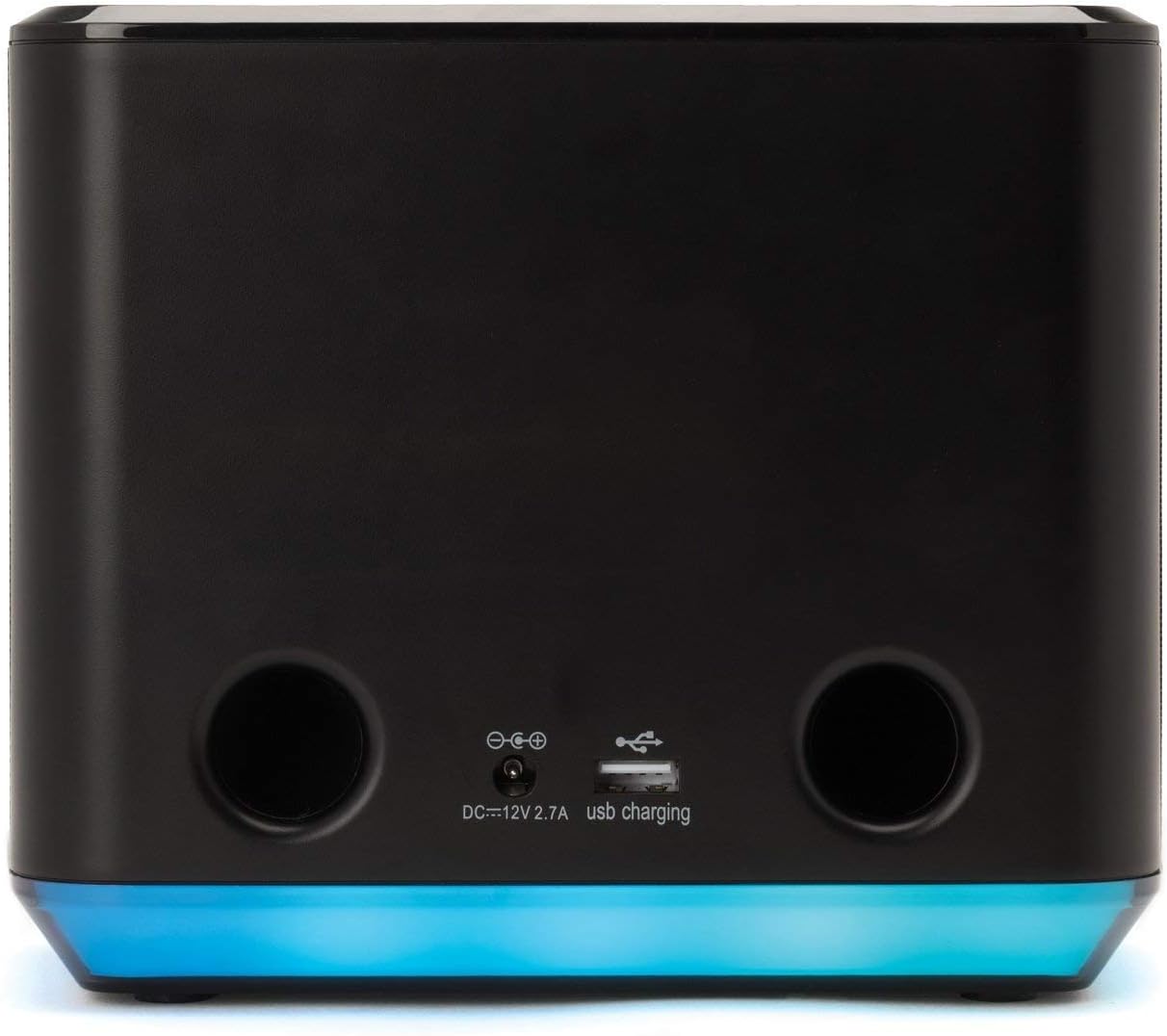
Rear View
The rear panel includes the power input and a USB charging port for external devices.
Top Controls
The top panel houses various control buttons for power, volume, Alexa activation, Bluetooth, and alarm functions.

Setup Guide
1. Power Connection
- Connect the included universal AC adapter to the DC 12V 2.7A input port on the rear of the iAVS16.
- Plug the AC adapter into a working wall outlet. The unit will power on and the display will illuminate.
2. App Installation
To fully utilize the iAVS16's features, including Wi-Fi setup and Alexa integration, you need to install the iHome AVS app on your mobile device.
- Download the iHome AVS app from the Apple App Store (for iOS devices) or Google Play Store (for Android devices).
- Follow the on-screen instructions to create an iHome account or log in if you already have one.
3. Wi-Fi and Alexa Setup
The iAVS16 requires a Wi-Fi connection to enable Alexa Voice Service. Ensure your mobile device is connected to the 2.4GHz Wi-Fi network you intend to use for the iAVS16.
- Open the iHome AVS app on your mobile device.
- Follow the app's instructions to add a new device. The app will guide you through connecting the iAVS16 to your Wi-Fi network.
- Once connected to Wi-Fi, the app will prompt you to log in with your Amazon account to enable Alexa Voice Service.
- Complete the Alexa setup process within the app to personalize your settings and enable desired skills.
Operating Instructions
Basic Clock and Alarm Functions
The time and alarm settings are primarily managed through the iHome AVS app or via Alexa voice commands once the device is set up.
- Setting Time: The time will automatically synchronize once connected to Wi-Fi and Alexa.
- Setting Alarms: Use the iHome AVS app or say, "Alexa, set an alarm for [time]" to set alarms.
- Snooze: Press the ZZZ button on the top of the unit to snooze a sounding alarm.
- Alarm Off: Press the Alarm button (triangle with circle) to turn off a sounding alarm.
Using Alexa Voice Assistant
The iAVS16 features far-field voice recognition, allowing you to interact with Alexa from across the room.
- Say the wake word "Alexa" followed by your command or question.
- Examples: "Alexa, play [song/artist]", "Alexa, what's the weather?", "Alexa, tell me the news."
- The integrated light bar will illuminate to indicate Alexa is listening or responding.
Bluetooth Pairing
You can stream audio from your Bluetooth-enabled device to the iAVS16.
- Press the Bluetooth button (Bluetooth symbol) on the top of the iAVS16. The Bluetooth indicator on the display will flash.
- On your mobile device, go to Bluetooth settings and select "iHome iAVS16" from the list of available devices.
- Once paired, the Bluetooth indicator will glow solid, and you can play audio from your device.
Music Streaming
The iAVS16 supports various streaming services through Wi-Fi and Alexa.
- Alexa: Use voice commands to play music from Amazon Music, Spotify, Pandora, iHeartRadio, TuneIn, and more.
- Spotify Connect: The iAVS16 supports Spotify Connect, allowing you to control music playback directly from the Spotify app on your phone or tablet.
- Bluetooth: Stream any audio from your paired Bluetooth device.
Smart Home Device Control
Integrate your iAVS16 with compatible smart home devices.
- Enable smart home skills in the Alexa app.
- Control hundreds of smart home devices from brands like Nest, Wink, and SmartThings using voice commands through your iAVS16.
- The iAVS16 works with iHome Smart Plugs (sold separately) for voice control of connected appliances.
USB Charging
A 2.1 Amp USB port is located on the rear of the unit for convenient charging of mobile devices.
- Connect your device's USB charging cable (not included) to the USB port on the iAVS16.
- Ensure your device is properly connected to begin charging.
LED Accent Lighting
The iAVS16 features an integrated LED light bar at its base.
- The light bar provides visual feedback for Alexa requests.
- It can also be used for mood lighting with adjustable modes and colors, controllable via the iHome AVS app or Alexa commands.
Maintenance
To ensure the longevity and optimal performance of your iHome iAVS16, follow these maintenance guidelines:
- Cleaning: Use a soft, dry cloth to clean the exterior of the unit. Do not use liquid cleaners or abrasive materials.
- Dust: Regularly dust the speaker grille and ventilation openings to prevent accumulation.
- Power: Disconnect the power adapter from the wall outlet if the unit will not be used for an extended period.
Troubleshooting
If you encounter issues with your iHome iAVS16, refer to the following common solutions:
- Unit does not power on: Ensure the AC adapter is securely connected to both the unit and a working power outlet.
- Cannot connect to Wi-Fi:
- Verify your Wi-Fi network is 2.4GHz. The iAVS16 may not support 5GHz networks.
- Ensure your mobile device is connected to the same 2.4GHz network during setup.
- Restart your Wi-Fi router and the iAVS16.
- Try repeating the setup process through the iHome AVS app.
- Alexa is not responding:
- Check if the unit is connected to Wi-Fi (Wi-Fi icon on display).
- Ensure your Amazon account is linked correctly in the iHome AVS app.
- Verify the microphone is not muted (microphone icon on top panel).
- Speak clearly and within range of the device.
- Bluetooth pairing issues:
- Ensure the iAVS16 is in Bluetooth pairing mode (flashing Bluetooth icon).
- Make sure your mobile device's Bluetooth is enabled and discoverable.
- Forget the iAVS16 from your device's Bluetooth list and try pairing again.
- Alarm not sounding or inconsistent snooze:
- Verify alarm settings within the iHome AVS app or via Alexa.
- Ensure the volume is not set to minimum.
- If snooze duration is inconsistent, a factory reset and re-setup might be necessary.
- Poor sound quality:
- Ensure the unit is placed on a stable surface.
- Check the audio source for quality issues.
- Adjust volume levels on both the iAVS16 and your connected device.
Specifications
The iHome iAVS16 offers the following technical specifications:

| Model Name | iAVS16 |
| Brand | iHome |
| Mounting Type | Tabletop Mount |
| Speaker Type | Soundbar |
| Special Features | Radio, Alexa Voice Assistant, Bluetooth, USB Charging, LED Accent Lighting |
| Compatible Devices | Laptop, Smartphone, Tablet |
| Surround Sound Channel Configuration | 2.1 |
| Color | Black |
| Product Dimensions (L x W x H) | 19.1D x 14.7W x 9.1H Centimetres |
| Item Weight | 866 g |
| Control Method | Voice, Buttons |
| Wireless Communication Technology | Bluetooth, Wi-Fi |
| Power Source | Corded Electric (100V-240V AC adapter) |
| Wattage | 8 watts |
| Speaker Maximum Output Power | 25 Watts |
| Audio Output Mode | Stereo |
| Hardware Interface | USB |
| Display Type | Digital |
Warranty and Support
For warranty information and customer support, please refer to the documentation included with your purchase or visit the official iHome website. Keep your proof of purchase for warranty claims.