
MXBAOHENG YS-160W
MXBAOHENG YS-160W Automatic Cutting Machine User Manual
Model: YS-160W | Brand: MXBAOHENG
1. Introduction and Overview
The MXBAOHENG YS-160W Automatic Cutting Machine is a high-precision, computerized numerical control (CNC) device designed for efficient and accurate cutting of various flexible and semi-rigid materials. This machine is ideal for processing heat-shrink tubes, cables, wires, belts, films, tapes, sleeves, rubber, plastic webbing, and similar materials. Its automated features ensure consistent results and reduced manual labor, making it suitable for industrial and commercial applications requiring precise length and quantity control.
This manual provides essential information for the safe operation, setup, maintenance, and troubleshooting of your YS-160W cutting machine. Please read it thoroughly before operating the machine.

Figure 1: MXBAOHENG YS-160W Automatic Cutting Machine with samples of materials it can cut.
2. Safety Instructions
Operating any machinery requires strict adherence to safety protocols to prevent injury and damage. Always follow these guidelines:
- Read the Manual: Understand all instructions and warnings before operation.
- Power Supply: Ensure the machine is connected to the correct voltage (110V/220V as specified for your model) and a grounded outlet. Disconnect power before performing any maintenance or adjustments.
- Personal Protective Equipment (PPE): Wear appropriate PPE, such as safety glasses, to protect against flying debris. Avoid loose clothing or jewelry that could get caught in moving parts.
- Work Area: Keep the work area clean, well-lit, and free of obstructions. Ensure adequate space around the machine for safe operation and material handling.
- Moving Parts: Keep hands and fingers clear of the cutting blade and material feeding mechanism during operation. Never attempt to clear jams while the machine is running.
- Material Handling: Use caution when loading and unloading materials. Ensure materials are properly aligned and secured before starting the cutting process.
- Supervision: Do not leave the machine unattended while it is operating.
- Emergency Stop: Familiarize yourself with the location and operation of the emergency stop button.
- Maintenance: Only qualified personnel should perform maintenance and repairs. Use only genuine replacement parts.
3. Product Features
The YS-160W Automatic Cutting Machine incorporates several advanced features for optimal performance:
- Computerized Numerical Control (CNC): Allows precise setting of cutting length, number of pieces, and material feeding speed for accurate cuts with minimal material loss.
- Automatic Stopper: The machine automatically stops operation if the material supply runs out, preventing dry runs and potential damage.
- Memory Function: Set parameters such as cutting length, quantity, and speed are retained even after the machine is powered off and on, saving setup time for recurring tasks.
- High Accuracy: Achieves precise cut lengths, with settings adjustable between 0.1mm and 9999.9mm.
- Multi-functionality: Suitable for a wide range of materials including heat shrink tubes, fiberglass pipes, electrical wires, flat cables, hardware wires, woven labels, non-woven fabrics, insulating paper, magic tape, cotton tape, zippers, Velcro strips, elastic tapes, and various belts.
4. Components and Parts
Familiarize yourself with the main components of the YS-160W machine:
- Control Panel: Features an LCD display and numerical keypad for setting cutting parameters.
- Material Feed Rollers: Mechanisms that pull the material into the cutting area.
- Cutting Blade Assembly: Houses the cutting blade responsible for precise cuts.
- Material Output Tray: Area where cut pieces are collected.
- Emergency Stop Button: Red button for immediate shutdown in emergencies.
- Power Switch: Green button for starting and stopping normal operation.
- Material Spool Holder: An external accessory for holding rolls of material.
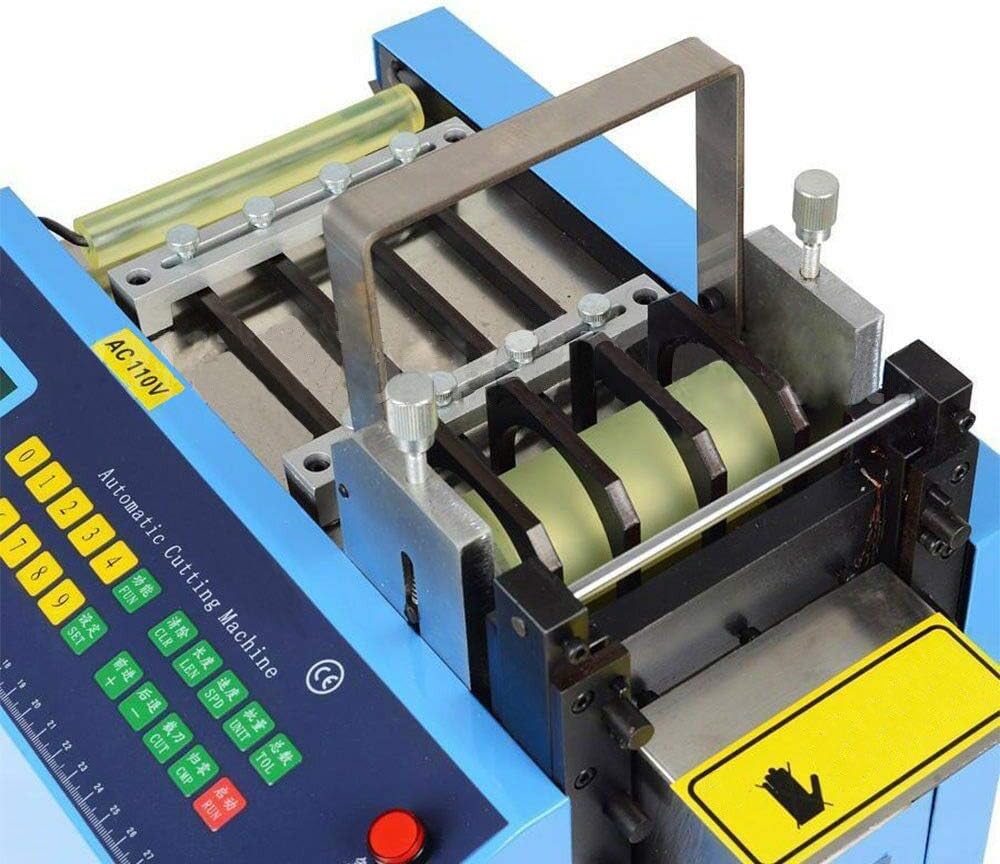
Figure 2: Close-up of the material feeding and cutting mechanism.

Figure 3: Rear view of the machine, showing the material exit point.

Figure 4: Included accessories: material spool holder, spare blade, and hex wrenches.
5. Setup
- Unpacking: Carefully remove the machine and all accessories from the packaging. Retain packaging for future transport or storage.
- Placement: Place the machine on a stable, level surface capable of supporting its weight. Ensure adequate ventilation and clearance around the machine.
- Power Connection: Connect the power cord to the machine and then to a suitable grounded electrical outlet. Verify the voltage matches your machine's requirements (110V or 220V).
- Install Spool Holder (if applicable): If using rolled materials, attach the provided spool holder to the designated mounting point on the machine.
- Material Loading:
- Ensure the machine is powered off.
- Feed the material through the designated entry point and guide it through the feed rollers until it reaches the cutting blade assembly.
- Ensure the material is straight and free of kinks or twists.
6. Operation
- Power On: Press the green power switch to turn on the machine. The LCD display will illuminate.
- Set Cutting Length: Use the numerical keypad and display to input the desired cutting length in millimeters (e.g., 100.0 for 100mm).
- Set Quantity: Input the number of pieces you wish to cut.
- Adjust Speed: If applicable, adjust the material feeding speed according to the material type and desired output.
- Start Cutting: Press the start button (usually green or labeled "RUN") to begin the cutting process. The machine will automatically feed and cut the material according to the set parameters.
- Monitor Operation: Observe the machine during operation. The automatic stopper will activate if the material runs out.
- Stop Cutting: To pause or stop the cutting process, press the stop button (usually red or labeled "STOP"). For immediate shutdown in an emergency, press the emergency stop button.
- Power Off: After completing your task, press the green power switch to turn off the machine.
Watch the following video for a demonstration of the machine in operation:
Video 1: Demonstration of the MXBAOHENG Automatic Cutting Machine in operation, showing material feeding and cutting.
7. Maintenance
Regular maintenance ensures the longevity and optimal performance of your cutting machine:
- Cleaning: Regularly clean the machine, especially the material feed path and cutting area, to remove dust, debris, and material residue. Use a soft, dry cloth. Do not use abrasive cleaners or solvents.
- Blade Inspection and Replacement: Inspect the cutting blade periodically for sharpness and damage. A dull blade can lead to inaccurate or frayed cuts. Replace the blade as needed using the provided tools and following safety precautions (ensure power is disconnected).
- Lubrication: Refer to the machine's specific lubrication points (if any) in the detailed product diagram or contact support for guidance.
- General Inspection: Periodically check all screws, bolts, and connections to ensure they are tight. Inspect cables for any signs of wear or damage.
8. Troubleshooting
This section addresses common issues you might encounter:
| Problem | Possible Cause | Solution |
|---|---|---|
| Machine does not power on. | No power supply; power cord loose; emergency stop engaged. | Check power connection; ensure outlet is live; disengage emergency stop button. |
| Material not feeding. | Material jammed; feed rollers dirty/worn; material supply depleted. | Clear any jams (power off first); clean feed rollers; replenish material. |
| Inaccurate cut lengths. | Blade dull; material slipping; incorrect parameter settings. | Replace blade; ensure material is properly loaded and tensioned; verify settings on control panel. |
| Machine stops unexpectedly. | Material ran out (automatic stopper); overload; internal error. | Check material supply; reduce load if possible; power cycle machine. If problem persists, contact support. |
If you encounter issues not listed here or if solutions do not resolve the problem, please contact MXBAOHENG customer support.
9. Specifications
| Attribute | Detail |
|---|---|
| Brand | MXBAOHENG |
| Model Number | YS-160W (also HQ-849) |
| Power Supply | 110V/220V (as per variant) |
| Power Consumption | 500W |
| Cutting Width | 0-160mm |
| Cutting Length | 0.1-9999.9mm |
| Material | Stainless Steel (machine construction) |
| Manufacturer | MXBAOHENG |
10. Warranty and Support
MXBAOHENG is committed to providing high-quality products and customer service. For any inquiries regarding warranty, technical support, or service, please contact MXBAOHENG customer service directly. Please have your model number (YS-160W) and purchase information ready when contacting support.
For the most up-to-date warranty information and contact details, please refer to the official MXBAOHENG website or your purchase documentation.
Ask a question about this manual
Ask about setup, troubleshooting, compatibility, parts, safety, or missing instructions. Manuals+ will review the question and use this page’s manual context to help answer it.