
1. Introduction
The LaiPuDuo RGBW Wall-Mounted Touch Panel Dimmer Switch is designed for controlling various LED light sources, including point light sources, flexible light strips, and wall washer lamps. It features a glass panel design and a high-precision capacitance touch control chip for enhanced touch sensitivity and reduced false triggers. This controller allows for various lighting effects such as jump change, gradual change, and strobe, based on application requirements.
2. Package Contents
Please verify that all items are present in the package:
- 1 x RGBW Full Color Touch Panel Controller
- 1 x User Manual

Image: The LaiPuDuo RGBW Touch Panel Controller shown next to its product packaging box.
3. Technical Specifications
- Working Temperature: -20°C to 60°C
- Supply Voltage: DC 12-24V
- Output Channels: 4 channels
- Connection Mode: Common Anode
- External Dimensions: L86 × W86 × H37mm (3.39 x 3.39 x 1.46 inches)
- Net Weight: 128g
- Static Power Consumption: <1W
- Output Current: <4A (each channel)
- Output Power: 12V: <192W, 24V: <384W
- Material: Glass (panel), Metal (contact)
- Control Method: Touch
- Mounting Type: Wall Mount
- Connectivity Protocol: Wi-Fi (as per specifications, though primary control is touch)
- International Protection Rating: IP54
4. Installation
Follow these steps for proper installation of the RGBW Touch Panel Dimmer Switch:
- Prepare Wiring: Ensure the power supply is disconnected before beginning installation. Identify the input (DC12-24V) and output (RGBW) terminals on the back of the controller.
- Connect LED Strip: Connect the corresponding wires from your RGBW LED light strip to the output terminals (R, G, B, W, and + for common anode) on the controller.
- Connect Power Supply: Connect the DC12-24V power supply wires to the input terminals (+ and -) on the controller.
- Mount Controller: Securely mount the controller to the wall using appropriate mounting hardware (not included).
- Connect Power Adapter: Once all connections are secure, connect the power adapter to the power source.

Image: The rear of the controller displaying the input and output wiring terminals for power and LED strip connections.
Installation Video Guide
Video: This video demonstrates the wiring process for connecting the RGBW controller to an LED strip and power supply, followed by a demonstration of its basic operation.
5. Operating Instructions
The touch panel provides intuitive control over your LED lighting. Refer to the image below for button layout and functions.
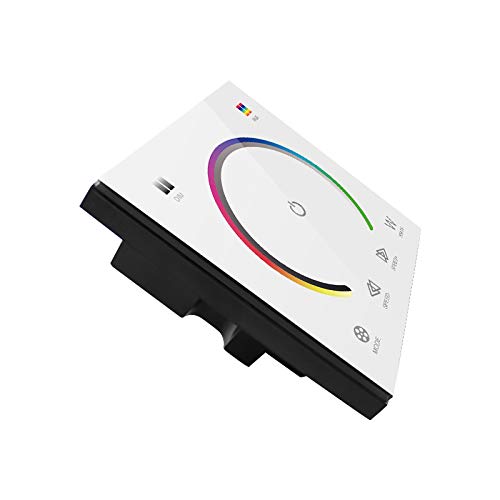
Image: The front of the touch panel controller, showing the color wheel, power button, mode, speed, and white light controls.
- Power Button (Center Circle): Touch to turn the LED lights on or off.
- Color Wheel: Slide your finger around the color wheel to select a desired RGB color. The LED strip will change to the selected color.
- White Light (W Button): Touch the 'W' button to activate or adjust the dedicated white light channel.
- Mode Button: Cycles through various pre-programmed dynamic lighting modes.
- Speed Buttons (Left/Right Arrows): Adjust the speed of dynamic lighting modes.
Operation Video Guide
Video: This video demonstrates the functionality of the touch panel, including color selection via the color wheel, switching between RGB and white light, and adjusting modes and speeds.
6. Maintenance
To ensure the longevity and proper functioning of your touch panel dimmer switch:
- Cleaning: The glass panel can be cleaned with a soft, dry cloth. Avoid abrasive cleaners or harsh chemicals that may damage the surface.
- Environment: Operate the device within the specified working temperature range (-20°C to 60°C). Avoid exposure to extreme moisture or direct sunlight.
- Power: Always disconnect power before performing any maintenance or wiring adjustments.
7. Troubleshooting
If you encounter issues with your RGBW Touch Panel Dimmer Switch, refer to the following common problems and solutions:
- Lights do not turn on:
- Check if the power supply is correctly connected and providing the specified DC12-24V.
- Verify that the LED strip is properly connected to the output terminals.
- Ensure the power button on the touch panel is activated.
- Incorrect colors or incomplete color display:
- Confirm that the RGBW wires from the LED strip are connected to the correct corresponding terminals on the controller (R to R, G to G, B to B, W to W).
- Ensure the common anode (+) wire is correctly connected.
- Check if the LED strip itself is functioning correctly by testing it with another controller if possible.
- Touch panel is unresponsive:
- Ensure the panel is clean and dry. Moisture or dirt can affect touch sensitivity.
- Temporarily disconnect and reconnect the power supply to reset the controller.
- White light or RGB colors do not operate simultaneously:
- This controller is designed to switch between RGB colors and the dedicated white channel. Simultaneous operation of RGB and the separate white channel is not supported. You must select either an RGB color or the white light function.
8. Warranty and Support
For warranty information or technical support, please contact the seller or manufacturer directly. Keep your purchase receipt as proof of purchase.