
YZ8-48, YZ-48AB, YZ-96A
HHD Egg Incubator Temperature and Humidity Sensor Probe User Manual
Models: YZ8-48, YZ-48AB, YZ-96A
1. Introduction
This manual provides essential information for the proper installation, operation, and maintenance of the HHD Egg Incubator Temperature and Humidity Sensor Probe. This sensor is designed as a spare part for various HHD egg incubator models, including YZ8-48, YZ-48AB, and YZ-96A, ensuring accurate environmental monitoring within the incubator.
The sensor is crucial for maintaining optimal conditions for egg hatching by providing precise temperature and humidity readings to the incubator's control system. Its compact design and ease of integration make it a reliable component for your hatching machine.
2. Product Overview
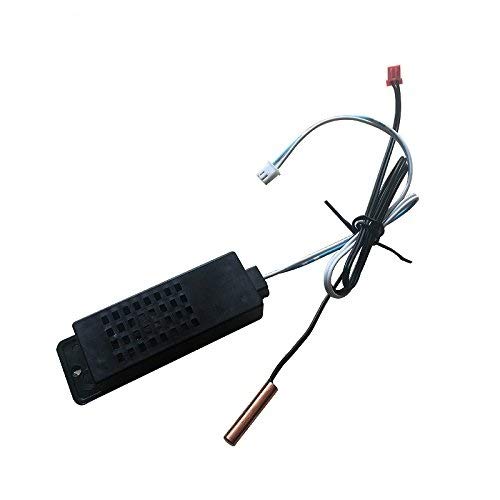
Figure 1: HHD Egg Incubator Temperature and Humidity Sensor Probe
This image displays the HHD Egg Incubator Temperature and Humidity Sensor Probe. It features a black rectangular housing with ventilation slots, connected to wires. One wire leads to a white connector, and another to a red connector. A separate wire extends to a copper-colored cylindrical temperature probe. The wires are neatly bundled with a black tie.
The sensor unit consists of a main housing containing the humidity sensing element, a separate temperature probe (typically copper-colored), and connecting wires with specific connectors for integration with the incubator's main board. It is designed for direct replacement or installation in compatible HHD incubator models.
3. Setup and Installation
Before proceeding with installation, ensure the incubator is powered off and disconnected from the main power supply to prevent electrical hazards.
- Locate Sensor Port: Identify the designated temperature and humidity sensor ports on your HHD egg incubator's control board or internal wiring harness. Refer to your incubator's specific manual for exact locations.
- Connect Humidity Sensor: Carefully align the connector from the black rectangular humidity sensor housing with the corresponding port on the incubator. Gently push until it clicks into place, ensuring a secure connection.
- Connect Temperature Probe: Connect the wire from the copper-colored temperature probe to its designated port. These connectors are typically keyed to prevent incorrect insertion.
- Position Sensors: Place the humidity sensor and temperature probe inside the incubator chamber in a location that provides an accurate representation of the overall internal environment. Avoid placing them directly in water or in areas with restricted airflow. Ensure wires are routed safely and do not interfere with moving parts like egg turning mechanisms.
- Secure Connections: Double-check all connections to ensure they are firm and not loose.
Once installed, you can reconnect the incubator to power and proceed with operation.
4. Operating the Sensor
The HHD Temperature and Humidity Sensor Probe operates automatically once correctly installed and the incubator is powered on. It continuously measures the internal temperature and humidity, sending data to the incubator's control unit.
- Temperature Monitoring: The temperature probe provides real-time temperature readings, which are displayed on the incubator's control panel. The incubator's thermostat uses this data to regulate heating elements.
- Humidity Monitoring: The humidity sensor provides real-time humidity readings, displayed on the control panel. This allows you to adjust water levels or other humidity sources to maintain desired levels.
- Calibration: While these sensors are typically pre-calibrated, if you suspect inaccuracies, refer to your incubator's main manual for any sensor calibration procedures it may support.
Always monitor the readings on your incubator's display to ensure they are within the optimal range for the type of eggs being incubated.
5. Maintenance
Proper maintenance ensures the longevity and accuracy of your sensor probe.
- Regular Cleaning: Periodically inspect the sensor for dust, debris, or moisture buildup. Gently wipe the black housing and the copper probe with a soft, dry cloth. Do not use abrasive cleaners or immerse the sensor in water.
- Avoid Contaminants: Keep the sensor away from direct contact with egg fluids, shell fragments, or other contaminants that could impede its function.
- Check Connections: Ensure that the sensor's connectors remain clean and securely attached to the incubator's board. Loose connections can lead to intermittent readings.
- Storage: If the incubator is stored for an extended period, ensure the sensor is clean and stored in a dry, dust-free environment.
6. Troubleshooting
If you encounter issues with your sensor, consider the following troubleshooting steps:
| Problem | Possible Cause | Solution |
|---|---|---|
| Inaccurate Temperature/Humidity Readings |
|
|
| No Readings on Incubator Display |
|
|
If troubleshooting steps do not resolve the issue, contact the manufacturer or supplier for further assistance.
7. Specifications
| Attribute | Value |
|---|---|
| Product Type | Temperature and Humidity Sensor Probe |
| Compatibility | HHD Egg Incubator Models: YZ8-48, YZ-48AB, YZ-96A (and similar 48/56/112 capacity models) |
| Package Dimensions | 15 x 14 x 11 cm |
| Item Weight | 300 g |
| Material | High quality material (as per product description) |
8. Warranty and Support
Specific warranty information for this spare part may vary depending on the retailer or region of purchase. Please refer to your purchase receipt or contact the seller directly for details regarding warranty coverage and support.
For technical support or inquiries not covered in this manual, it is recommended to contact the manufacturer of your HHD egg incubator or the supplier from whom you purchased the sensor probe.
Related Documents - YZ8-48, YZ-48AB, YZ-96A
 |
Industrial Chiller Manual: Operation, Maintenance, and Technical Specifications Comprehensive manual for YZ-XXF and YZ-XXS series industrial chillers, covering operation, safety precautions, maintenance, troubleshooting, technical specifications, and circuit diagrams. Includes information on NS501 and CT8810 controllers. |
 |
Návod k použití: Inteligentní líheň YZ 32A/S, YZ 56A/S Kompletní návod k obsluze pro automatické digitální líhně a inkubátory YZ 32A, YZ 32S, YZ 56A, YZ 56S. Zjistěte, jak nastavit teplotu, vlhkost a jak úspěšně líhnout drůbež. |
 |
Brinsea Maxi 48 EX Connect Egg Incubator Operating Manual Comprehensive operating manual for the Brinsea Maxi 48 EX Connect egg incubator, covering setup, features, temperature and humidity control, egg handling, and maintenance. Learn how to achieve optimal hatching results. |
 |
ACDC LED Luminaire Instruction Manual - LED-YZ-T8-V2 Series Comprehensive instruction manual for ACDC LED luminaires, model series LED-YZ-T8-V2. Details features, applications, safety precautions, technical specifications, and installation guidance for IP65 rated lighting. |
 |
Bluetooth Earphones User Guide and FCC Compliance Instructions for using Bluetooth earphones, including pairing, operation, and FCC compliance information. Covers basic functions like volume control, playback, and call management. |
 |
Bluetooth Earphones User Manual - Model YZ-05 User manual for Shenzhenshi huayunzhichuangkeji Co., Ltd. YZ-05 Bluetooth earphones, detailing pairing, operation, specifications, and FCC compliance. |
Ask a question about this manual
Ask about setup, troubleshooting, compatibility, parts, safety, or missing instructions. Manuals+ will review the question and use this page’s manual context to help answer it.