
1. Introduction
The SKYRC B6AC V2 is an advanced, microprocessor-controlled charge/discharge station designed for comprehensive battery management. This upgraded version of the iMAX B6AC offers enhanced accuracy and stability, along with new functionalities. It features an integral equalizer for various Lithium battery types, including LiPo, LiHV, LiFe, and LiIon, supporting up to six cells. Additionally, it is compatible with NiMH, NiCd, and Pb batteries. The charger provides a maximum charge current of 6A and a maximum charge power of 50W, ensuring efficient and safe battery maintenance.
2. Safety Information
WARNING: Failure to follow these safety guidelines may result in property damage, personal injury, or death. Always prioritize safety when operating this device.
- NEVER USE THE CHARGER UNSUPERVISED! Constant monitoring is required during charging and discharging processes.
- LiPo batteries pose a SEVERE risk of fire if misused. Exercise extreme caution.
- Read the entire operating manual thoroughly before using this charger.
- Operate the charger in a well-cooled and well-ventilated area to prevent overheating.
- This device is intended for indoor use only. Do not expose it to rain or moisture.
- Always disconnect the power supply before making or breaking connections to the battery.
- WARNING: Explosive gases. Prevent flames and sparks near the charging area. Ensure adequate ventilation during charging.

Image: Bottom of the charger displaying critical safety warnings and input/output specifications. Note the fire hazard symbol and warnings about unsupervised use and LiPo battery risks.
3. Product Overview
3.1. Components (What's in the Box)

Image: Visual representation of the items included in the product package. This includes the iMAX B6AC V2 charger, an AC power cord, a DC cable with alligator clip charging connector, and several T-plug charging cables with different connectors (Banana, Alligator Clip, XT60, Futaba, JST).
The SKYRC iMAX B6AC V2 package typically includes the following components:
- SKYRC iMAX B6AC V2 Charger/Discharger Unit
- AC Power Cord
- DC Cable with Alligator Clip Charging Connector
- Various T-Plug Charging Cables (e.g., with Banana connector, Alligator Clip connector, XT60 connector, Futaba connector, JST connector)
3.2. Key Features

Image: The product packaging illustrating the key new features of the iMAX B6AC V2, including its capabilities as a Lithium Battery Meter, Battery Internal Resistance Meter, and support for PC control and firmware upgrades.
The SKYRC iMAX B6AC V2 offers a range of advanced features for comprehensive battery management:
- Dual Power AC/DC Input: Operates from both AC (100-240V) and DC (11-18V) power sources.
- Multi-Chemistry Support: Compatible with LiPo, LiFe, LiIon, LiHV (Lithium High Voltage), NiMH, NiCd, and Pb (Lead-Acid) battery types.
- Integrated Balancer: Features an integral equalizer for six-cell Lithium-Polymer (LiPo), Lithium High Voltage, Lithium iron phosphate (LiFe), and Lithium-Ion (LiIon) batteries.
- Adjustable Terminal Voltage: Users can set the terminal voltage for specific battery types.
- PC Control & Firmware Upgrade: Connect to a PC for advanced control and to update the charger's firmware.
- Lithium Battery Meter: Allows for checking the voltage of individual cells in a Lithium battery pack.
- Battery Internal Resistance Meter: Measures the internal resistance of battery cells.
- Re-Peak Mode: Optimized charging mode for NiMH/NiCd batteries.
- Safety Features: Includes Automatic Charging Current Limit, Capacity Limit, Temperature Threshold, and Processing Time Limit for enhanced safety.

Image: The main product view of the SKYRC iMAX B6AC V2 charger, showcasing its blue metallic casing, LCD display, and control buttons for navigation and operation.
4. Setup
Before operating the charger, ensure it is set up correctly and safely.
- Power Connection:
- AC Input: Connect the supplied AC power cord to the charger's AC input port and then to a standard wall outlet (100-240V AC).
- DC Input: Alternatively, for DC power, connect the DC input cable (with alligator clips) to a 11-18V DC power source, such as a car battery. Ensure correct polarity.
- Battery Connection:
- Connect your battery to the charger's main output port using the appropriate charging cable.
- For Lithium batteries (LiPo, LiFe, LiIon, LiHV), also connect the battery's balance lead to the charger's balance port. Ensure the balance lead is connected correctly, matching the cell count.
- Placement: Place the charger and battery on a non-flammable surface in a well-ventilated area, away from any combustible materials.
5. Operating Instructions
The SKYRC iMAX B6AC V2 offers various operating modes for different battery types. Navigate through the menus using the "BATT/PROG STOP", "DEC.", "INC.", and "ENTER START" buttons.
5.1. Basic Operation Flow
- Power On: Connect the charger to a power source. The LCD display will illuminate.
- Select Battery Type: Use the "BATT/PROG STOP" button to cycle through the main menu options until you find the desired battery type (e.g., LiPo, NiMH).
- Select Program Mode: Once the battery type is selected, use "DEC." or "INC." to choose the desired program mode (e.g., Charge, Balance Charge, Fast Charge, Storage, Discharge, Cycle).
- Set Parameters: Use "DEC." and "INC." to adjust parameters such as charge current (Amps), cell count (for Lithium batteries), and discharge current. Press "ENTER START" to confirm a parameter and move to the next.
- Start Operation: After setting all parameters, press and hold "ENTER START" for a few seconds. The charger will perform a battery check and prompt for confirmation. Confirm to begin the operation.
- Monitor Progress: The display will show real-time charging/discharging data. Monitor the process closely.
- Stop Operation: Press "BATT/PROG STOP" at any time to stop the current operation.
5.2. Specific Modes
- Balance Charge (LiPo/LiFe/LiIon/LiHV): This mode charges the battery while simultaneously balancing the voltage of each cell, ensuring optimal performance and longevity.
- Charge: Standard charging mode for all supported battery types.
- Fast Charge (LiPo/LiFe/LiIon/LiHV): Charges the battery faster but may not achieve full balance.
- Storage (LiPo/LiFe/LiIon/LiHV): Charges or discharges the battery to a specific voltage level ideal for long-term storage, preserving battery health.
- Discharge: Discharges the battery to a set voltage.
- Cycle (NiMH/NiCd): Performs charge/discharge or discharge/charge cycles to optimize battery capacity and eliminate memory effect.
5.3. PC Control and Firmware Upgrade
The charger can be connected to a personal computer via a mini-USB cable (not included). This allows for advanced control, data logging, and firmware updates using the dedicated SKYRC software. Refer to the SKYRC official website for software downloads and detailed instructions on PC connectivity and firmware upgrades.
6. Maintenance
Proper maintenance ensures the longevity and reliable operation of your SKYRC iMAX B6AC V2 charger.
- Cleaning: Regularly clean the charger's exterior with a soft, dry cloth. Do not use solvents or abrasive cleaners. Ensure no dust or debris accumulates in the ventilation openings.
- Storage: When not in use, store the charger in a cool, dry place, away from direct sunlight and extreme temperatures. Disconnect all batteries and power sources before storage.
- Cable Inspection: Periodically inspect all cables and connectors for any signs of wear, damage, or corrosion. Replace damaged cables immediately.
- Firmware Updates: Check the official SKYRC website periodically for new firmware updates. Keeping the firmware updated can improve performance and add new features.
7. Troubleshooting
This section provides general guidance for common issues. For detailed troubleshooting, refer to the comprehensive manual available on the manufacturer's website.
| Problem | Possible Cause | Solution |
|---|---|---|
| Charger does not power on. | No power supply; incorrect power connection. | Ensure AC or DC power cable is securely connected and power source is active. Check power outlet/DC source. |
| "Connection Break" error. | Battery not connected; poor connection; incorrect balance lead connection. | Verify all battery connections (main and balance leads) are secure and correctly inserted. |
| "Cell Error" or "Voltage Error". | Incorrect cell count setting; damaged battery cell. | Confirm the cell count setting matches your battery. Inspect battery for damage. |
| Charger gets hot during operation. | Normal operation; insufficient ventilation. | Some heat is normal. Ensure adequate ventilation around the charger. Do not block air vents. Reduce charge current if excessive. |
8. Specifications
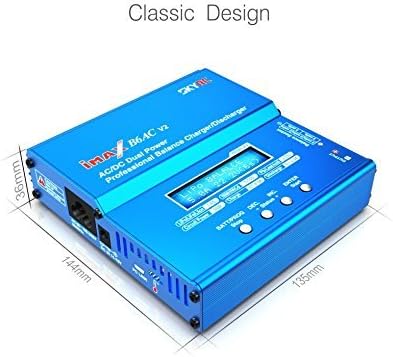
Image: Dimensional drawing of the SKYRC iMAX B6AC V2 charger, indicating its physical size.
| Feature | Detail |
|---|---|
| Input Voltage | AC 100-240V (1A Max), DC 11-18V (5A Max) |
| Charge Power | Max. 50W |
| Discharge Power | Max. 5W |
| Charge Current Range | 0.1-6.0A |
| Discharge Current Range | 0.1-2.0A |
| LiPo/LiFe/LiIon/LiHV Cell Count | 1-6 cells |
| NiMH/NiCd Cell Count | 1-15 cells |
| Pb Battery Voltage | 2-20V |
| Product Dimensions (L x W x H) | 144mm x 135mm x 36mm (5.67 x 5.31 x 1.42 inches) |
| Item Weight | 632g (1.39 pounds) |
| Model Number | 43227-562 |
9. Warranty and Support
For information regarding product warranty, please refer to the documentation provided with your purchase or contact the seller directly. The manufacturer, SKYRC, provides support for their products. For technical assistance, firmware updates, or detailed operational guides, please visit the official SKYRC website.
While RotorLogic is an authorized reseller, direct product support and warranty claims are typically handled by the manufacturer, SKYRC, or through the point of purchase.


