1. Product Overview
The AGPTEK G02 is a compact and portable MP3 player designed for active lifestyles. It features a convenient clip-on design, FM radio, and 8GB of internal storage, all housed in a sweatproof silicone case.
1.1 Package Contents
- 1x AGPTEK G02 8GB MP3 Player
- 1x USB Charging Cable
- 1x Sweatproof Silicone Case
- Note: Earphones are not included in the package.

Figure 1.1: Package Contents
1.2 Device Layout
Familiarize yourself with the buttons and ports on your AGPTEK G02 MP3 player.

Figure 1.2: Front View of the MP3 Player
- Central Control Pad: Includes Play/Pause, Volume Up (+), Volume Down (-), Previous Track (◀◀), and Next Track (▶▶).
- LED Indicators: Two small lights at the top indicate status (e.g., charging, power on/off).
- Headphone Jack: Standard 3.5mm audio output port.
- USB Port: For charging and data transfer.
- FM/Music Switch: Slider to switch between FM radio and music playback modes.
- Shuffle/Repeat Switch: Slider to toggle between shuffle and repeat playback modes.
- Clip: Integrated clip on the back for attaching to clothing or gear.
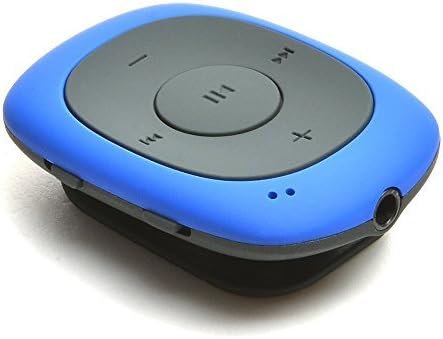
Figure 1.3: Headphone Jack Location
2. Setup
2.1 Initial Charging
Before first use, fully charge the MP3 player. Connect the included USB charging cable to the player's USB port and the other end to a computer's USB port or a USB wall adapter (not included).
- The LED indicator will show red during charging.
- Charging typically takes about 2.5 hours for a full charge.
- The red LED will turn off when charging is complete.

Figure 2.1: Charging Port
2.2 Transferring Music Files
The AGPTEK G02 has 8GB of internal memory for storing music. It supports MP3, WMA, and WAV audio formats.
- Connect the MP3 player to your computer using the USB charging cable.
- The player will appear as a removable disk drive on your computer.
- Drag and drop your desired MP3, WMA, or WAV audio files directly into the player's storage.
- Once files are transferred, safely eject the removable disk from your computer before disconnecting the cable.
Note: The player does not directly support iTunes music. Convert files to a supported format (MP3, WMA, WAV) if necessary.
3. Operating Instructions
3.1 Power On/Off
- To Power On: Press and hold the Play/Pause button (▶▶) for a few seconds until the blue LED indicator lights up.
- To Power Off: Press and hold the Play/Pause button (▶▶) again for a few seconds until the blue LED indicator turns off.
3.2 Music Playback
- Ensure the FM/Music switch is set to 'Music'.
- Connect your wired earphones to the 3.5mm headphone jack.
- Press the Play/Pause button (▶▶) to start or pause playback.
- Press the Next Track (▶▶) button to skip to the next song.
- Press the Previous Track (◀◀) button to go back to the beginning of the current song, or press twice to go to the previous song.

Figure 3.1: Playback Controls
3.3 Volume Adjustment
- Increase Volume: Press and hold the Volume Up (+) button.
- Decrease Volume: Press and hold the Volume Down (-) button.
3.4 Shuffle and Repeat Modes
Use the Shuffle/Repeat switch to select your preferred playback mode:
- Slide the switch to enable shuffle mode for random song playback.
- Slide the switch to enable repeat mode to loop the current song or playlist.
3.5 FM Radio Function
The AGPTEK G02 includes an FM radio feature. Ensure earphones are connected as they act as the antenna.
- Slide the FM/Music switch to 'FM'.
- The player will automatically scan and save available FM stations (FM Frequency Range: 88MHz-108MHz).
- Use the Previous Track (◀◀) and Next Track (▶▶) buttons to navigate between saved stations.

Figure 3.2: FM Radio Functionality
4. Wearing the Device
The AGPTEK G02 is designed for portability and convenience during physical activity.
- Clip-on Design: Use the integrated clip on the back of the player to securely attach it to your clothing, belt, or bag strap.
- Sweatproof Silicone Case: For added protection during workouts, place the MP3 player inside the provided sweatproof silicone case. This helps protect the device from moisture and minor impacts.

Figure 4.1: MP3 Player in Use with Sweatproof Case
5. Maintenance
To ensure the longevity and optimal performance of your AGPTEK G02 MP3 player, follow these maintenance guidelines:
- Cleaning: Use a soft, dry cloth to wipe the device. For the silicone case, you can use a damp cloth with mild soap if necessary, then rinse and air dry completely before reinserting the player.
- Storage: Store the player in a cool, dry place away from direct sunlight, extreme temperatures, and excessive humidity.
- Avoid Impact: While durable, avoid dropping the device or subjecting it to strong impacts.
- Water Exposure: The silicone case provides sweat resistance, but the player is not waterproof. Do not submerge it in water or expose it to heavy rain.
- Battery Care: To preserve battery life, avoid fully discharging the battery frequently. Charge it regularly, even if not in use for extended periods.
6. Troubleshooting
If you encounter issues with your AGPTEK G02 MP3 player, refer to the following common problems and solutions:
| Problem | Possible Cause | Solution |
|---|---|---|
| Player does not turn on. | Low battery. | Charge the player for at least 30 minutes. |
| No sound from earphones. | Earphones not properly connected; Volume too low; Corrupted audio file. | Ensure earphones are fully plugged in. Increase volume. Try playing a different audio file. Test with another pair of earphones. |
| Cannot transfer files to the player. | Incorrect USB connection; Driver issue; Unsupported file format. | Ensure the USB cable is securely connected. Try a different USB port or cable. Check if the player is recognized as a removable disk. Ensure files are MP3, WMA, or WAV. |
| FM radio not working or poor reception. | Earphones not connected; Weak signal. | Earphones must be connected as they act as the antenna. Try moving to an area with better FM signal. |
| Player freezes or becomes unresponsive. | Software glitch. | Press and hold the Play/Pause button for an extended period (10-15 seconds) to force a restart. |
7. Specifications
| Feature | Detail |
|---|---|
| Model Name | G02 |
| Internal Memory | 8GB |
| Supported Audio Formats | MP3, WMA, WAV |
| FM Radio Frequency | 88MHz-108MHz |
| Battery Type | Built-in 160mAh rechargeable Lithium Polymer battery |
| Battery Life (Audio Playback) | Approx. 10 hours (at medium volume) |
| Charging Time | Approx. 2.5 hours |
| Product Dimensions | 1.97 x 1.43 x 0.61 inches |
| Item Weight | 0.49 oz (0.48 ounces) |
| Connectivity | USB |
| Special Features | Clip-on Design, FM Radio, Sweatproof Silicone Case |

Figure 7.1: Product Dimensions and Weight
8. Warranty and Support
AGPTEK products are designed for reliability and performance. For warranty information and customer support, please refer to the official AGPTEK website or contact their customer service directly.
- Online Support: Visit the AGPTEK official website for FAQs, driver downloads, and product registration.
- Contact Customer Service: If you require further assistance or have specific warranty claims, please reach out to AGPTEK customer support through the contact methods provided on their website.