
HORI NSW-054U
HORI Mario Kart 8 Deluxe Racing Wheel
User Manual
1. Introduction
Thank you for purchasing the HORI Mario Kart 8 Deluxe Racing Wheel for Nintendo Switch. This accessory is designed to enhance your racing experience in Mario Kart 8 Deluxe and other compatible Nintendo Switch titles. Please read this manual thoroughly before use to ensure proper setup and operation.
Key Features:
- Mario-themed racing wheel attachment for Nintendo Switch Joy-Con.
- Wide diameter wheel for comfortable grip and control.
- Rubber grips for enhanced control and comfort during extended play.
- Quick-action shoulder buttons for responsive gameplay.
- Officially licensed by Nintendo.
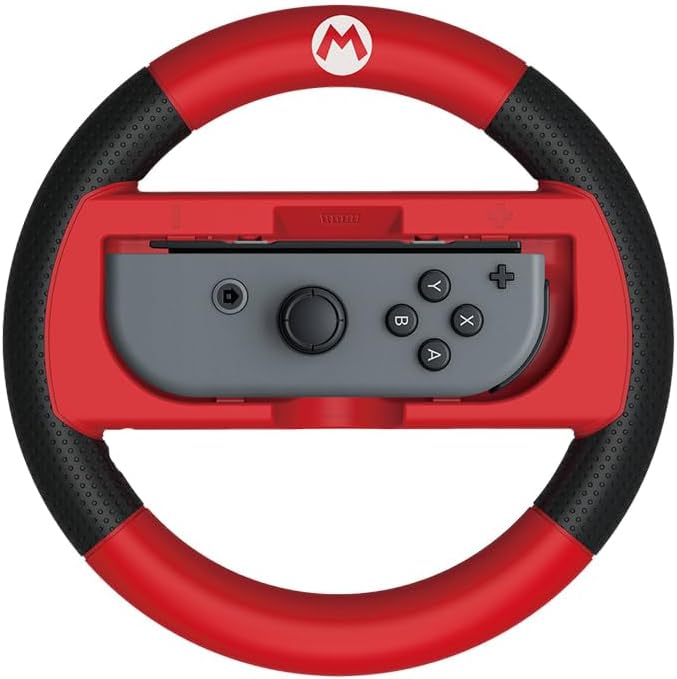
This image displays the HORI Mario Kart 8 Deluxe Racing Wheel in red and black, designed to house a single Nintendo Switch Joy-Con controller. The Joy-Con is shown inserted into the center of the wheel, with its analog stick and face buttons visible. The wheel features a prominent 'M' logo at the top, indicating its Mario theme, and textured rubber grips on the sides for enhanced comfort and control during gameplay.
2. Setup
Inserting the Joy-Con:
- Identify the correct Joy-Con for insertion. The racing wheel is designed for a single Joy-Con (either left or right).
- Align the Joy-Con with the slot in the center of the racing wheel. Ensure the '+' or '-' symbol on the Joy-Con matches the corresponding indicator on the wheel's slot.
- Gently slide the Joy-Con into the slot until it clicks securely into place. Do not force the Joy-Con, as this may cause damage.
- Verify that the Joy-Con is firmly seated and does not wobble.
Removing the Joy-Con:
- Locate the release button or latch on the back or side of the racing wheel, typically near the Joy-Con slot.
- Press and hold the release button while gently sliding the Joy-Con out of the slot.
- Store the racing wheel and Joy-Con separately when not in use to prevent accidental damage.
3. Operating Instructions
Gameplay:
- Once the Joy-Con is securely inserted, hold the racing wheel with both hands, similar to a real steering wheel.
- Steer by rotating the wheel left or right. The Joy-Con's motion sensors will translate your movements into in-game steering.
- Utilize the quick-action shoulder buttons (SL/SR) located on the top of the wheel for in-game actions such as using items or drifting, depending on the game's controls.
- The Joy-Con's face buttons (A, B, X, Y) and analog stick remain accessible and functional while inserted in the wheel.
Best Practices:
- Ensure your Nintendo Switch console is updated to the latest system software.
- Calibrate your Joy-Con controllers if you experience any issues with motion control accuracy. This can typically be done in the Nintendo Switch System Settings.
- Play in a well-lit area to ensure optimal motion tracking.
4. Maintenance
Cleaning:
- To clean the racing wheel, use a soft, dry cloth.
- For stubborn dirt, slightly dampen the cloth with water. Do not use harsh chemicals, abrasive cleaners, or excessive moisture, as these can damage the product's finish or internal components.
- Ensure the wheel is completely dry before re-inserting a Joy-Con or storing.
Storage:
- Store the racing wheel in a cool, dry place away from direct sunlight and extreme temperatures.
- Avoid placing heavy objects on top of the wheel to prevent deformation or damage.
5. Troubleshooting
Joy-Con does not fit or is loose:
- Ensure you are inserting the Joy-Con in the correct orientation, matching the '+' or '-' symbols.
- Verify that there are no obstructions in the slot.
- Confirm the Joy-Con is fully clicked into place.
Buttons or motion controls are not responding:
- Remove the Joy-Con from the wheel and re-insert it, ensuring a secure connection.
- Check if the Joy-Con functions correctly outside of the racing wheel. If not, the issue may be with the Joy-Con itself.
- Restart your Nintendo Switch console.
- Calibrate the Joy-Con's motion controls via the Nintendo Switch System Settings.
General performance issues:
- Ensure your Nintendo Switch system software is up to date.
- Try playing in a different environment to rule out interference.
6. Specifications
| Model Number: | NSW-054U |
| Compatibility: | Nintendo Switch Joy-Con (Left or Right) |
| Dimensions (L x W x H): | 19 x 13.5 x 3 cm (approximately) |
| Weight: | 180 g (approximately) |
| Material: | High-quality plastic with rubber grips |
| Official License: | Nintendo Official Licensed Product |
7. Warranty Information
HORI products are manufactured with high-quality materials and are subject to strict quality control. For specific warranty terms and conditions, please refer to the warranty card included with your purchase or visit the official HORI website for your region. Keep your proof of purchase for warranty claims.
8. Customer Support
If you encounter any issues not covered in this manual or require further assistance, please contact HORI customer support. Contact information can typically be found on the official HORI website or on the product packaging.
Please have your product model number (NSW-054U) and proof of purchase ready when contacting support.