
1. Introduction
The Abilix Krypton ABK8 is an advanced educational robot kit designed to introduce users to the exciting world of robotics and programming. With over 1000 building pieces, it allows for the construction of various robot models, fostering creativity and problem-solving skills. The robot is programmable via dedicated applications available for Android and iOS devices, making learning interactive and engaging for users aged 8 and above.
2. Product Components
The Abilix Krypton ABK8 kit includes:
- Over 1000 building pieces for diverse robot constructions.
- Main control unit (brain of the robot).
- Various motors and sensors.
- Connecting cables and accessories.
- Rechargeable Lithium-polymer battery (included).
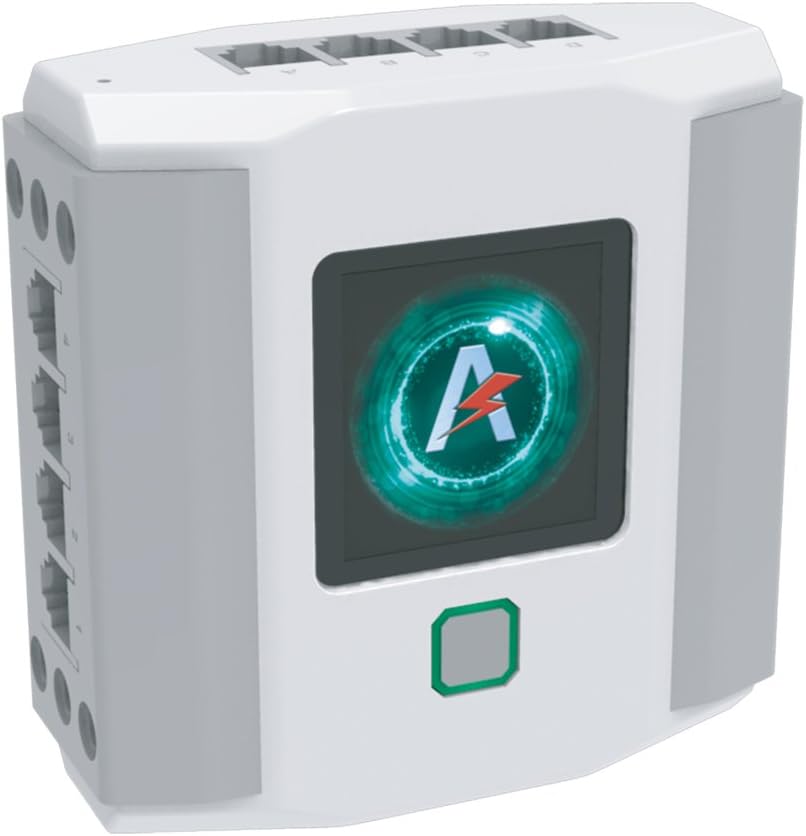
Figure 2.1: The main control unit, the central processing unit for the Abilix Krypton robot.

Figure 2.2: Example of connection blocks used to assemble the robot structures.
3. Setup and Assembly
Assembly of the Abilix Krypton robot is required. Follow the detailed instructions provided in the accompanying build guide (not included in this manual) or within the Abilix application for specific robot models.
3.1 Battery Installation and Charging
The robot requires one Lithium-polymer battery, which is included. Ensure the battery is fully charged before first use. Connect the battery to the main control unit as per the instructions in the build guide. Use only the provided charging cable and adapter.
3.2 App Installation
To control and program your Abilix Krypton robot, download the official Abilix application from the Google Play Store (for Android devices) or the Apple App Store (for iOS devices).

Figure 3.1: The Abilix application interface on a tablet, used for building and programming.
3.3 Initial Assembly
Begin by selecting a robot model from the build guide or app. Carefully connect the pieces, motors, and sensors to the main control unit. Ensure all connections are secure to prevent operational issues.

Figure 3.2: An example of a fully assembled Abilix Krypton robot, ready for programming.

Figure 3.3: Various robot configurations that can be built with the Abilix Krypton kit, showcasing its versatility.
4. Operating the Robot
Once assembled and the app is installed, you can begin operating and programming your Abilix Krypton robot.
4.1 Connecting to the App
- Turn on the main control unit.
- Open the Abilix application on your smart device.
- Follow the in-app instructions to connect your device to the robot via Bluetooth or Wi-Fi.
4.2 Programming
The Abilix app provides an intuitive interface for programming. You can use block-based coding to create sequences of movements, reactions to sensor inputs, and more. Experiment with different commands to understand the robot's capabilities.
4.3 Running Programs
After creating a program, upload it to the robot via the app. The robot will then execute the programmed actions. Monitor its behavior and refine your code as needed.
5. Maintenance
Proper maintenance ensures the longevity and optimal performance of your Abilix Krypton robot.
- Cleaning: Use a soft, dry cloth to wipe down the plastic components. Avoid using harsh chemicals or abrasive materials.
- Storage: Store the robot and its components in a clean, dry place away from direct sunlight and extreme temperatures.
- Battery Care: Do not overcharge or completely drain the battery. If storing for extended periods, charge the battery to approximately 50% capacity.
- Component Check: Periodically inspect all connections and moving parts for wear or damage. Replace any damaged components promptly.
6. Troubleshooting
If you encounter issues with your Abilix Krypton robot, refer to the following common problems and solutions:
| Problem | Possible Cause | Solution |
|---|---|---|
| Robot does not turn on. | Battery is low or not connected. | Charge the battery. Ensure the battery is securely connected to the main control unit. |
| Cannot connect to the app. | Bluetooth/Wi-Fi is off, robot is out of range, or app issue. | Ensure Bluetooth/Wi-Fi is enabled on your device and the robot. Move closer to the robot. Restart the app and the robot. |
| Robot not responding to commands. | Incorrect programming, loose connections, or motor/sensor malfunction. | Review your program for errors. Check all physical connections. If a component is faulty, contact support. |
| Parts do not fit together. | Incorrect orientation or wrong part. | Refer to the build guide carefully. Ensure parts are oriented correctly and you are using the right pieces. |
7. Specifications
| Feature | Detail |
|---|---|
| Model Number | ABK8 |
| Product Dimensions | 50 x 50 x 50 cm (approximate assembled size) |
| Item Weight | 3 kg |
| Recommended Age | 8 years and older |
| Number of Items | 1156 pieces |
| Battery Type | 1 Lithium-polymer battery (included) |
| Material Type | Plastic |
| Color | Assortment |
8. Warranty and Support
For warranty information and technical support, please refer to the documentation provided with your purchase or contact the retailer/manufacturer directly. Keep your proof of purchase for warranty claims.