
Yealink EXP50
Yealink EXP50 Color-Screen Expansion Module User Manual
Model: EXP50 | Brand: Yealink
Introduction
The Yealink EXP50 Color-Screen Expansion Module is designed to enhance the functionality of Yealink T5 Series IP phones, including models SIP-T58V, SIP-T58A, SIP-T56A, SIP-T54S, and SIP-T52S. This module features a large 4.3-inch color LCD screen, providing a vivid visual experience and a user-friendly interface for advanced call handling. It is an ideal solution for receptionists, administrative assistants, and contact center workers who need to monitor contacts and manage a high volume of calls efficiently.
What's in the Box
Upon opening the package, verify that all components are present and in good condition.
- Yealink Color-Screen Expansion Module

Image: The retail packaging for the Yealink EXP50 Color-Screen Expansion Module, a brown cardboard box with the Yealink logo.
Setup
Follow these steps to properly connect your Yealink EXP50 Expansion Module to a compatible Yealink T5 Series IP phone.
- Power Off Phone: Ensure your Yealink T5 Series IP phone is powered off before connecting the expansion module.
- Connect Cable: Connect the dedicated expansion module cable from the EXP50 to the EXT port on your Yealink T5 Series IP phone.
- Secure Connection: Ensure the cable is securely fastened to prevent accidental disconnection.
- Power On Phone: Power on your Yealink T5 Series IP phone. The EXP50 module should be detected automatically.
- Firmware Update (if necessary): For optimal performance and compatibility, ensure your IP phone has the latest firmware. If the module is not recognized or functions incorrectly, a firmware update via the phone's administration interface may be required.
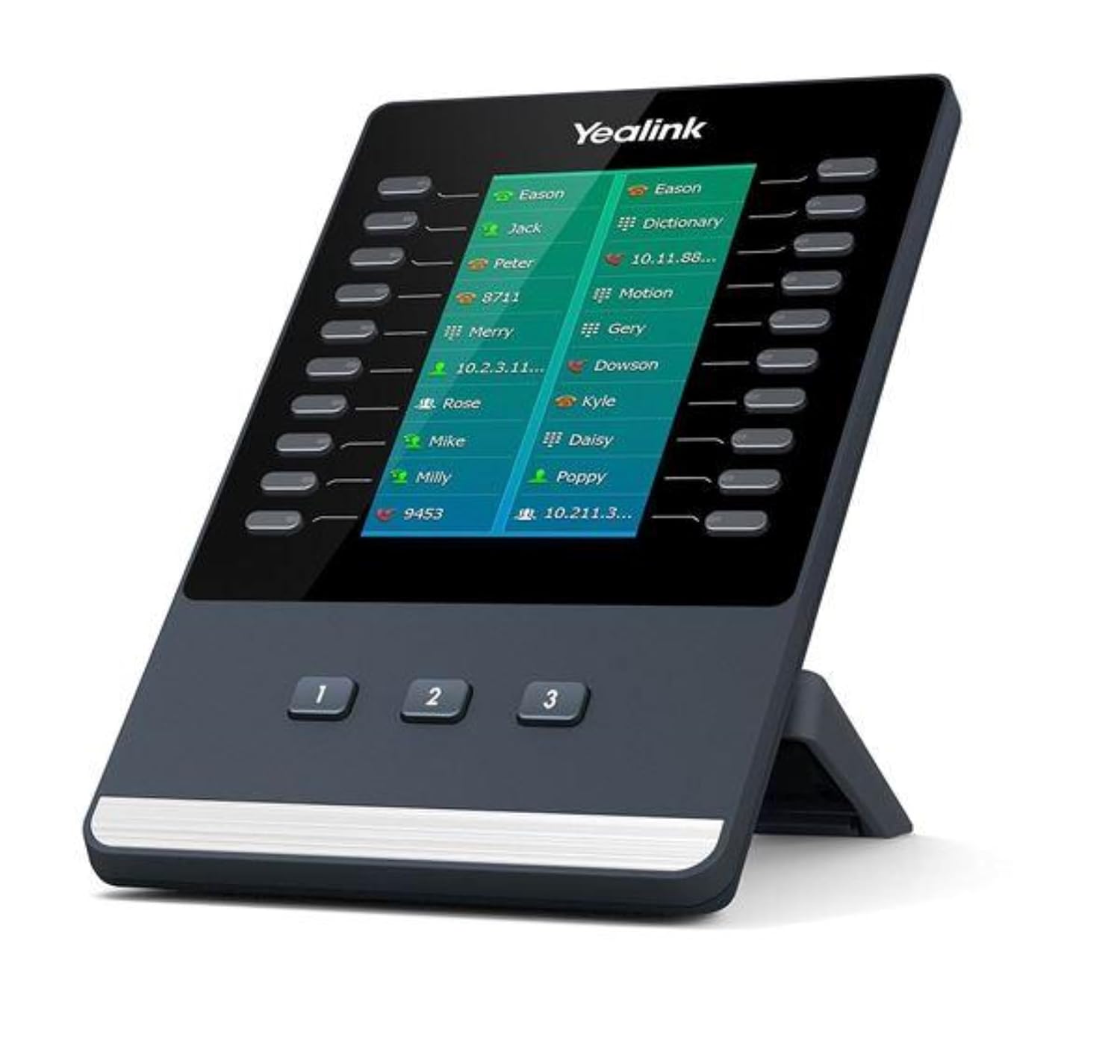
Image: The Yealink EXP50 Color-Screen Expansion Module, shown connected to a compatible Yealink T5 series IP phone, displaying a list of contacts on its color screen.

Image: A direct front view of the Yealink EXP50 Color-Screen Expansion Module, highlighting its large color display and programmable buttons.
Operating the EXP50
The EXP50 module significantly extends the capabilities of your Yealink T5 Series IP phone, providing quick access to various features and contacts.
- Color Screen Display: The 4.3-inch color screen provides a clear and intuitive interface for managing calls and contacts.
- Programmable Buttons: The module features three pages, each with 20 flexible buttons, allowing for up to 60 programmable features. These buttons are located on both sides of the screen.
- Feature Assignment: The multifunctional line keys can be programmed for various functions, including:
- BLF (Busy Lamp Field): Monitor the status of other extensions (busy, ringing, available).
- Speed Dial: Quickly dial frequently used numbers.
- Call Forward: Redirect incoming calls to another number.
- Transfer: Transfer an active call to another party.
- Call Park: Place a call on hold in a shared parking spot, allowing it to be retrieved from any phone.
- Call Pickup: Answer a call ringing on another extension.
- Page Navigation: Use the dedicated page buttons (labeled 1, 2, 3) at the bottom of the module to switch between the three sets of programmable keys.

Image: An angled view of the Yealink EXP50, showcasing its ergonomic design and the layout of the programmable buttons alongside the color display.
Maintenance
Proper care and maintenance will ensure the longevity and optimal performance of your Yealink EXP50 Expansion Module.
- Cleaning: Use a soft, dry, lint-free cloth to clean the screen and exterior surfaces. Avoid using abrasive cleaners, solvents, or aerosol sprays, as these can damage the device.
- Environment: Keep the module in a dry environment, away from direct sunlight, excessive heat, and moisture.
- Handling: Handle the device with care to avoid dropping or subjecting it to strong impacts.
Troubleshooting
This section addresses common issues you might encounter with your EXP50 module.
- Module Not Recognized: If the EXP50 is not recognized by your T5 Series IP phone, ensure the connection cable is securely plugged into the EXT port. Verify that your phone's firmware is up to date, as older firmware versions may not fully support the EXP50.
- Display Issues: If the screen is blank or shows incorrect colors, check the cable connection. If the color tone of the EXP50 screen differs slightly from your phone's screen, this can sometimes occur due to manufacturing variations and typically does not affect functionality.
- Buttons Unresponsive: If programmable buttons are not responding, ensure the module is properly connected and the phone's firmware is current. Reconfigure the button assignments through the phone's web interface if necessary.
- Intermittent Connection: Ensure all cables are firmly seated. Avoid placing the phone and module in areas with high electromagnetic interference.
Specifications
Key technical specifications for the Yealink EXP50 Color-Screen Expansion Module.
| Feature | Detail |
|---|---|
| Model Number | EXP50 |
| Compatible Devices | Yealink T5 Series IP phones (SIP-T58V, SIP-T58A, SIP-T56A, SIP-T54S, SIP-T52S) |
| Display | 4.3-inch color-screen LCD |
| Programmable Buttons | 3 pages of 20 flexible buttons (up to 60 features) |
| Dimensions (L x W x H) | 19.49 x 12.8 x 10.16 inches |
| Item Weight | 7.05 ounces (200 Grams) |
| Color | Black |
| Manufacturer | Yealink |
Warranty and Support
For warranty information and technical support, please refer to the documentation provided with your original purchase or visit the official Yealink website. Yealink is committed to providing high-quality products and support to ensure an optimal user experience.
For further assistance, you may contact your product vendor or Yealink customer service directly. Keep your purchase receipt and product serial number (if applicable) ready when seeking support.