
1. Introduction
This manual provides essential information for the safe and efficient operation of your Microtek Digital UPS E2+ 925 VA Inverter. The Microtek UPS EB Series is a Micro Controller design-based system, offering extended backup capabilities with external batteries. It includes user-friendly features such as a Voltage Range Selection Switch, allowing operation in a Standard Voltage Range of 100V~300V or a Narrow Voltage Range of 180V~260V.
2. Safety Instructions
Read all safety instructions before installing or operating the inverter. Failure to follow these instructions may result in electric shock, fire, or serious injury.
- Installation: Ensure the inverter is installed in a well-ventilated area, away from direct sunlight, heat sources, and flammable materials. Maintain adequate clearance around the unit for proper airflow.
- Water and Moisture: Do not expose the inverter to rain, water, or excessive moisture. Avoid operating the unit with wet hands.
- Electrical Connections: All electrical connections must be performed by a qualified electrician in accordance with local electrical codes. Ensure proper grounding.
- Battery Safety: Batteries contain corrosive acid. Wear protective eyewear and gloves when handling batteries. Do not short-circuit battery terminals.
- Children and Pets: Keep the inverter and batteries out of reach of children and pets.
- Servicing: Do not attempt to open or service the inverter yourself. Refer all servicing to qualified service personnel.
3. Product Overview
The Microtek Digital UPS E2+ 925 VA Inverter features a clear front panel display and robust construction for reliable power backup.
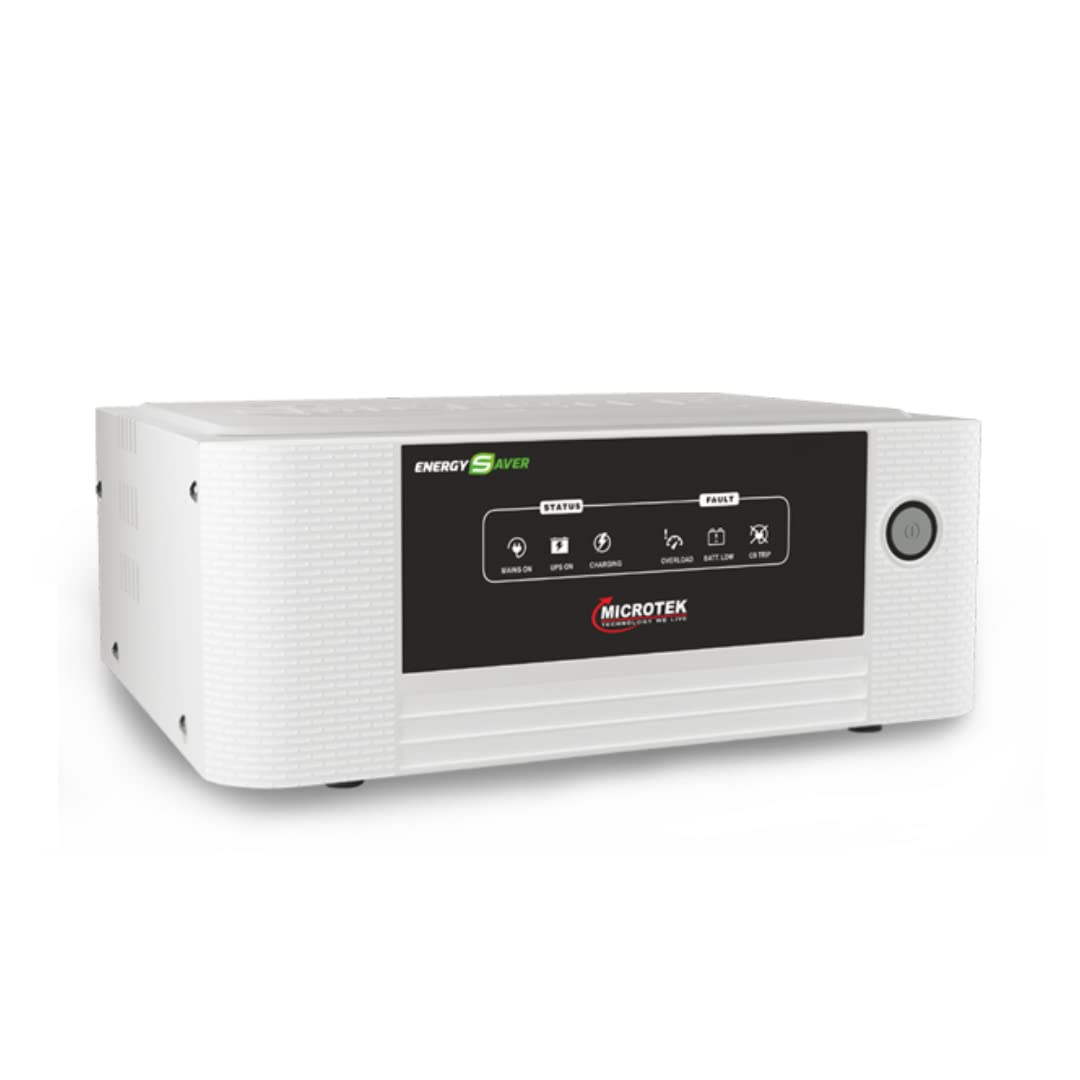
Figure 1: Front panel of the Microtek Digital UPS E2+ 925 VA Inverter. This image displays the 'ENERGY SAVER' branding, status indicators for Mains On, UPS On, Charging, Overload, Batt Low, and CB Trip, along with the power button.
Front Panel Indicators:
- MAINS ON: Illuminates when the inverter is receiving AC power from the utility grid.
- UPS ON: Illuminates when the inverter is providing power to the connected load from the battery.
- CHARGING: Illuminates when the battery is being charged.
- OVERLOAD: Illuminates and may beep if the connected load exceeds the inverter's capacity.
- BATT LOW: Illuminates when the battery charge level is low, indicating that the inverter will soon shut down.
- CB TRIP: Illuminates if the circuit breaker has tripped due to an electrical fault or overload.
4. Setup
Follow these steps for proper installation and setup of your inverter.

Figure 2: The Microtek Digital UPS E2+ 925 VA Inverter shown with a battery cabinet, illustrating a typical installation scenario in a household environment.
- Unpacking: Carefully remove the inverter from its packaging. Inspect for any damage during transit.
- Placement: Place the inverter on a flat, stable surface in a well-ventilated area. Ensure it is not exposed to direct sunlight or moisture.
- Battery Connection:
- Connect the RED cable from the inverter to the POSITIVE (+) terminal of the battery.
- Connect the BLACK cable from the inverter to the NEGATIVE (-) terminal of the battery.
- Ensure connections are tight and secure. Incorrect polarity will damage the inverter.
- Mains Input Connection: Plug the inverter's input power cord into a properly grounded wall outlet.
- Load Connection: Connect your appliances (lights, fans, etc.) to the output sockets provided on the inverter. Do not exceed the inverter's rated capacity (740 Watts).
- Voltage Range Selection: Locate the Mains input voltage range slide selection switch on the inverter. Select either the Standard Voltage Range (100V~300V) or Narrow Voltage Range (180V~260V) based on your local power supply conditions.
5. Operating Instructions
Once the inverter is set up, follow these steps for normal operation.
- Power On: Press the power button on the front panel to turn on the inverter. The 'MAINS ON' indicator will light up if utility power is present.
- Normal Operation: When utility power is available, the inverter will charge the battery and pass through AC power to your connected appliances. The 'CHARGING' indicator will be active.
- Backup Mode: In case of a power outage, the inverter will automatically switch to battery power. The 'UPS ON' indicator will light up, and your appliances will continue to receive power from the battery.
- Power Off: To turn off the inverter, press and hold the power button until the unit shuts down.
6. Maintenance
Regular maintenance ensures optimal performance and longevity of your inverter.
- Battery Care: Regularly check the electrolyte level in lead-acid batteries (if applicable) and top up with distilled water as needed. Keep battery terminals clean and free from corrosion.
- Cleaning: Keep the inverter's exterior clean and free from dust. Use a dry cloth for cleaning. Do not use liquid cleaners.
- Ventilation: Ensure that the ventilation openings on the inverter are not blocked to prevent overheating.
- Periodic Inspection: Periodically check all cables and connections for any signs of wear or damage.
7. Troubleshooting
This section addresses common issues you might encounter with your inverter.
| Problem | Possible Cause | Solution |
|---|---|---|
| Inverter not turning on | No mains power; Battery not connected or discharged; Blown fuse/tripped circuit breaker. | Check mains power supply; Ensure battery is properly connected and charged; Check and reset circuit breaker. |
| 'OVERLOAD' indicator on | Too many appliances connected; Short circuit in connected load. | Reduce the number of connected appliances; Disconnect all loads and reconnect one by one to identify faulty appliance. |
| 'BATT LOW' indicator on | Battery charge is low. | Allow the inverter to charge the battery when mains power is available. Reduce load if on backup. |
| 'CB TRIP' indicator on | Overload or short circuit. | Disconnect some loads, then reset the circuit breaker located on the inverter. |
| No output power in backup mode | Battery fully discharged; Inverter fault. | Allow battery to charge; If problem persists, contact customer support. |
8. Specifications
| Feature | Specification |
|---|---|
| Model Name | UPS E2+ 925 |
| Input Voltage (Standard Range) | 100V - 300V |
| Input Voltage (Narrow Range) | 180V - 260V |
| Output Power | 740 Watts |
| Voltage | 12 Volts |
| Electrical Output Waveform | Pure Sine Wave |
| Frequency | 50 Hz |
| Battery Compatibility | Lithium Ion Battery & Lead Acid Battery |
| Dimensions (L x W x H) | 21.1L x 40.6W x 43.6H Centimeters |
| Weight | 8980 Grams |
| Protection Features | Smart overload sense and short circuit protection |
9. Warranty and Support
Warranty Information:
The Microtek Digital UPS E2+ 925 VA Inverter comes with a 3-Year Warranty from the date of purchase. This warranty covers manufacturing defects under normal operating conditions. Please retain your purchase receipt as proof of warranty.
Customer Support:
For technical assistance, service, or warranty claims, please contact your authorized Microtek service center or dealer. Do not attempt to repair the unit yourself, as this may void the warranty and pose safety risks.
