
1. Introduction
This manual provides essential information for the proper installation, operation, and maintenance of your Buildalot Carbon Brushes designed for the HITACHI PDM-115 Grinder. Carbon brushes are critical components in electric motors, facilitating the transfer of electrical current to the rotating armature. Regular inspection and timely replacement ensure optimal performance and extend the lifespan of your power tool.
2. Product Overview
The Buildalot Carbon Brushes are specifically manufactured to be compatible with the HITACHI PDM-115 Grinder. Each package contains two carbon brushes, complete with springs and terminals, ready for installation.
- Dimensions: 6.5 x 7.5 x 13 mm (approximately 2.6 x 3.0 x 5.1 inches)
- Quantity: 2 brushes per package
- Weight: Approximately 20 g per package
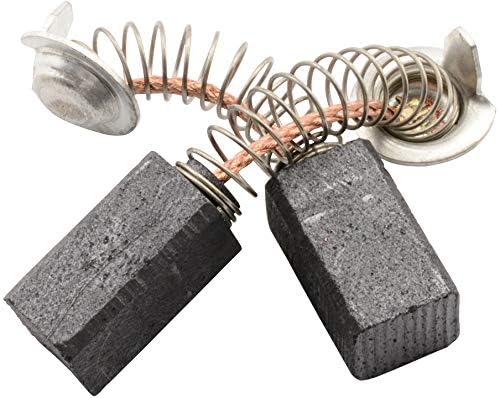
Image 2.1: A pair of Buildalot carbon brushes, showing the carbon block, spring, and electrical connector.
3. Specifications
| Feature | Detail |
|---|---|
| Manufacturer | Buildalot |
| Part Number | 0921_Hitachi_PDM-115 |
| Product Dimensions | 0.65 x 0.75 x 1.3 cm |
| Item Package Quantity | 2 |
| Item Weight | 20 g |
| Batteries Required? | No |
4. Setup and Installation
Replacing carbon brushes requires careful attention to safety and proper procedure. If you are unsure, consult a qualified technician.
Safety Precautions:
- ALWAYS disconnect the power tool from the electrical outlet before attempting any maintenance or installation.
- Wear appropriate personal protective equipment (PPE), such as safety glasses.
- Ensure your work area is clean and well-lit.
Installation Steps:
- Locate Brush Caps: Identify the brush caps on the housing of your HITACHI PDM-115 Grinder. These are typically small, screw-in caps located on opposite sides of the motor housing.
- Remove Old Brushes: Unscrew the brush caps. Carefully pull out the old carbon brushes and their springs. Note their orientation for correct installation of the new brushes.
- Inspect Commutator: While the brushes are out, inspect the commutator (the copper segments on the armature). It should be clean and smooth. If it's excessively grooved or dirty, professional servicing may be required.
- Insert New Brushes: Insert the new Buildalot carbon brushes into the brush holders. Ensure the carbon block slides freely and the spring applies even pressure to the brush. The copper wire terminal should be positioned correctly to make contact.
- Replace Brush Caps: Carefully screw the brush caps back into place. Do not overtighten.
- Test: Reconnect the power tool to the electrical outlet. Run the grinder at a low speed for a few minutes without load to allow the new brushes to seat properly against the commutator. Slight sparking is normal during this initial run-in period.
Image 4.1: Schematic diagram illustrating a carbon brush assembly with its spring and cap.
5. Operating Considerations
After installing new carbon brushes, it is recommended to allow a brief run-in period. Operate the grinder without load for approximately 5-10 minutes. This allows the carbon brushes to conform to the shape of the commutator, ensuring optimal contact and reducing initial sparking. During this period, observe for excessive sparking or unusual noises. If these occur, disconnect power and re-check the installation.
6. Maintenance
Carbon brushes are wear items and will gradually shorten with use. Regular inspection is crucial for maintaining tool performance and preventing damage to the motor.
Inspection and Replacement:
- Inspect carbon brushes every 50-100 hours of operation, or if you notice a decrease in power, excessive sparking, or intermittent operation.
- Replace brushes when they are worn down to approximately one-quarter of their original length, or if the spring no longer applies adequate pressure.
- Always replace both carbon brushes at the same time, even if one appears less worn. This ensures balanced current transfer and prevents premature wear on the commutator.
7. Troubleshooting
If your HITACHI PDM-115 Grinder exhibits issues after carbon brush replacement, consider the following:
- Excessive Sparking: This can indicate improperly seated brushes, a dirty or damaged commutator, or incorrect brush type. Ensure brushes are fully inserted and caps are tightened.
- Loss of Power/Intermittent Operation: Worn brushes are a common cause. If new brushes are installed, check for proper contact with the commutator and ensure the springs are applying sufficient pressure.
- Unusual Noises: Grinding or squealing noises can suggest improper brush seating or a damaged commutator. Discontinue use and inspect the motor components.
If troubleshooting steps do not resolve the issue, it is recommended to seek professional assistance.
8. Warranty Information
Specific warranty details for Buildalot Carbon Brushes are typically provided at the point of purchase or by the manufacturer. Please refer to your purchase documentation or contact Buildalot directly for information regarding warranty coverage and terms.
9. Support
For technical assistance, product inquiries, or further support regarding your Buildalot Carbon Brushes, please contact the seller from whom you purchased the product or visit the official Buildalot website for customer service contact information.