
Introduction
Thank you for choosing the Oceanaut OC6113 Men's Quartz Analog Watch. This manual provides essential information for the proper setup, operation, and maintenance of your timepiece. Please read these instructions carefully to ensure optimal performance and longevity of your watch.

This image displays the Oceanaut OC6113 watch as worn on a wrist, highlighting its black dial with chronograph subdials and the stainless steel bracelet.
Setup
Setting the Time and Date
- Pull the crown: Gently pull the crown (located on the right side of the watch case) out to position 2 for date adjustment, or position 3 for time adjustment.
- Adjust the date: If applicable, rotate the crown in position 2 to set the correct date.
- Adjust the time: Rotate the crown in position 3 to set the correct time. Ensure to account for AM/PM if your watch has a date function that changes at midnight.
- Push the crown back: Once the time and date are set, push the crown firmly back into position 1 (normal operating position) to engage the movement and ensure water resistance.
Adjusting the Bracelet
The stainless steel bracelet of your Oceanaut OC6113 watch is designed for a secure and comfortable fit. For proper sizing, it is recommended to have the bracelet adjusted by a qualified jeweler or watch technician. This typically involves removing or adding links to achieve the desired fit.

The back of the Oceanaut OC6113 watch is shown, detailing the stainless steel case back and the folding clasp mechanism of the bracelet in an open position.
Operating Your Watch
Basic Timekeeping
Your Oceanaut OC6113 watch features a precise quartz analog movement, displaying hours, minutes, and seconds through its central hands. Ensure the crown is fully pushed in for accurate timekeeping.
Chronograph Function
The watch is equipped with a chronograph function for measuring elapsed time. The pushers on the side of the case control this function:
- Start/Stop: Press the top pusher to start the chronograph. Press it again to stop.
- Reset: With the chronograph stopped, press the bottom pusher to reset all chronograph hands to their zero positions.
Maintenance
Cleaning Your Watch
To maintain the appearance of your watch, wipe the case and bracelet regularly with a soft, dry cloth. For more thorough cleaning, a slightly damp cloth with mild soap can be used, followed by a dry cloth. Avoid harsh chemicals or abrasive materials.
Water Resistance Guidelines
Your Oceanaut OC6113 watch is water resistant up to 100 meters (330 feet). This rating makes it suitable for swimming and snorkeling. It is not suitable for scuba diving or high-impact water sports.
- Always ensure the crown is fully pushed in before any contact with water.
- Do not operate the crown or pushers while the watch is wet or submerged in water.
- After exposure to saltwater, rinse the watch with fresh water and dry it thoroughly.
Battery Replacement
The watch is powered by one Lithium metal battery. When the watch stops running, it indicates that the battery needs replacement. Battery replacement should be performed by a qualified watch technician to ensure the watch's water resistance and proper function are maintained.
Troubleshooting
If you encounter any issues with your Oceanaut OC6113 watch, please refer to the following common solutions:
- Watch Not Running: Ensure the crown is fully pushed into position 1. If the watch still does not run, the battery may need replacement.
- Chronograph Hands Not Resetting to Zero: If the chronograph hands do not return to their zero position after pressing the reset pusher, consult a watch technician for adjustment.
- Date Not Changing: Check if the time is set correctly for AM/PM. The date typically changes around midnight.
For issues not covered here, please contact Oceanaut customer support or an authorized service center.
Specifications
Detailed specifications for your Oceanaut OC6113 watch:
| Brand | Oceanaut |
| Model Number | OC6113 |
| Movement | Analog Quartz |
| Case Material | Stainless Steel |
| Case Diameter | 44 Millimeters |
| Case Thickness | 13 Millimeters |
| Band Material | Stainless Steel |
| Band Width | 20 Millimeters |
| Band Color | Silver |
| Clasp Type | Folding Clasp |
| Water Resistance Depth | 100 Meters (330 Feet) |
| Special Features | Chronograph, Water Resistant |
| Battery Type | 1 Lithium Metal (included) |
| Product Dimensions (L x W x H) | 15.01 x 15.01 x 15.01 cm |
| Item Weight | 362.87 Grams |
| Manufacturer | Oceanaut Watches |
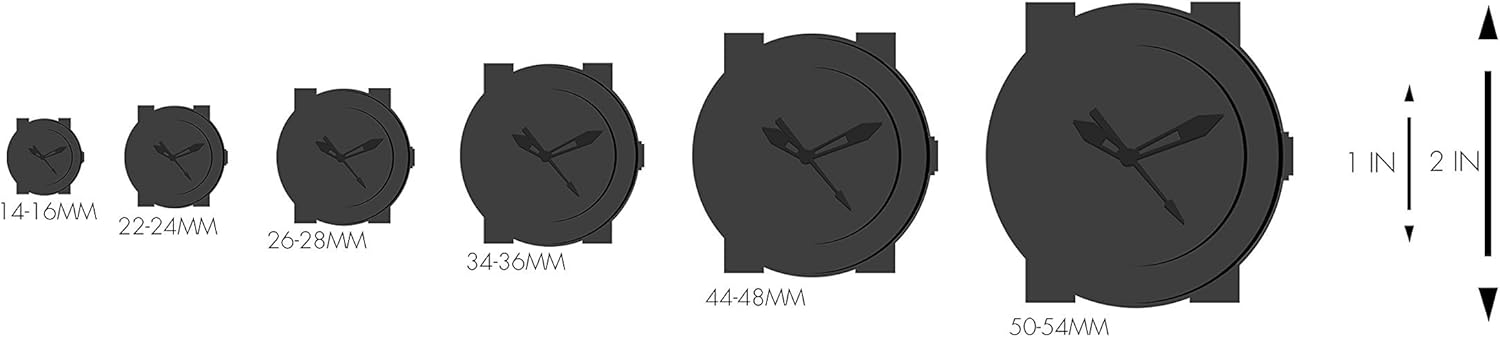
This diagram provides a visual reference for watch case sizes, ranging from 14mm to 54mm, to help understand the 44mm diameter of the OC6113 model.
Warranty and Support
For information regarding the warranty of your Oceanaut OC6113 watch, please refer to the warranty card included with your purchase or contact the retailer from whom you purchased the watch. For technical support or service inquiries, please reach out to Oceanaut customer service through their official channels.