
1. Introduction and Product Overview
The Holzstar OSS 100 Oscillating Spindle Sander is designed for precise and stable sanding of various wood materials. Its robust construction, including a large cast iron table, ensures accuracy even with larger workpieces. The oscillating and rotating spindle action provides a smooth finish. This manual provides essential information for the safe and efficient operation, setup, and maintenance of your sander.
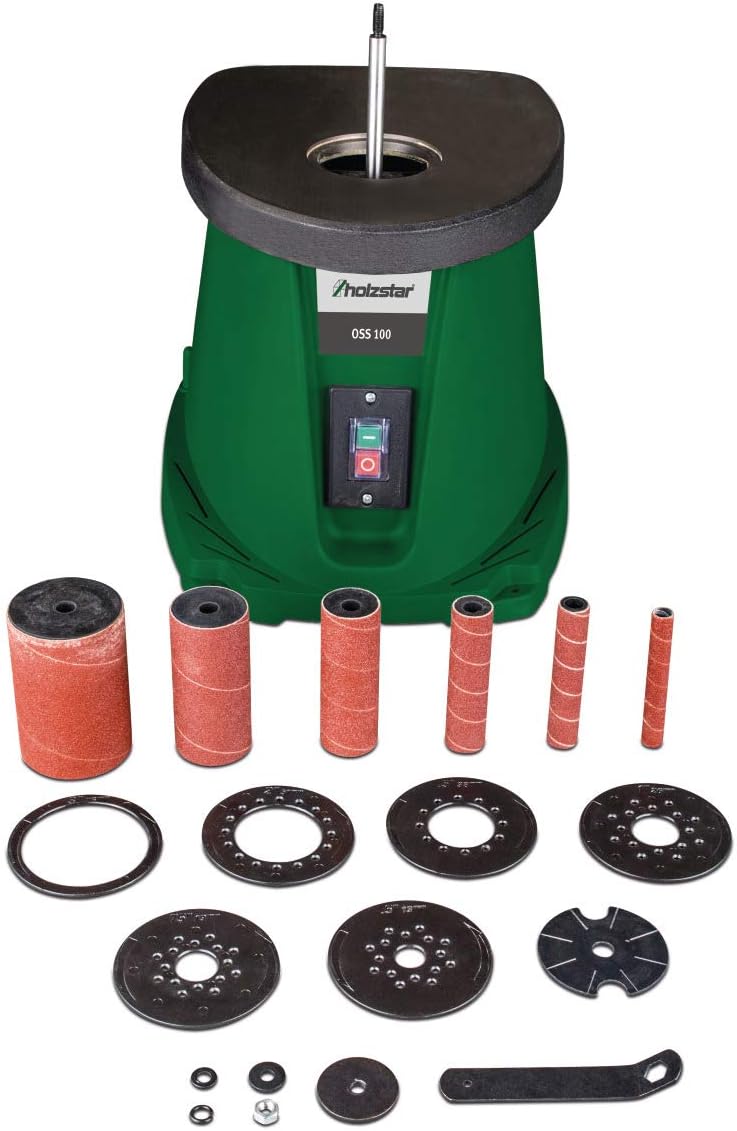
Figure 1.1: Holzstar OSS 100 Oscillating Spindle Sander with included accessories.
Key Features:
- Precision and Stability: Large, solid cast iron table for maximum accuracy.
- Efficient Dust Extraction: Integrated suction ports for connection to an external dust extraction unit, ensuring a clean and safe working environment.
- Convenient Storage: Built-in storage for accessories and assembly tools.
- Powerful Motor: 450 W motor provides ample power for all wood materials.
- Compact Design: Lightweight and compact construction for easy transport and storage.
- Smooth Finish: Achieved through the rotating and oscillating spindle action.
2. Safety Instructions
Always observe basic safety precautions to reduce the risk of fire, electric shock, and personal injury when operating power tools. Read and understand all instructions before use.
General Safety:
- Work Area: Keep your work area clean and well-lit. Cluttered or dark areas invite accidents.
- Electrical Safety: Do not expose power tools to rain or wet conditions. Avoid body contact with earthed or grounded surfaces.
- Personal Safety: Always wear eye protection. Use hearing protection when operating for extended periods. Wear appropriate clothing; avoid loose clothing or jewelry that can get caught in moving parts.
- Tool Use and Care: Do not force the tool. Use the correct tool for your application. Disconnect the plug from the power source before making any adjustments, changing accessories, or storing power tools.
- Maintenance: Maintain power tools. Check for misalignment or binding of moving parts, breakage of parts, and any other condition that may affect the tool’s operation.
3. Package Contents
Carefully unpack the Holzstar OSS 100 Oscillating Spindle Sander and check for any damage. Ensure all components listed below are present. If any parts are missing or damaged, contact your retailer immediately.
- Holzstar OSS 100 Oscillating Spindle Sander unit
- 6 Sanding Sleeves (K80 grit): Ø 13 mm, 19 mm, 26 mm, 38 mm, 51 mm, 76 mm
- 5 Rubber Sanding Rollers (115 mm length): Ø 19 mm, 26 mm, 38 mm, 51 mm, 76 mm
- 6 Table Inserts: Ø 13 mm, 19 mm, 26 mm, 38 mm, 51 mm, 76 mm
- 3 Spindle Washers: Ø 15 mm, 21 mm, 45 mm
- Assembly Tool

Figure 3.1: Included sanding sleeves, rubber rollers, table inserts, spindle washers, and assembly tool.
4. Setup
Follow these steps to set up your oscillating spindle sander for first use.
4.1 Placement
Place the sander on a stable, level workbench or surface. Ensure there is adequate space around the machine for safe operation and workpiece handling.
4.2 Installing Sanding Sleeves and Table Inserts
- Select the appropriate rubber sanding roller and sanding sleeve for your desired sanding diameter. The sleeve should fit snugly over the roller.
- Slide the chosen rubber roller with the sanding sleeve onto the spindle.
- Secure the roller and sleeve using the appropriate spindle washer and nut, tightening with the assembly tool. Ensure it is firmly seated but do not overtighten.
- Select the table insert that matches the diameter of the installed sanding sleeve. Place it into the opening on the work table. The insert should fit flush with the table surface to prevent workpieces from catching.

Figure 4.1: Sander with a sanding sleeve and matching table insert installed.
4.3 Dust Extraction Connection
Connect an external dust extraction unit to the 38 mm dust port located at the rear of the sander. Proper dust extraction is crucial for maintaining a clean work environment and prolonging the life of your sanding sleeves.
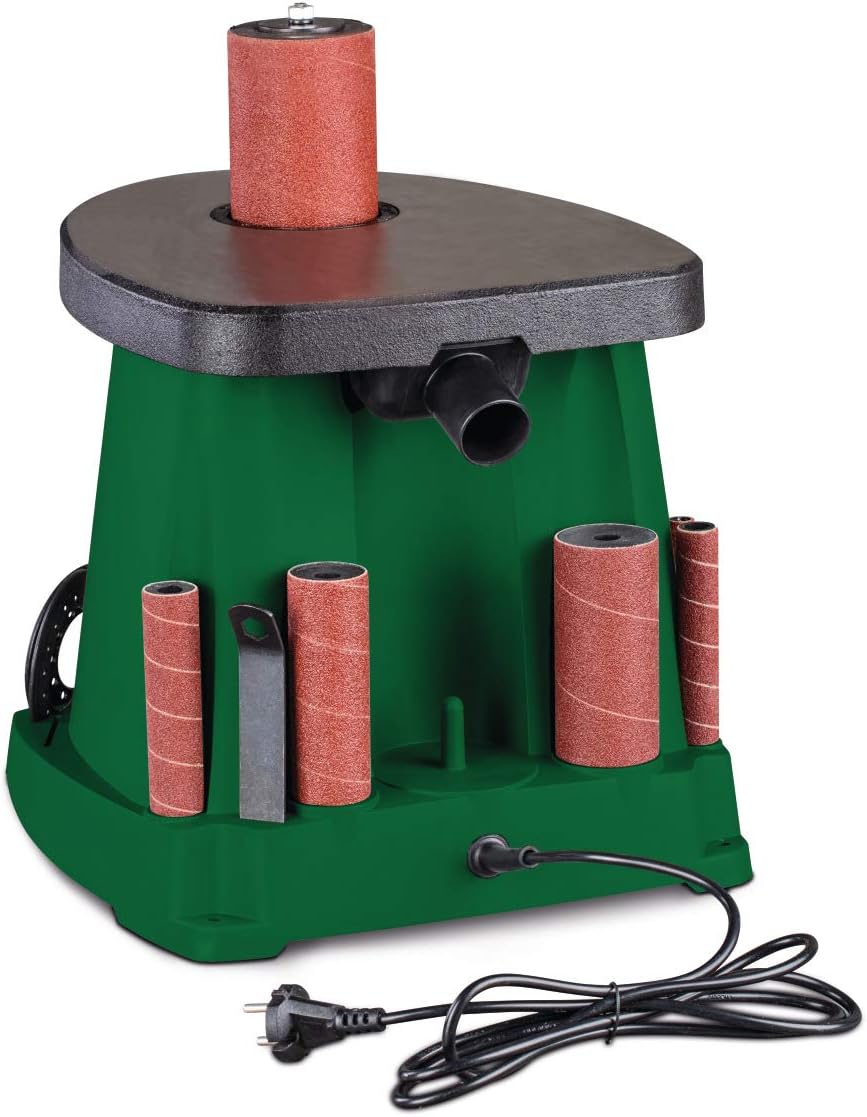
Figure 4.2: Rear view showing the dust extraction port and power connection.
5. Operating Instructions
Before operating, ensure all safety precautions are understood and followed. Always wear appropriate personal protective equipment (PPE).
5.1 Power Connection
Plug the sander's power cord into a standard 230 V, 50 Hz electrical outlet. Ensure the power switch is in the 'OFF' position before plugging in.
5.2 Starting and Stopping
- To start the sander, press the green 'ON' button on the front panel.
- To stop the sander, press the red 'OFF' button.
5.3 Sanding Techniques
- Always allow the sander to reach full speed before bringing the workpiece into contact with the sanding sleeve.
- Apply light, even pressure. Excessive pressure can lead to poor finish, reduced sanding sleeve life, and potential motor strain.
- Move the workpiece smoothly around the sanding sleeve. Avoid holding the workpiece stationary in one spot, as this can create grooves or burn marks.
- For curved edges, rotate the workpiece as you sand to maintain a consistent curve.
- Always sand with the grain of the wood where possible to achieve the best finish.
- Ensure the dust extraction system is active during operation to manage sawdust effectively.
6. Maintenance
Regular maintenance ensures the longevity and optimal performance of your Holzstar OSS 100 sander. Always disconnect the power supply before performing any maintenance.
6.1 Cleaning
- After each use, clean the work table and the area around the spindle to remove sawdust and debris.
- Use a brush or compressed air to clean the motor vents and internal components, ensuring proper airflow and preventing overheating.
- Wipe down the exterior surfaces with a damp cloth. Do not use harsh chemicals or solvents.
6.2 Sanding Sleeve Replacement
Replace sanding sleeves when they become worn, torn, or lose their abrasive quality. Refer to Section 4.2 for installation steps, reversing the process to remove old sleeves.
6.3 General Inspection
- Periodically check all fasteners and screws for tightness.
- Inspect the power cord for any signs of damage, fraying, or cuts. Replace immediately if damaged.
- Ensure the oscillation and rotation mechanisms operate smoothly. If you notice any unusual noises or resistance, discontinue use and consult a qualified technician.
7. Troubleshooting
This section addresses common issues you might encounter with your Holzstar OSS 100 sander.
| Problem | Possible Cause | Solution |
|---|---|---|
| Sander does not start | No power supply; Power switch off; Faulty power cord | Check power connection; Ensure switch is ON; Inspect power cord for damage. |
| Poor sanding finish / Slow material removal | Worn sanding sleeve; Incorrect grit; Excessive pressure | Replace sanding sleeve; Use appropriate grit for material; Reduce pressure. |
| Excessive vibration or noise | Loose sanding sleeve/roller; Unbalanced workpiece; Internal mechanical issue | Ensure sleeve/roller is securely fastened; Support workpiece properly; If persistent, consult technician. |
| Ineffective dust extraction | Dust port clogged; Dust extractor not connected/on; Damaged hose | Clear dust port; Connect and activate dust extractor; Check hose for blockages or damage. |
8. Specifications
Technical data for the Holzstar OSS 100 Oscillating Spindle Sander.
| Specification | Value |
|---|---|
| Model Number | 5903500 |
| Power | 0.45 kW (450 W) |
| Voltage | 230 V |
| Frequency | 50 Hz |
| Work Table Dimensions (L x W) | 370 mm x 295 mm |
| Max Sanding Height | 116 mm |
| Sanding Sleeve Diameters | 13, 19, 26, 38, 51, 76 mm |
| Spindle Diameter | 12.7 mm |
| Oscillation Stroke | 16 mm |
| Oscillations per Minute | 58 min⁻¹ |
| Max Rotation Speed | 2000 rpm |
| Dust Port Diameter | 38 mm |
| Product Dimensions (L x W x H) | Approx. 390 mm x 330 mm x 450 mm |
| Weight | 14 kg |
9. Warranty and Support
Holzstar products are manufactured to high-quality standards. For warranty information, please refer to the warranty card included with your purchase or contact your authorized Holzstar dealer. Keep your proof of purchase for any warranty claims.
Customer Support:
For technical assistance, spare parts, or service, please contact your local Holzstar dealer or the retailer from whom you purchased the product. They will be able to provide specific support and guidance.

