
Happybuy Type 90800 Commercial Meat Grinder
Happybuy Commercial Electric Meat Grinder User Manual
Model: Type 90800 Commercial Meat Grinder
Brand: Happybuy
1. Product Overview
The Happybuy Commercial Electric Meat Grinder is designed for efficient and convenient meat processing. Constructed from food-grade stainless steel, this durable machine is suitable for various applications, including home kitchens, hotel restaurants, and commercial butcheries. With its powerful 850W motor, it can process up to 150 kg (330 lbs) of meat per hour, significantly enhancing meat cutting efficiency.
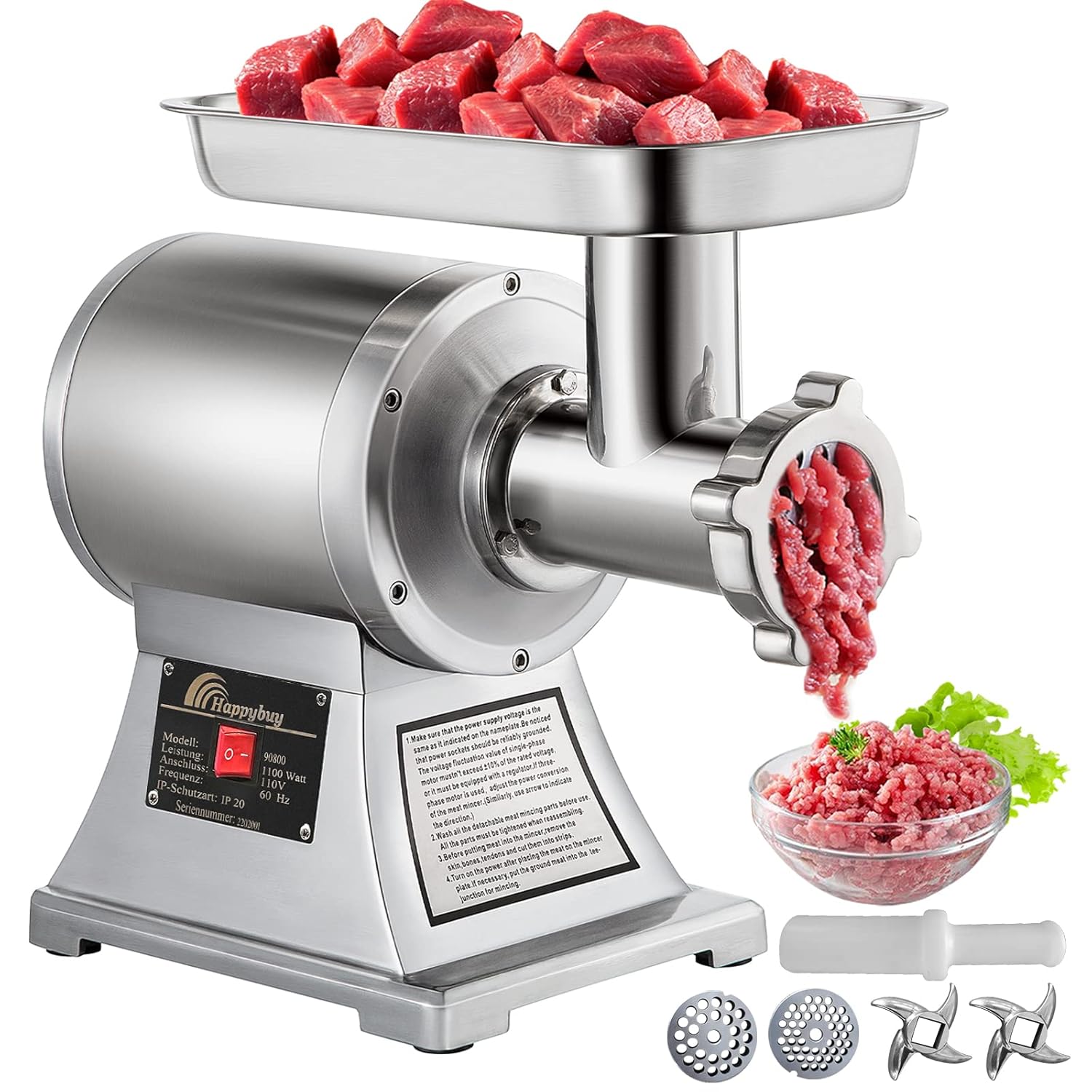
Figure 1.1: Happybuy Commercial Electric Meat Grinder with accessories and processed meat.
This manual provides essential information for the safe and effective operation, maintenance, and troubleshooting of your meat grinder. Please read it thoroughly before first use.
2. Safety Instructions
Always adhere to the following safety precautions to prevent injury or damage to the appliance:
- Electrical Safety: Ensure the power supply voltage matches the specifications (220V for this model). Do not operate with wet hands. Unplug the machine before cleaning or maintenance.
- Personal Safety: Keep hands and fingers away from the feeding throat and grinding plates during operation. Always use the provided meat pusher. Do not wear loose clothing or jewelry that could get caught in moving parts.
- Food Safety: Only process fresh, thawed meat. Do not process bones or other hard materials that could damage the machine. Clean all components thoroughly after each use to prevent bacterial growth.
- Placement: Place the grinder on a stable, flat, and dry surface. Ensure adequate ventilation around the motor.
- Children and Pets: Keep the appliance out of reach of children and pets.
- Maintenance: Do not attempt to repair the machine yourself. Contact qualified service personnel for repairs.
3. Package Contents
Upon unpacking, verify that all components are present and undamaged:
- 1 x Commercial Electric Meat Grinder Unit
- 1 x Meat Pusher
- 1 x 6mm Grinding Plate (pre-installed or separate)
- 1 x 8mm Grinding Plate
- 2 x Cutting Blades
- 1 x Stainless Steel Feed Tray

Figure 3.1: Included accessories: 6mm grinding plate, 8mm grinding plate, two cutting blades, and a meat pusher.
4. Product Features
The Happybuy Commercial Electric Meat Grinder boasts several key features designed for performance and durability:
- Premium Stainless Steel Construction: The entire machine is forged from food-grade stainless steel, ensuring resistance to wear, rust, and corrosion. This material also makes it easy to clean and maintain.
- Powerful 850W Motor: Equipped with a high-power 850W motor, the grinder achieves a rotation speed of 193 RPM, allowing it to process approximately 150 kg (330 lbs) of meat per hour. This motor is designed for efficient and rapid grinding.
- Simple One-Button Operation: The grinder features a single ON/OFF button for straightforward operation, making it easy to handle for most users.
- Detachable Grinding Head: The removable grinding head, feed tray, and mouth facilitate easy cleaning of all accessories. All parts can be thoroughly washed with warm soapy water.
- Efficient Heat Dissipation: Ventilation holes are integrated into the design to ensure proper heat dissipation, guaranteeing stable long-term operation of the motor.
- Non-Skid Feet: Four anti-skid feet are provided at the base to ensure stability during operation.

Figure 4.1: High-efficiency meat grinding capabilities with powerful motor and upgraded auger.

Figure 4.2: Durable construction details including stainless steel material and user-friendly design elements.
5. Setup and Assembly
Before first use, assemble the meat grinder components:
- Unpack: Carefully remove all components from the packaging.
- Clean: Wash all detachable parts (grinding head, feed tray, cutting blades, grinding plates, meat pusher) with warm soapy water. Rinse thoroughly and dry completely.
- Assemble Grinding Head:
- Insert the auger (spiral shaft) into the grinding head.
- Place a cutting blade onto the end of the auger shaft, ensuring it is correctly oriented.
- Select the desired grinding plate (6mm for fine, 8mm for coarse) and place it over the cutting blade.
- Secure the grinding head assembly by screwing on the locking ring tightly.
- Attach Feed Tray: Place the stainless steel feed tray onto the top of the grinding head.
- Position: Place the assembled unit on a stable, flat, and dry surface, ensuring the non-skid feet are firmly in place.

Figure 5.1: Illustration of detachable parts for easy assembly and cleaning.
6. Operating Instructions
Follow these steps for safe and effective meat grinding:
- Prepare Meat: Cut meat into pieces that fit easily into the feeding throat (54mm wide). Remove any large bones, tendons, or gristle that could jam the machine.
- Connect Power: Plug the power cord into a suitable electrical outlet (220V).
- Start Grinder: Press the ON button to start the motor.
- Feed Meat: Place prepared meat into the feed tray. Use the provided meat pusher to gently guide the meat into the grinding throat. NEVER use your fingers or hands to push meat into the grinder.
- Collect Ground Meat: Position a bowl or container beneath the grinding head to collect the processed meat.
- Stop Grinder: Once all meat is processed, press the OFF button to stop the machine. Unplug the power cord from the outlet.
The machine is designed for continuous operation but avoid prolonged use without breaks to ensure motor longevity. The low noise level during operation ensures a comfortable working environment.
7. Maintenance and Cleaning
Regular cleaning and maintenance are crucial for the longevity and hygienic operation of your meat grinder:
- Disconnect Power: Always unplug the machine from the power outlet before cleaning.
- Disassemble: Unscrew the locking ring and remove the grinding plate, cutting blade, auger, and feed tray.
- Clean Components: Wash all detachable parts with warm water and a mild dish soap. Use a brush to remove any meat residue from the grinding plates and auger.
- Rinse and Dry: Rinse all parts thoroughly with clean water. Dry them completely with a soft cloth or allow them to air dry to prevent rust.
- Clean Main Unit: Wipe the main body of the grinder with a damp cloth. Do not immerse the main unit in water or spray it directly with water.
- Reassemble and Store: Once all parts are dry, reassemble them. Store the grinder in a clean, dry place away from direct sunlight and moisture.
The smooth surface of the stainless steel simplifies the cleaning process, ensuring no crevices for food particles to hide.
8. Troubleshooting
If you encounter issues with your meat grinder, refer to the following common problems and solutions:
| Problem | Possible Cause | Solution |
|---|---|---|
| Machine does not start |
|
|
| Meat not grinding or jamming |
|
|
| Unusual noise or vibration |
|
|
If the problem persists after attempting these solutions, please contact customer support.
9. Specifications
| Feature | Detail |
|---|---|
| Model | Type 90800 Commercial Meat Grinder |
| Material | Food-grade Stainless Steel |
| Motor Power | 850 W |
| Rotation Speed | 193 RPM |
| Product Capacity | 150 kg (330 lbs) per hour |
| Product Dimensions (L x W x H) | 448 x 210 x 387 mm (17.6 x 8.2 x 15.2 inches) |
| Gross Weight | 24 kg (52.9 lbs) |
| Voltage | 220 V |
| Feeding Throat Width | 54 mm |
Note: While some specifications mention 110V, the product description and typical European standards for such powerful appliances suggest 220V. Please verify the voltage on your specific unit before connecting to power.

Figure 9.1: Product dimensions and typical usage environments.
10. Warranty and Support
Happybuy products are designed for durability and performance. For warranty information, technical support, or spare parts inquiries, please contact Happybuy customer service through their official website or the retailer where the product was purchased.
Please have your model number (Type 90800) and purchase date available when contacting support.
Related documentsType 90800 Commercial Meat Grinder


Ask a question about this manual
Ask about setup, troubleshooting, compatibility, parts, safety, or missing instructions. Manuals+ will review the question and use this page’s manual context to help answer it.