
Billboard BB731
Billboard BB731 Water-Resistant Bluetooth Wireless Speaker
User Manual
Introduction
The Billboard BB731 is a portable, water-resistant Bluetooth wireless speaker designed to deliver enhanced bass and clear audio. Its compact size and durable construction make it ideal for on-the-go use, whether indoors or outdoors. This manual provides detailed instructions on how to set up, operate, and maintain your speaker to ensure optimal performance.
What's in the Box
- Billboard BB731 Wireless Speaker
- Charging Cable
- User Manual
Key Features
- Bluetooth Connectivity: Seamlessly syncs with smartphones and tablets up to 33 feet away.
- Built-in Microphone: Allows for hands-free calling directly from the speaker.
- Water-Resistant Design: Durable material protects against splashes and rain, suitable for outdoor use.
- Long Playtime: Up to 7 hours of audio playback on a single charge.
- Quick Charging: Fully charges in approximately 2 hours.
Product Overview and Controls


Control Buttons:
- Power Button (⑁): Press and hold to power on/off.
- Play/Pause/Call Button (▲): Press to play/pause music. Press to answer/end calls. Press and hold to reject calls.
- Volume Up / Next Track (+): Short press for volume up. Long press for next track.
- Volume Down / Previous Track (-): Short press for volume down. Long press for previous track.
- Mode Button (M): Press to switch between Bluetooth, AUX, and TF card modes.
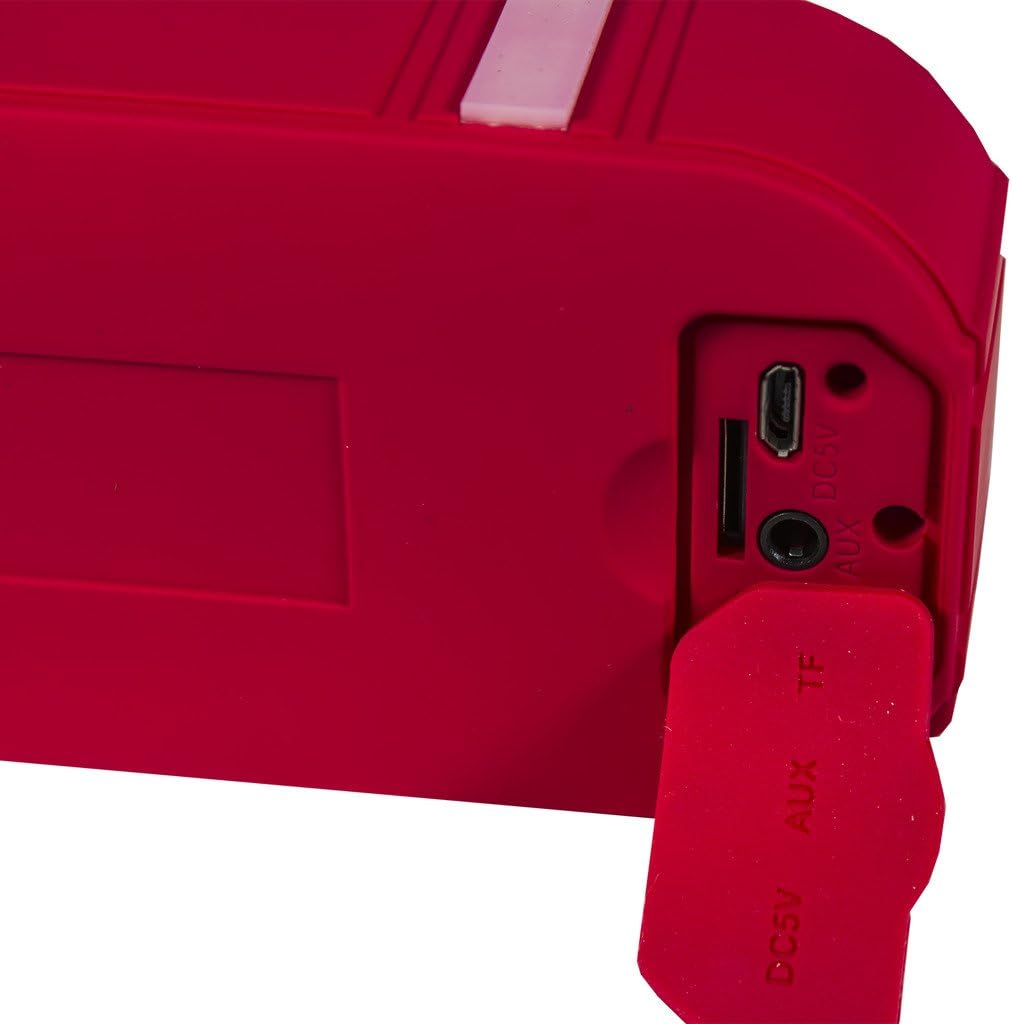
Ports:
- DC5V: Micro USB charging port.
- AUX: 3.5mm audio input for wired connection.
- TF: MicroSD card slot for direct music playback.
Setup Guide
1. Charging the Speaker
- Locate the DC5V charging port on the side of the speaker (under the protective flap).
- Connect the included charging cable to the speaker's DC5V port and the other end to a USB power adapter (5V±0.5V, not included) or a computer's USB port.
- The charging indicator light will illuminate. The speaker will be fully charged in approximately 2 hours.
- Once fully charged, disconnect the charging cable.
2. Powering On/Off
- To power on, press and hold the Power button (⑁) for a few seconds until you hear an audible indication.
- To power off, press and hold the Power button (⑁) again for a few seconds until the speaker turns off.
3. Bluetooth Pairing
- Ensure the speaker is powered on and in Bluetooth mode (indicated by a flashing blue LED, if available). If not, press the Mode button (M) to switch to Bluetooth mode.
- On your smartphone or tablet, go to the Bluetooth settings.
- Search for available devices. You should see "BB731" or a similar name in the list.
- Select "BB731" to connect. Once paired, the speaker will provide an audible confirmation, and the LED indicator will become solid blue.
- The speaker will automatically attempt to reconnect to the last paired device when powered on.
Operation
Playing Music
- Bluetooth Playback: Once paired, open your music application on your device and start playing music. Use the speaker's Play/Pause, Volume Up/Down, and Next/Previous Track buttons to control playback.
- AUX Input: Connect a 3.5mm audio cable (not included) from your audio source to the speaker's AUX port. Press the Mode button (M) to switch to AUX mode.
- TF Card Playback: Insert a MicroSD (TF) card with music files into the TF card slot. Press the Mode button (M) to switch to TF card mode. The speaker will automatically begin playing music from the card.
Answering Calls
- When a call comes in, the speaker will ring. Press the Play/Pause/Call button (▲) once to answer the call.
- To end a call, press the Play/Pause/Call button (▲) once again.
- To reject an incoming call, press and hold the Play/Pause/Call button (▲) for a few seconds.
Care and Maintenance
- Keep the speaker away from extreme temperatures, direct sunlight, and dusty environments.
- Clean the speaker with a soft, dry cloth. Do not use abrasive cleaners or solvents.
- Ensure the protective flap covering the charging and AUX ports is securely closed when not in use, especially in wet conditions, to maintain water resistance.
- Do not submerge the speaker in water. While water-resistant, it is not designed for submersion.
- Store the speaker in a cool, dry place when not in use for extended periods.
Troubleshooting
| Problem | Possible Cause | Solution |
|---|---|---|
| Speaker does not turn on. | Battery is low or depleted. | Charge the speaker for at least 2 hours. |
| Cannot pair with Bluetooth device. | Speaker is not in pairing mode or out of range. | Ensure speaker is in Bluetooth mode (flashing LED). Move speaker closer to your device (within 33 feet). Turn off and on both devices. |
| No sound from speaker. | Volume is too low on speaker or device. Incorrect mode selected. | Increase volume on both speaker and connected device. Press Mode button (M) to select the correct input source (Bluetooth, AUX, TF). |
| Poor sound quality. | Device is too far from speaker. Interference. | Move device closer to the speaker. Avoid obstacles between speaker and device. |
Technical Specifications
| Feature | Specification |
|---|---|
| Model Name | BB731 |
| Speaker Type | Built-In |
| Connectivity Technology | Bluetooth |
| Wireless Communication Technology | Bluetooth |
| Bluetooth Range | 33 Feet (10 Meters) |
| Power Source | Battery Powered |
| Battery Life | Up to 7 Hours |
| Charging Time | 2 Hours |
| Battery Voltage/Capacity | 600 mAh |
| Battery Charging Voltage | 5V±0.5V |
| Speaker Maximum Output Power | 10 Watts |
| Audio Output Mode | Stereo |
| Is Waterproof | TRUE (Water-Resistant) |
| Color | Red |
| Item Weight | 6.1 ounces (0.38 Pounds) |
| Product Dimensions | 2.5 x 6 x 4.5 inches |
| Compatible Devices | Tablet, Smartphone |
| Recommended Uses | For Smartphones or Tablets, Travel |
Warranty and Support
This Billboard BB731 speaker comes with a Limited Warranty. For specific details regarding warranty coverage, duration, and terms, please refer to the warranty information included in your product packaging or contact the manufacturer directly.
For technical support, troubleshooting assistance beyond this manual, or warranty claims, please contact Billboard customer service. Contact information can typically be found on the product packaging or the official Billboard website.