
AQUANEAT SF-A004
AQUANEAT Aquarium Bio Sponge Filter Instruction Manual (Large up to 60 Gallons)
Model: SF-A004
Introduction
This manual provides detailed instructions for the setup, operation, and maintenance of your AQUANEAT Aquarium Bio Sponge Filter. This filter is designed to provide both mechanical and biological filtration for your aquarium, promoting a healthy aquatic environment. It is suitable for tanks up to 60 gallons and is particularly beneficial for small fish, fry, and shrimp tanks due to its gentle filtration.
Product Features
- Dual Filtration: Provides both mechanical filtration (trapping debris) and biological filtration (housing beneficial bacteria).
- Oxygenation: Air infusion chamber produces minute bubbles, increasing oxygen solubility in the water.
- Fish Safe Design: Soft sponge material prevents small fish, fry, or shrimp from being sucked into the filter.
- Easy Maintenance: Simple to set up and clean.
- Recommended Tank Size: Ideal for 40 to 60-gallon aquariums.
- Dimensions: Approximately 4.5 inches diameter x 8.0 inches height.
Package Contents
The package includes one (1) AQUANEAT Aquarium Bio Sponge Filter (Model SF-A004).
Setup Instructions
- Unpack the Filter: Carefully remove the sponge filter from its packaging. Inspect all components for any damage.
- Assemble the Filter (if necessary): The AQUANEAT sponge filter features a detachable design. Ensure the sponge is securely placed around the central plastic core and the air uplift tube is firmly inserted.

Image: Detachable design of the sponge filter, illustrating how the components fit together for assembly and cleaning.
- Connect Air Line: Attach an air line tubing (not included) to the inlet on the top of the uplift tube.
- Connect Air Pump: Connect the other end of the air line tubing to an air pump (not included). An air pump is essential for the filter's operation.
- Position in Aquarium: Place the sponge filter at the bottom of your aquarium. The filter is weighted to stay submerged.
- Start Air Pump: Turn on your air pump. Air will be pushed through the air line, into the filter, and out through the uplift tube, creating bubbles and drawing water through the sponge.

Image: Sponge filter in operation within an aquarium, demonstrating the air line connection and bubble output.
Operating Instructions
Once properly set up, the AQUANEAT Bio Sponge Filter will continuously operate to filter your aquarium water. The air pump creates an airlift effect, drawing water through the sponge material. The sponge mechanically traps particulate matter, while its porous surface provides a large area for beneficial bacteria to colonize, facilitating biological filtration by converting harmful ammonia and nitrites into less toxic nitrates.
- Ensure the air pump is always running to maintain filtration and oxygenation.
- Monitor water parameters regularly to ensure the filter is effectively maintaining water quality.
- The filter produces minimal current, making it ideal for sensitive fish species and fry.
Maintenance
Regular cleaning of your sponge filter is crucial for optimal performance and to prevent the accumulation of excessive debris. However, it is important to clean it correctly to preserve the beneficial bacterial colony.
- Frequency: Clean the sponge filter every 2-4 weeks, or when you notice a reduction in water flow or visible clogging.
- Cleaning Procedure:
- Turn off and unplug the air pump.
- Carefully remove the sponge filter from the aquarium. It is recommended to place it in a bucket or container to avoid dripping dirty water.
- Gently detach the sponge from the central core.
- Rinse the sponge thoroughly in a bucket of old aquarium water (water removed during a water change). Do not use tap water as chlorine can kill beneficial bacteria.
- Squeeze the sponge repeatedly until most of the trapped debris is removed and the water runs clearer.
- Reassemble the filter and place it back into the aquarium.
- Reconnect and restart the air pump.
- Sponge Replacement: The sponge material is durable, but over time it may degrade or become too clogged to clean effectively. Replace the sponge when it shows signs of significant wear, tearing, or if cleaning no longer restores adequate flow.
Troubleshooting
| Problem | Possible Cause | Solution |
|---|---|---|
| No bubbles or weak flow |
|
|
| Water remains cloudy |
|
|
| Filter floats |
|
|
Specifications
- Model Number: SF-A004
- Brand: AQUANEAT
- Recommended Tank Size: 40-60 Gallons
- Dimensions (Approximate): 4.5 inches (Diameter) x 8.0 inches (Height)
- Item Weight: 8.1 ounces (230 Grams)
- Material: Soft sponge, plastic
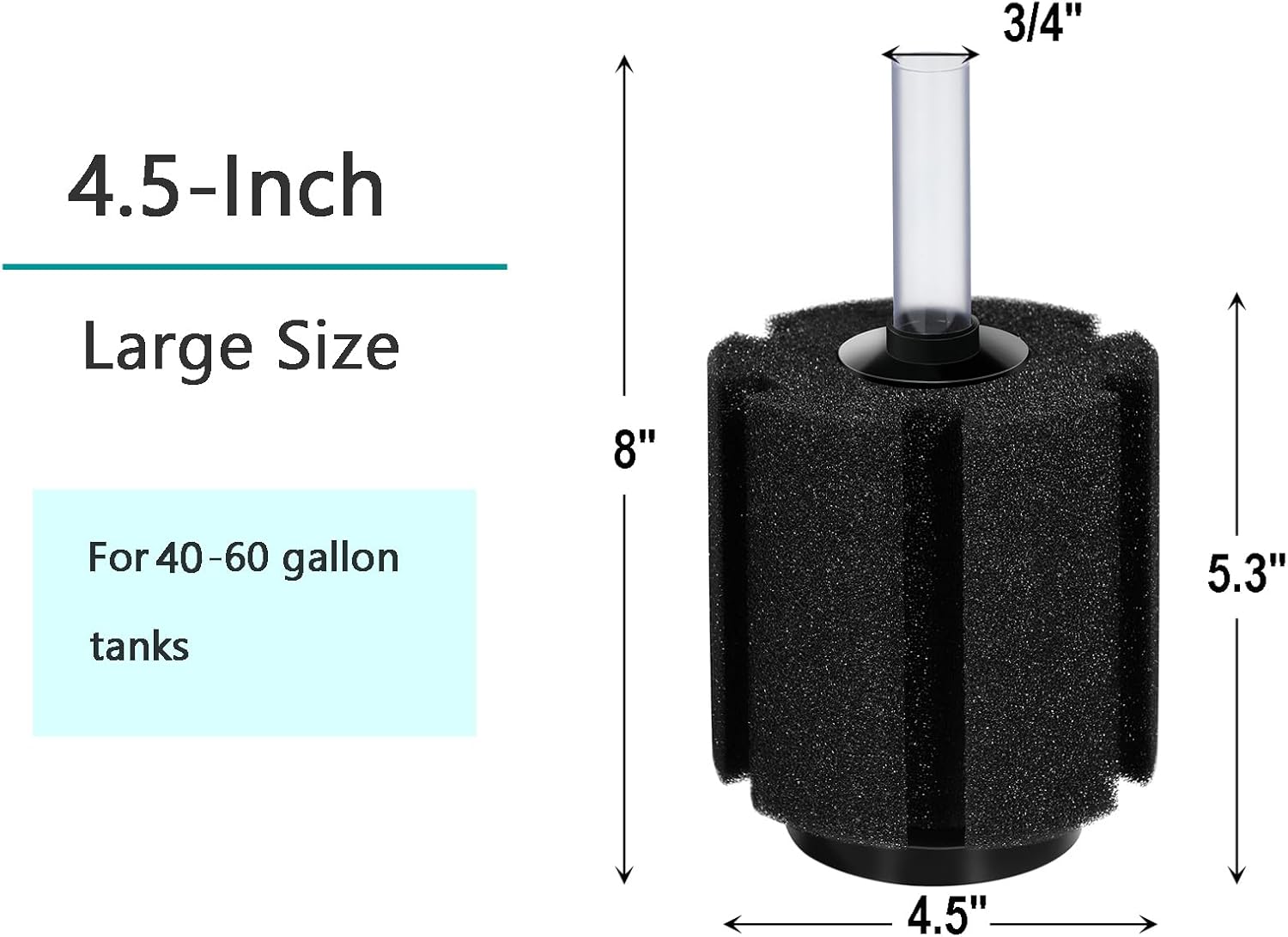
Image: Dimensional diagram of the AQUANEAT sponge filter, indicating its height and diameter.
Warranty and Support
AQUANEAT products are manufactured to high-quality standards. For any questions regarding product operation, maintenance, or potential defects, please contact AQUANEAT customer support through your retailer or the official brand website. Please retain your proof of purchase for warranty claims.
Related Documents - SF-A004
 |
VEVOR SF-650F-UV 8W Aquarium Filter User Manual and Instructions This document provides comprehensive instructions, safety guidelines, installation steps, cleaning procedures, and troubleshooting advice for the VEVOR SF-650F-UV 8W Aquarium Filter. |
 |
THERA-TRAINER MOBI User Manual: High-Performance Movement Exerciser Made in Germany This user manual provides comprehensive guidance for the THERA-TRAINER MOBI, a high-performance movement exerciser proudly manufactured in Germany. It covers setup, safe operation, intended use, medical indications, troubleshooting, and maintenance for users with minor physical and/or mental impairments, aiding in mobilization and rehabilitation. |
 |
SF-650F-UV 8W Aquarium Filter User Manual and Instructions Comprehensive user manual and installation guide for the SF-650F-UV 8W Aquarium Filter. Learn how to install, operate, clean, and troubleshoot your UV aquarium filter for optimal aquarium water quality. Includes technical specifications and safety guidelines. |
 |
SuperFish Pond Clear UVC 7500 - 15000 User Manual User manual for the SuperFish Pond Clear UVC 7500 and 15000 pond water clarifier. Includes general instructions, safety warnings, installation steps, maintenance procedures, technical specifications, and warranty information. |
 |
Fuel Pump Reassembly - Toyota 1GR-FE Engine Service Manual Detailed reassembly instructions for the fuel pump system on Toyota 1GR-FE engines, covering steps for the fuel suction plate, fuel pump, fuel filter, fuel sub-tank, and fuel sender gauge, as found in the official service manual. |
 |
Spider Farmer Leaf Bowl Trimmer User Manual Comprehensive user manual for the Spider Farmer Leaf Bowl Trimmer, detailing product size, accessories, and assembly instructions. |