
BEAUTURAL Advanced LCD Iron
BEAUTURAL 1800-Watt Steam Iron User Manual
Model: Advanced LCD Iron
Brand: BEAUTURAL
Product Overview
The BEAUTURAL 1800-Watt Steam Iron is designed for efficient and safe garment care. It features a digital LCD screen with 9 preset temperature and steam settings for various fabric types, a durable double-layer ceramic coated soleplate, and a 3-way auto-off safety function. Every iron is pre-tested to ensure quality performance.
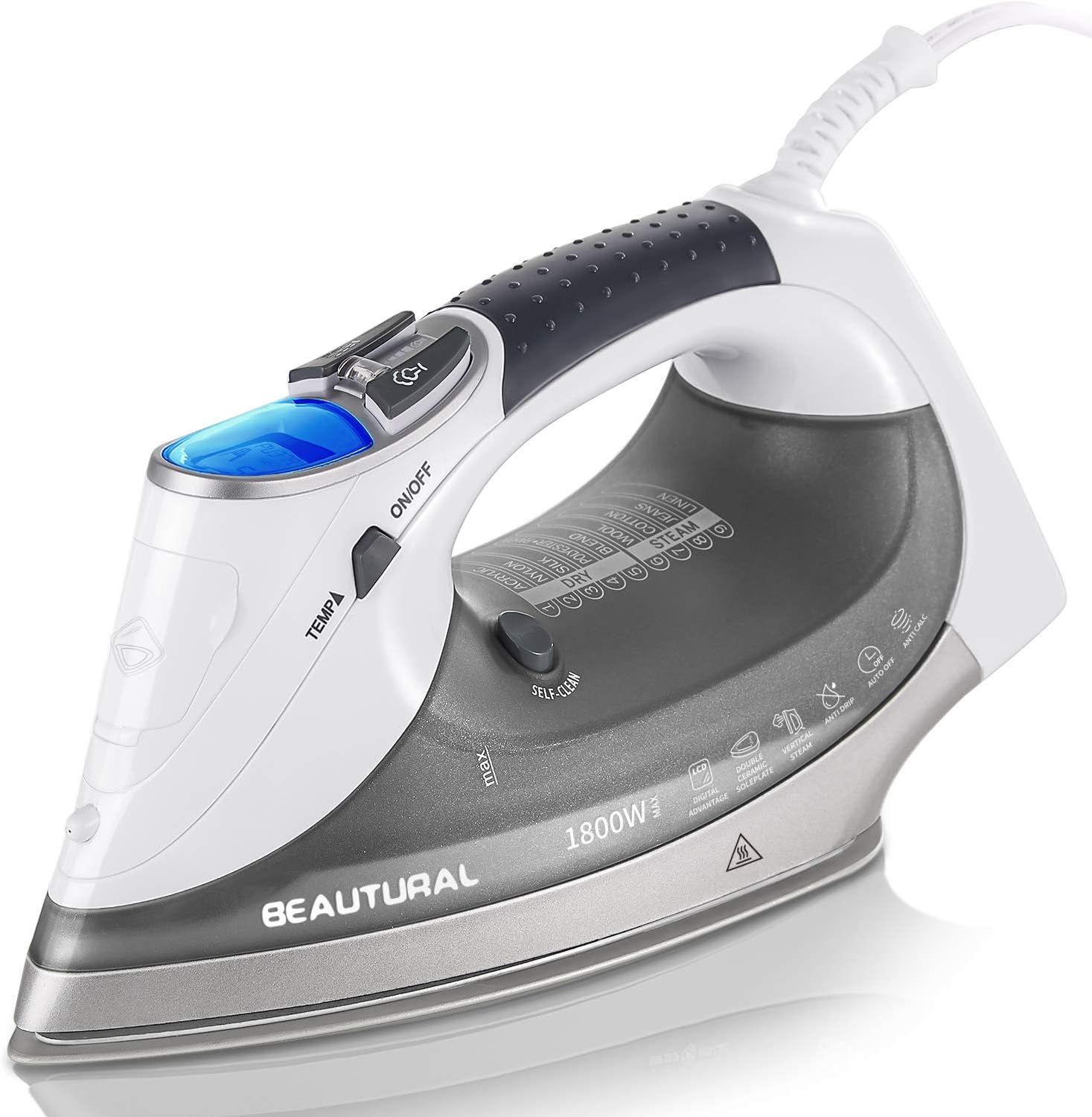
Figure 1: BEAUTURAL 1800-Watt Steam Iron, Gray model.
Key Features
- 9 Preset Modes: Clear-view LCD screen allows selection of fabric type for optimal heat, preventing fabric damage. Ideal for nylon, silk, wool, cotton, jeans, linen, and more.
- Double Ceramic Soleplate: Harder than stainless steel, scratch-resistant, durable, and easy to clean. Unique double-layer design ensures even heating across the entire soleplate.
- 3-Way Auto Shutoff: Motion sensors automatically turn off the iron after 30 seconds when flat or 8 minutes when vertical, enhancing safety.
- 1800 Watts of Power: Provides powerful steam and quick heating for effective wrinkle removal on all fabric types.
- Pre-Tested Quality: Each iron undergoes quality control testing before shipping, ensuring reliability out of the box.

Figure 2: Digital LCD screen showing 9 professional fabric presets for precise temperature control.

Figure 3: Illustration of the unique dual plate design for more even heating and superior performance.

Figure 4: The 1800-watt heating element provides powerful steam for effective wrinkle removal.
Setup
- Unpacking: Carefully remove the iron and all accessories from the packaging. Ensure all protective films and tags are removed from the soleplate and body.
- Water Filling: Open the water inlet cover located on the top of the iron. Use the provided measuring cup to fill the water tank with tap water up to the 'MAX' line. Close the water inlet cover securely. Note: Some condensation may be present in the water tank due to pre-testing; this is normal.
- Placement: Place the iron on a stable, heat-resistant ironing board or surface.
- Power Connection: Plug the iron's power cord into a suitable electrical outlet. The LCD screen will illuminate, indicating the iron is in standby mode.
Video 1: Official product overview demonstrating the iron's features and ease of use, including water filling and temperature selection.
Operating Instructions
- Power On: Press the "ON/OFF" button to activate the iron. The LCD screen will display the current status.
- Select Fabric Type: Use the "TEMP" button to cycle through the 9 preset fabric modes (Acrylic, Nylon, Silk, Polyester, Blend, Wool, Cotton, Jeans, Linen). The LCD screen will show the selected fabric type and corresponding temperature.
- Heating: Allow the iron to heat up to the selected temperature. The iron will beep when it reaches the desired temperature, indicating it is ready for use.
- Steam Function:
- Continuous Steam: Adjust the steam output using the steam control slider (Min/Max).
- Steam Burst: For stubborn wrinkles, press the steam burst button. Ensure the iron is at the correct temperature for steam generation.
- Spray Mist: Press the spray mist button to lightly dampen fabrics for easier ironing.
- Ironing: Glide the iron smoothly over the fabric. The ceramic soleplate ensures even heat distribution and prevents sticking.
- Auto Shutoff: The iron will automatically turn off if left motionless for 30 seconds (horizontal) or 8 minutes (vertical). The LCD screen will display "OFF". To reactivate, simply move the iron.

Figure 5: Demonstrating the iron's ultimate gliding performance on fabric.
Maintenance
- Self-Cleaning: Use the self-clean function regularly (e.g., every 2 weeks) to prevent mineral buildup and maintain optimal steam performance. Refer to the full user manual for detailed self-cleaning instructions.
- Empty Water Tank: After each use, empty any remaining water from the tank to prevent mineral deposits and prolong the iron's lifespan.
- Storage: Always store the iron upright on its heel to avoid damage to the soleplate. Ensure the iron is completely cool before storing.
- Cleaning Soleplate: Clean the ceramic soleplate with a damp cloth. Avoid abrasive cleaners or metallic scouring pads that could scratch the surface.

Figure 6: The iron is 100% pre-tested, and any remaining water droplets are normal.
Troubleshooting
| Problem | Possible Cause | Solution |
|---|---|---|
| Iron not heating. | Not plugged in, auto-off activated, or wrong temperature setting. | Ensure iron is plugged in. Move iron to reactivate from auto-off. Select appropriate fabric setting. |
| No steam or insufficient steam. | Water tank empty, temperature too low, or mineral buildup. | Fill water tank. Select a higher temperature setting (steam requires higher heat). Perform self-cleaning. |
| Water leaking from soleplate. | Temperature too low for steam, or overfilled water tank. | Ensure iron is hot enough for steam. Do not overfill the water tank. |
| "ERR" message on LCD. | Internal error or malfunction. | Unplug the iron, wait a few minutes, then plug it back in. If the error persists, contact customer support. |
Specifications
- Brand: BEAUTURAL
- Model Name: Steam Iron (Advanced LCD Iron)
- Power: 1800-Watt
- Soleplate Material: Ceramic
- Color: Gray
- Product Dimensions: 11.3"L x 5.75"W
- Item Weight: 3.18 pounds
- Water Tank Volume: 340 Milliliters (approx. 11.5 OZ)
- Special Features: Self-Cleaning, Auto Shutoff, Corded, Non-Stick, Digital LCD Screen, 9 Preset Temperature Settings.

Figure 7: Key specifications including weight and dimensions of the iron.
Warranty and Support
This BEAUTURAL Steam Iron comes with a Manufacturer Warranty. For detailed warranty information, service, or support, please refer to the official user manual or contact BEAUTURAL customer service.
You can access the full User Manual in PDF format here.
Ask a question about this manual
Ask about setup, troubleshooting, compatibility, parts, safety, or missing instructions. Manuals+ will review the question and use this page’s manual context to help answer it.