
1. Introduction
Thank you for choosing the Lloyd LS13AI 1 Ton Split Air Conditioner. This manual provides essential information for the safe and efficient operation, installation, and maintenance of your new air conditioning unit. Please read this manual thoroughly before using the appliance and retain it for future reference.
The Lloyd LS13AI is designed to provide comfortable cooling and dehumidification for your indoor environment. It features an Anti-dust Filter, Auto Restart function, Dehumidifier, and a Hidden LED Display for enhanced user experience.
2. Safety Information
WARNING: Failure to follow these instructions could result in electric shock, fire, or serious injury.
- Installation must be performed by qualified personnel in accordance with national wiring standards.
- Ensure the power supply matches the specifications listed on the unit's nameplate.
- Do not operate the AC with wet hands or when standing on wet surfaces.
- Do not insert fingers or objects into the air inlet/outlet.
- Keep the area around the outdoor unit clear of obstructions.
- Do not attempt to repair or modify the unit yourself. Contact authorized service personnel.
- Ensure proper grounding to prevent electric shock.
- Turn off the power supply before cleaning or performing any maintenance.
3. Package Contents
Please check that all the following items are included in your package:
- Indoor Unit
- Outdoor Unit
- Remote Control
- User Manual (this document)
- Installation Kit (includes piping, wiring, drain hose, etc.)
4. Setup and Installation
Proper installation is crucial for the performance and longevity of your air conditioner. It is highly recommended that installation be carried out by a certified technician.
4.1. Choosing Installation Location
Indoor Unit:
- Select a location where air circulation is unobstructed.
- Avoid direct sunlight or heat sources.
- Ensure the wall is strong enough to support the unit's weight.
- Allow sufficient space around the unit for maintenance.
Outdoor Unit:
- Choose a well-ventilated area, away from direct sunlight or rain.
- Ensure there is enough space for air intake and exhaust.
- Minimize the distance between the indoor and outdoor units for optimal efficiency.
- Mount the unit on a stable, level surface to reduce vibration and noise.
4.2. Electrical Connection
The unit requires a dedicated power circuit. Ensure the voltage and frequency match the specifications. All electrical wiring must comply with local and national regulations. A qualified electrician should handle all electrical connections.
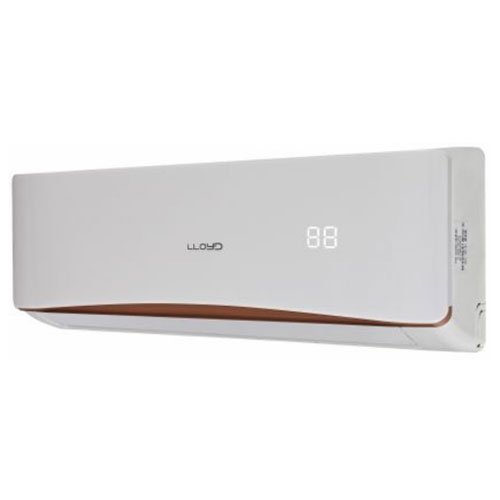
Image 1: Lloyd LS13AI 1 Ton Split AC Indoor Unit. This image shows the front view of the indoor unit, typically mounted on a wall.
5. Operating Instructions
Your Lloyd LS13AI AC is controlled via the provided remote control. Ensure the remote has fresh batteries installed.
5.1. Remote Control Functions
- POWER Button: Turns the unit ON or OFF.
- MODE Button: Cycles through operating modes: Auto, Cool, Dry, Fan.
- TEMP ▲/▼ Buttons: Adjusts the temperature setting.
- FAN Button: Selects fan speed (Auto, Low, Medium, High).
- TIMER Button: Sets the ON/OFF timer.
- SLEEP/NIGHT Mode: Activates the Easy Night Mode for comfortable sleep.
5.2. Operating Modes
- COOL Mode: Provides cooling. Set desired temperature using TEMP buttons.
- DRY Mode (Dehumidification): Reduces humidity in the room. The fan speed is automatically controlled.
- FAN Mode: Circulates air without cooling or heating. Fan speed can be adjusted.
- AUTO Mode: The unit automatically selects the operating mode (Cool, Dry, Fan) based on the room temperature.
- Easy Night Mode: Optimizes temperature and fan speed for quiet and energy-efficient operation during sleep.
5.3. Special Features
- Anti-dust Filter: Helps to remove dust and other particles from the air. Regular cleaning is recommended.
- Auto Restart: In case of a power outage, the unit will automatically restart with the previous settings once power is restored.
- Hidden LED Display: The display on the indoor unit is hidden and only visible when the unit is operating or when settings are being adjusted.
6. Maintenance
Regular maintenance ensures optimal performance and extends the lifespan of your AC unit. Always turn off the power supply before performing any maintenance.
6.1. Air Filter Cleaning
The Anti-dust Filter should be cleaned regularly, typically every two weeks, or more frequently depending on usage and air quality.
- Open the front panel of the indoor unit.
- Gently remove the air filters.
- Clean the filters using a vacuum cleaner or wash them with lukewarm water and a mild detergent.
- Rinse thoroughly and allow them to dry completely in a shaded area before reinstalling.
- Reinstall the filters and close the front panel.
6.2. Indoor Unit Cleaning
Wipe the indoor unit's surface with a soft, dry cloth. For stubborn dirt, use a damp cloth with a mild detergent, then wipe dry. Do not use harsh chemicals, abrasives, or solvents.
6.3. Outdoor Unit Cleaning
Periodically check the outdoor unit for any obstructions (leaves, debris) around the air inlet and outlet. Clear them carefully. For thorough cleaning of the outdoor coil, it is recommended to contact a professional service technician.
7. Troubleshooting
Before contacting service, please check the following common issues and solutions:
| Problem | Possible Cause | Solution |
|---|---|---|
| AC does not turn on | No power supply; Remote control batteries dead; Circuit breaker tripped. | Check power connection; Replace remote batteries; Reset circuit breaker. |
| Insufficient cooling | Dirty air filter; Doors/windows open; Temperature setting too high; Outdoor unit obstructed. | Clean air filter; Close doors/windows; Lower temperature setting; Clear obstructions. |
| Unusual noise | Loose parts; Unit not level; Foreign object inside. | Check for loose parts; Ensure unit is level; Turn off and inspect for foreign objects (if safe). |
| Water leakage from indoor unit | Clogged drain pipe; Improper installation. | Check and clear drain pipe; Contact service for installation check. |
If the problem persists after checking these points, please contact authorized service personnel.
8. Specifications
| Feature | Detail |
|---|---|
| Model Name | LS13AI |
| Brand | Lloyd |
| Capacity | 1 Ton |
| Installation Type | Split System |
| Power Source | Corded Electric |
| Controller Type | Remote Control |
| BEE Star Rating | 5 Star |
| Special Features | Anti-dust Filter, Auto Restart, Dehumidifier, Hidden LED Display, Easy Night Mode |
| Refrigerant | Eco Friendly Refrigerant |
9. Warranty and Support
Your Lloyd LS13AI Air Conditioner comes with a standard manufacturer's warranty. Please refer to the warranty card provided with your product for specific terms, conditions, and duration of coverage.
For technical assistance, service requests, or warranty claims, please contact Lloyd customer support. Keep your purchase receipt and product serial number handy when contacting support.
Customer Support Contact: Please refer to the official Lloyd website or your warranty card for the most up-to-date contact information.