1. Product Overview
The Mengshen Wireless Infrared Motion Sensor Alarm System is a versatile device designed to enhance security and convenience in various environments such as homes, shops, offices, and factories. It features a wireless motion sensor and a receiver unit, offering multiple operational modes including welcome, doorbell, alarm, light color, and night light.

Image: The complete Mengshen Wireless Infrared Motion Sensor Alarm System, including the receiver unit and two motion sensors.
2. Components and Parts
2.1 Receiver Unit

Image: Detailed view of the receiver unit with its key components labeled.
- ON/OFF and Mode Key: Used to power the receiver on/off and cycle through different operational modes.
- LED Light: Indicates activity, alerts, or selected mode.
- Music Select Key: Allows selection of different melodies or sounds.
- Volume Key: Adjusts the sound output level.
- Speaker: Emits sounds for alerts, melodies, or welcome chimes.
- Desk Stand: Provides stable placement on flat surfaces.
2.2 Motion Sensor

Image: Detailed view of the motion sensor with its key components labeled.
- Infrared Induction Window: Detects motion based on infrared heat signatures.
- Indicator Light: Illuminates upon motion detection or for status indication.
- USB Interface: For optional power supply via USB 2.0 micro-B.
- ON/OFF Switch: Powers the motion sensor on or off.
2.3 Package Contents
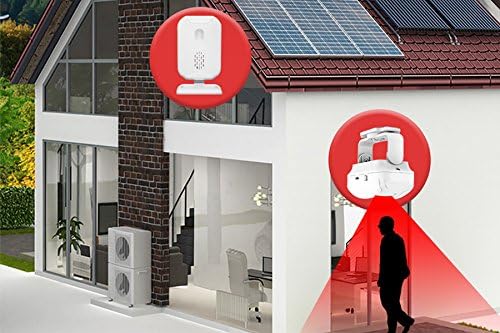
Image: All items included in the Mengshen Wireless Infrared Motion Sensor Alarm System package.
The package typically includes:
- 1 x Receiver Unit
- 2 x Motion Sensors (for the C: 1 receiver and 2 sensors variant)
- Mounting Accessories (screws, adhesive pads)
- User Manual
3. Setup
3.1 Powering the Devices
- Receiver: Insert 3 x AA batteries (not included) into the battery compartment, or connect a USB 2.0 micro-B cable (not included) to a power source.
- Motion Sensor: Insert 3 x AAA batteries (not included) into the battery compartment, or connect a USB 2.0 micro-B cable (not included) to a power source.
Ensure batteries are inserted with correct polarity. For continuous operation, USB power is recommended.
3.2 Mounting and Placement
The motion sensors can be mounted using the provided adhesive pads or screws. For long-term stability and to prevent accidental falls, especially with batteries installed, using screws for mounting is highly recommended.
- Sensor Placement: Position the motion sensor in an area where it can effectively detect movement, such as near doorways, windows, or hallways. Ensure the infrared induction window has a clear line of sight to the detection area.
- Indoor Use Only: These sensors are designed for indoor use. Exposure to outdoor elements like wind, rain, or direct sunlight can lead to false alarms or damage the device.
- Receiver Placement: Place the receiver unit in a central location within the wireless range of the sensors (up to 280 meters in open areas). It can be placed on a desk using its stand or mounted on a wall.

Image: A motion sensor strategically placed above a doorway to detect incoming individuals.

Image: Example of receiver and sensor placement for comprehensive home coverage.
4. Operating Instructions
4.1 Powering On/Off
- To power on the receiver, press the ON/OFF and Mode key. To power off, press and hold the same key.
- To power on the motion sensor, slide the ON/OFF switch to the 'ON' position. To power off, slide it to 'OFF'.
4.2 Selecting Operational Modes
The receiver offers 5 distinct operational modes. Press the ON/OFF and Mode key repeatedly to cycle through them:
- Welcome Mode: Plays a welcoming chime when motion is detected. Ideal for storefronts or entryways.
- Doorbell Mode: Functions as a traditional doorbell, alerting you to visitors.
- Alarm Mode: Emits a loud alarm sound (up to 113 dB) upon motion detection, serving as an anti-theft deterrent.
- Light Color Mode: The LED light on the receiver changes color upon detection, providing a visual alert without sound.
- Night Light Mode: The receiver's LED light illuminates softly upon detection, useful for guiding in dark environments.

Image: The alarm system activating upon detecting an unauthorized entry, illustrating the Alarm Mode.
4.3 Adjusting Volume and Melodies
- Volume: Use the Volume key on the receiver to increase or decrease the sound output.
- Melody: Use the Music Select key on the receiver to choose from various available melodies or alarm sounds.
5. Maintenance
- Battery Replacement: Replace batteries in both the receiver and sensors when the indicator lights dim or performance degrades. Use fresh AA batteries for the receiver and AAA batteries for the sensors.
- Cleaning: Wipe the devices with a soft, dry cloth. Do not use abrasive cleaners or immerse in water.
- Environmental Conditions: Ensure the devices are kept in a dry, indoor environment, away from extreme temperatures, direct sunlight, and high humidity.
6. Troubleshooting
| Problem | Possible Cause | Solution |
|---|---|---|
| No detection / No sound | Low or dead batteries; Device is off; Sensor obstructed; Out of range. | Replace batteries; Turn on devices; Clear obstructions from sensor's view; Move receiver closer to sensor. |
| False alarms | Sensor exposed to wind, rain, or direct sunlight; Heat sources in detection area. | Ensure sensor is used indoors only; Reposition sensor away from drafts, vents, or direct heat sources. |
| Low volume | Volume setting is too low. | Increase volume using the Volume key on the receiver. |
7. Specifications
| Feature | Detail |
|---|---|
| Manufacturer | Mengshen |
| Model Number | MS-YBQ042 |
| Receiver Power Source | 3 x AA Batteries (not included) or USB 2.0 micro-B |
| Sensor Power Source | 3 x AAA Batteries (not included) or USB 2.0 micro-B |
| Maximum Sound Level | 113 dB |
| Wireless Range | Up to 280 meters (open area) |
| Mounting Type | Wall mount (for sensor), Desk stand (for receiver) |
| Dimensions (Package) | 22.5 x 11.1 x 5.2 cm |
| Weight (Item) | 290 g |
8. Warranty and Support
For information regarding product warranty, please refer to the documentation provided at the time of purchase or contact your retailer. For technical support or further inquiries, please reach out to the manufacturer, Mengshen, through their official channels.