
Borofone BC19
Borofone BC19 Hero Single Wireless Earbud User Manual
Model: BC19 | Brand: Borofone
Introduction
This manual provides detailed instructions for the safe and efficient use of your Borofone BC19 Hero Single Wireless Earbud. Please read this manual thoroughly before using the product to ensure proper operation and to prevent damage.
Safety Information
- Do not expose the device to extreme temperatures, humidity, or liquids.
- Avoid dropping or subjecting the device to strong impacts.
- Do not attempt to disassemble, repair, or modify the device yourself. This may void the warranty and cause damage.
- Keep the device away from children and pets.
- Use only the specified charging voltage (5V DC) to charge the device.
- Dispose of the product responsibly according to local regulations.
Package Contents
Please check the package for the following items:
- Borofone BC19 Single Wireless Earbud
- Charging Case
- USB Charging Cable
- User Manual
Product Overview
Familiarize yourself with the components of your Borofone BC19 earbud and charging case.

Figure 1: The Borofone BC19 single wireless earbud securely placed within its white charging case, with the lid open, revealing the earbud and the charging cradle.
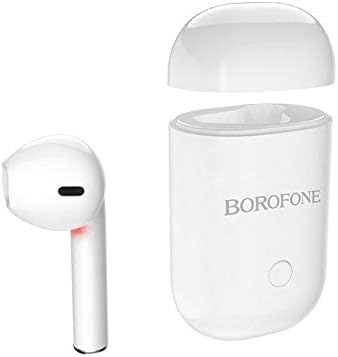
Figure 2: The white Borofone BC19 earbud is shown detached from its charging case, which has its lid open. This illustrates the compact design of both components.

Figure 3: The Borofone BC19 charging case is encased in a light grey protective silicone cover, featuring a power button icon and a small lanyard attached for portability.

Figure 4: A close-up of the bottom of the Borofone BC19 charging case, displaying the USB charging port and regulatory markings including "Model: BC19".
Specifications
| Brand | Borofone |
| Model | BC19 |
| Color | White |
| Type | Wireless In-Ear Headset |
| Connectivity Technology | Wireless (Bluetooth 5.0) |
| Form Factor | In-Ear |
| Compatible Devices | Multiple |
| Supported Profiles | A2DP, AVRCP |
| Charging Voltage | 5V DC |
| Earbud Charging Time | 50 minutes |
| Charging Case Charging Time | 1 hour |
| Earbud Battery Capacity | 35 mAh |
| Charging Case Battery Capacity | 180 mAh |
| Talk/Music Time | 3 hours |
| Standby Time | 120 hours |
| Product Dimensions | 11.99 x 1.91 x 5 cm |
| Product Weight | 18 grams |
Setup
1. Initial Charging
Before first use, fully charge the earbud and its charging case.
- Place the earbud into the charging case.
- Connect the USB charging cable to the charging port on the case (refer to Figure 4 for port location) and plug the other end into a 5V DC power source.
- The indicator light on the case will show charging status.
- Charging time for the earbud is approximately 50 minutes, and for the charging case, it is about 1 hour.
2. Power On/Off
- Power On: The earbud will automatically power on when removed from the charging case. Alternatively, press and hold the multi-function button on the earbud for a few seconds until you hear a power-on prompt.
- Power Off: Place the earbud back into the charging case to automatically power off. Alternatively, press and hold the multi-function button for a few seconds until you hear a power-off prompt.
Operating Instructions
1. Bluetooth Pairing
To connect your Borofone BC19 earbud to your device:
- Ensure the earbud is charged and powered on.
- Enable Bluetooth on your smartphone or other compatible device.
- Search for available Bluetooth devices. The earbud will appear as "BC19" or "Borofone BC19".
- Select "BC19" from the list to pair. Once paired, you will hear a confirmation sound.
- If pairing fails, turn off the earbud and your device's Bluetooth, then repeat the steps.
2. Music Playback
- Play/Pause: Single press the multi-function button.
- Next Track: Double press the multi-function button.
- Previous Track: Triple press the multi-function button.
3. Call Management
- Answer/End Call: Single press the multi-function button during an incoming call or active call.
- Reject Call: Press and hold the multi-function button for 2 seconds during an incoming call.
Maintenance
- Clean the earbud and charging case regularly with a soft, dry cloth.
- Do not use abrasive cleaners or solvents.
- Store the device in a cool, dry place when not in use.
- Avoid prolonged exposure to direct sunlight or extreme temperatures.
Troubleshooting
| Problem | Possible Cause | Solution |
|---|---|---|
| Earbud does not power on. | Low battery. | Charge the earbud and charging case fully. |
| Cannot pair with device. | Bluetooth is off on device; earbud not in pairing mode; interference. | Ensure Bluetooth is enabled on your device. Turn the earbud off and on again. Move closer to the device. Clear previous Bluetooth connections on your device. |
| No sound or low sound. | Volume too low; earbud not properly connected; earbud dirty. | Adjust volume on your device. Re-pair the earbud. Clean the earbud's speaker mesh. |
| Charging issues. | Cable or power source issue; dirty charging contacts. | Try a different USB cable or power adapter. Ensure charging contacts on the earbud and case are clean and free of debris. |
| Sound quality is poor or buzzing. | Interference; earbud too far from device; faulty unit. | Move closer to your device. Avoid environments with strong electromagnetic interference. If the issue persists, contact customer support. |
Warranty and Support
Borofone products are manufactured to high quality standards. For warranty information or technical support, please refer to the warranty card included in your package or visit the official Borofone website. Please retain your proof of purchase for warranty claims.
Ask a question about this manual
Ask about setup, troubleshooting, compatibility, parts, safety, or missing instructions. Manuals+ will review the question and use this page’s manual context to help answer it.