
1. Introduction
This manual provides detailed instructions for the installation, operation, maintenance, and troubleshooting of the LSI Logic Broadcom MegaRAID 9440-8i RAID Controller. Please read this manual thoroughly before attempting to install or operate the device to ensure proper functionality and to prevent damage.
2. Product Overview
The Broadcom MegaRAID 9440-8i is an 8-channel storage controller designed for high-performance RAID solutions. It supports SATA 6Gb/s and SAS 12Gb/s interfaces, offering robust data protection and performance for various server and workstation environments. The controller features a PCIe 3.1 x8 interface for high-speed data transfer and supports multiple RAID levels including 0, 1, 5, 10, and 50.
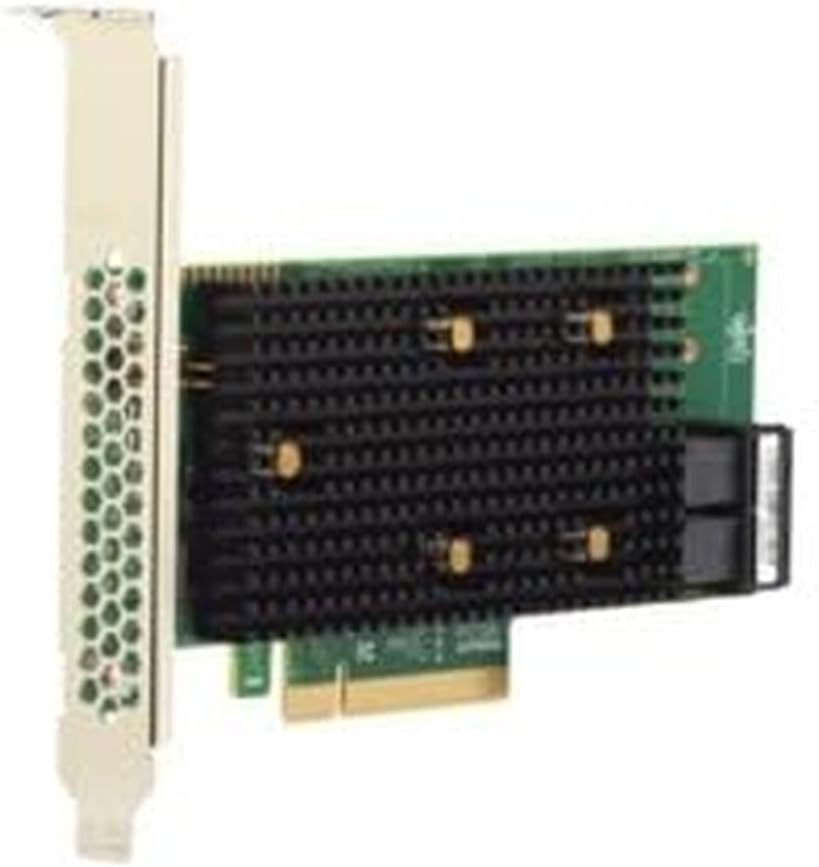
Figure 2.1: Side view of the MegaRAID 9440-8i controller, showing the PCIe bracket and card edge connector.

Figure 2.2: Top view of the MegaRAID 9440-8i controller, displaying the large heatsink for thermal management and the two SFF-8643 Mini-SAS HD connectors.
3. Setup and Installation
3.1 Package Contents
Verify that your package contains the following items:
- Broadcom MegaRAID 9440-8i RAID Controller
- Low-profile bracket (if not pre-installed)
- Documentation (Quick Installation Guide, if included)
3.2 Hardware Installation
- Power Off System: Ensure the computer system is completely powered off and disconnected from the power source.
- Open Chassis: Open the computer chassis to access the PCIe slots.
- Locate PCIe Slot: Identify an available PCIe 3.1 x8 or larger slot.
- Insert Controller: Carefully align the MegaRAID 9440-8i controller with the chosen PCIe slot and press firmly until it is securely seated.
- Secure Controller: Secure the controller with the chassis retention mechanism or screw.
- Connect Drives: Connect your SATA or SAS drives to the controller's Mini-SAS HD ports using appropriate cables. Each Mini-SAS HD port supports up to four drives.
- Close Chassis: Close the computer chassis and reconnect the power source.

Figure 3.1: Angled view of the MegaRAID 9440-8i controller, highlighting the two SFF-8643 Mini-SAS HD connectors for connecting up to eight drives.
3.3 Driver Installation
After physical installation, power on your system. The operating system (Windows, Linux, macOS) may automatically detect and install generic drivers. For optimal performance and full functionality, download and install the latest drivers and firmware from the Broadcom support website. Refer to the Broadcom documentation for specific driver installation procedures for your operating system.
4. Operating Instructions
4.1 Accessing the RAID Configuration Utility
During system boot-up, a prompt will appear to enter the MegaRAID BIOS Configuration Utility. Typically, this involves pressing a specific key combination (e.g., Ctrl+R or Ctrl+H) when prompted. Consult the on-screen instructions or the Broadcom documentation for the exact key sequence.
4.2 Creating RAID Arrays
Within the RAID Configuration Utility, you can create and manage virtual drives (RAID arrays). The MegaRAID 9440-8i supports the following RAID levels:
- RAID 0 (Striping): Offers maximum performance but no data redundancy.
- RAID 1 (Mirroring): Provides data redundancy by mirroring data across two drives.
- RAID 5 (Striping with Parity): Balances performance and redundancy, requiring at least three drives.
- RAID 10 (Striping of Mirrors): Combines RAID 0 and RAID 1 for high performance and redundancy, requiring at least four drives.
- RAID 50 (Striping of RAID 5 Arrays): Offers high performance and fault tolerance for large storage systems, requiring at least six drives.
Follow the on-screen prompts within the utility to select drives, choose a RAID level, and configure array parameters such as stripe size and cache policy.
4.3 Managing Virtual Drives
The utility allows you to perform various management tasks on existing virtual drives, including:
- Viewing virtual drive status
- Rebuilding failed drives
- Expanding virtual drive capacity (if supported by RAID level)
- Deleting virtual drives
5. Maintenance
5.1 Firmware Updates
Regularly check the Broadcom support website for the latest firmware updates. Firmware updates can improve performance, add new features, and resolve known issues. Follow the provided instructions carefully when performing firmware updates to avoid damaging the controller.
5.2 Drive Health Monitoring
Utilize the MegaRAID Storage Manager (MSM) software or the RAID Configuration Utility to monitor the health of your connected drives. Proactive monitoring can help identify failing drives before they cause data loss.
5.3 Environmental Considerations
Ensure the system where the controller is installed has adequate ventilation to prevent overheating. Operate the controller within its specified temperature and humidity ranges.
6. Troubleshooting
6.1 Common Issues
- Controller Not Detected: Ensure the controller is fully seated in the PCIe slot and that the system BIOS recognizes the slot. Check for proper power connections.
- Drives Not Detected: Verify that all SATA/SAS cables are securely connected to both the controller and the drives. Ensure drives are powered on.
- RAID Array Failure: If a drive in a redundant array fails, replace the faulty drive immediately. The array should automatically begin rebuilding. Monitor the rebuild process through the RAID utility.
- Performance Issues: Check for outdated drivers or firmware. Ensure proper RAID level configuration for your workload. Verify drive health.
6.2 LED Indicators
The MegaRAID 9440-8i controller may feature LED indicators to provide status information. Refer to the Broadcom documentation for a detailed explanation of LED patterns and their meanings (e.g., activity, fault, rebuild status).
7. Specifications
| Feature | Specification |
|---|---|
| Brand | LSI Logic / Broadcom |
| Model Number | 05-50008-02 |
| Hardware Interface | PCIe 3.1 x8 |
| Supported Interfaces | SATA 6Gb/s, SAS 12Gb/s |
| Channels | 8 (via 2x Mini-SAS HD SFF-8643 connectors) |
| Supported RAID Levels | 0, 1, 5, 10, 50 |
| Data Transfer Rate | Up to 1200 MB/s |
| Form Factor | Low Profile |
| Product Dimensions (L x W x H) | 3.94" x 3.94" x 1.97" (10.0L x 10.0W x 5.0H cm) |
| Item Weight | 0.28 Kilograms |
| Compatible Devices | Desktop, Laptop, Server |
| Operating System Support | Windows, Linux, macOS |
| Country of Origin | China |

Figure 7.1: Rear view of the MegaRAID 9440-8i controller's printed circuit board (PCB).
8. Warranty Information
The Broadcom MegaRAID 9440-8i RAID Controller is covered by a 2-year manufacturer's warranty. This warranty typically covers defects in materials and workmanship under normal use. For specific terms, conditions, and claim procedures, please refer to the official warranty statement provided by Broadcom or contact their customer support.
9. Support
For technical assistance, driver downloads, firmware updates, or further documentation, please visit the official Broadcom support website. You may also contact their customer service department for direct support regarding your MegaRAID 9440-8i controller.


