
1. Introduction
Thank you for choosing the PetCul Automatic Pet Feeder. This device is designed to simplify pet feeding by allowing you to program up to 4 meals a day with precise portion control. It features an infrared induction sensor to prevent overfilling and a voice recorder to call your pet at meal times. This manual provides comprehensive instructions to help you set up, operate, and maintain your feeder for optimal performance and your pet's well-being.

Image: The PetCul Automatic Pet Feeder, a white and black device with a digital display, shown alongside a cat.
2. Safety Information
- For indoor use only. Do not expose the feeder to rain or moisture.
- Use only dry pet food with a diameter between 0.2-0.6 inches (0.5-1.5 cm). Larger or smaller food may cause blockages or inaccurate dispensing.
- Keep the feeder out of reach of children and pets when not in use or during cleaning.
- Ensure the power adapter cable is not chewed by pets. If damaged, discontinue use immediately.
- Do not immerse the main unit in water. Only the food tray and food container are washable.
- Always unplug the feeder before cleaning or maintenance.
3. Package Contents
Please check the package to ensure all items are present and in good condition:
- PetCul Automatic Pet Feeder Main Unit
- Food Tray
- Power Adapter
- USB Cable
- Instruction Manual (this document)

Image: The PetCul Automatic Pet Feeder shown with its power adapter, USB cable, and user manual.
4. Product Overview
Familiarize yourself with the components and control panel of your PetCul Automatic Pet Feeder.

Image: A close-up of the feeder's control panel, highlighting the Meal Time, Meal Size, Power Light, Voice Play, and Voice Recording buttons and display.
Key Features:
- 3 Lbs Capacity: Large food storage for extended use.
- 1-39 Portions One Meal: Customizable portion sizes per feeding.
- 4 Feeding Times Per Day: Schedule up to four distinct meal times.
- 10 Seconds Voice Recorder: Record a personalized message to call your pet.
- Speaker: Plays recorded voice messages.
- Infrared Sensor: Detects food in the bowl to prevent overfilling.
- Power Options: Operates via power adapter or batteries (not included).
- Compatibility: Suitable for both dogs and cats.
- BPA-free Plastic: Safe for your pets.

Image: The PetCul Automatic Pet Feeder with its dimensions (15 inches height, 11 inches width, 8 inches depth) and key features listed.
The feeder also features a non-slip base to ensure stability during use.

Image: The bottom of the PetCul Automatic Pet Feeder, illustrating its four anti-skid pads designed to prevent movement.
5. Setup
5.1 Power Supply
- AC Adapter: Connect the USB cable to the feeder and the power adapter, then plug the adapter into a standard wall outlet.
- Battery Backup (Optional): For power outages or portability, install 3 D-size batteries (not included) into the battery compartment at the bottom of the feeder. Ensure correct polarity.
5.2 Filling the Feeder
- Open the lid on top of the feeder.
- Pour dry pet food into the food container. Do not overfill.
- Close the lid securely to maintain food freshness.
5.3 Initial Power On
Once powered, the display will light up. If using batteries, ensure they are fresh. The feeder is now ready for programming.
6. Operating Instructions
6.1 Setting Current Time
- Press and hold the 'SET' button until the hour digit flashes.
- Use the 'UP' and 'DOWN' buttons to adjust the hour.
- Press 'SET' again to move to the minute digit, then adjust using 'UP' and 'DOWN'.
- Press 'SET' to confirm and exit time setting mode.
6.2 Programming Meal Times and Portions
The feeder allows for up to 4 programmable meals per day.
- Press the 'MEAL' button to cycle through Meal 1, Meal 2, Meal 3, Meal 4.
- When a meal time is displayed, press 'SET' to enter its setting mode. The hour digit will flash.
- Adjust the hour using 'UP' and 'DOWN', then press 'SET'.
- Adjust the minute using 'UP' and 'DOWN', then press 'SET'.
- The portion size will now flash. Use 'UP' and 'DOWN' to select the desired portion (1-39). Each portion is approximately 10g of dry food.
- Press 'SET' to confirm the portion and exit. Repeat for other meals as needed.
- To enable or disable a meal, press the 'ON/OFF' button when that meal is displayed.
6.3 Voice Recording
Record a 10-second message to play at each meal time.
- Press and hold the 'REC' button. The display will show 'REC'.
- Speak clearly into the microphone for up to 10 seconds.
- Release the 'REC' button to save the recording.
- To play back the recording, press the 'PLAY' button.
6.4 Manual Feeding
To dispense food instantly outside of scheduled times:
- Press the 'MANUAL' button once to dispense one portion.
- Press multiple times for additional portions.
6.5 Infrared Induction
The feeder is equipped with an infrared sensor to detect food in the bowl. When the bowl fills to a certain level, the feeder will automatically stop dispensing to prevent overflow.
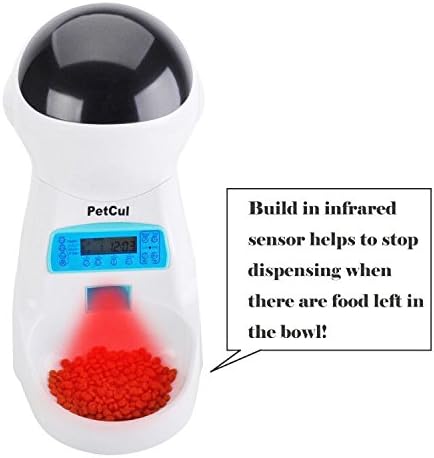
Image: The PetCul Automatic Pet Feeder's dispensing area, showing a red light indicating the infrared sensor detecting food in the bowl.
7. Maintenance
7.1 Cleaning
- Unplug the feeder from the power source and remove any batteries.
- Remove the food tray and the food container. These parts can be hand washed with mild soap and water. Rinse thoroughly.
- Wipe the main unit with a soft, damp cloth. Do not immerse the main unit in water.
- Ensure all parts are completely dry before reassembling and refilling with food.
7.2 Storage
If storing the feeder for an extended period, clean all parts, ensure they are dry, and remove any batteries. Store in a cool, dry place.
8. Troubleshooting
| Problem | Possible Cause | Solution |
|---|---|---|
| Feeder not dispensing food. | Food hopper is empty; Food jammed; Low battery; Power disconnected. | Refill food; Clear any blockages; Replace batteries or connect to AC power; Check power connection. |
| Food overflowing in the bowl. | Infrared sensor blocked or dirty; Incorrect portion setting. | Clean the infrared sensor area; Reduce portion size. |
| Voice recording not playing. | No recording saved; Low volume. | Record a new message; Ensure volume is adequate (if adjustable). |
| Display is blank or flickering. | Low battery; Power connection issue. | Replace batteries or ensure AC adapter is securely connected. |
9. Specifications
| Feature | Detail |
|---|---|
| Brand | PetCul |
| Model | B071D6MNJ7 |
| Item Weight | 3.3 Pounds |
| Product Dimensions (LxWxH) | 8 x 15 x 11 inches |
| Material | Stainless Steel, Ceramic, Plastic |
| Color | White |
| Capacity | 3L |
| Power Source | Power Adapter, Batteries (not included) |
| Target Species | Cat, Dog |
| Special Features | Portion Control, Timer, Voice Recording, Infrared Induction |
10. Warranty and Support
This PetCul Automatic Pet Feeder comes with a 12-Month Warranty on limited parts and labor. For any questions, technical support, or warranty claims, please contact PetCul customer service. Refer to the product packaging or the retailer's website for specific contact information.