
1. Introduction
This manual provides essential instructions for the safe and efficient use of your Singing Machine Karaoke System, model SML605P. Please read this manual thoroughly before operating the unit and retain it for future reference. This portable karaoke system features a CD+G player, Bluetooth connectivity, USB playback, a dancing water fountain, and synchronized LED lights to enhance your karaoke experience.
2. Important Safety Information
- Read Instructions: All safety and operating instructions should be read before the product is operated.
- Retain Instructions: The safety and operating instructions should be retained for future reference.
- Heed Warnings: All warnings on the product and in the operating instructions should be adhered to.
- Follow Instructions: All operating and use instructions should be followed.
- Water and Moisture: Do not use this apparatus near water.
- Cleaning: Clean only with a dry cloth.
- Ventilation: Do not block any ventilation openings. Install in accordance with the manufacturer's instructions.
- Heat: Do not install near any heat sources such as radiators, heat registers, stoves, or other apparatus (including amplifiers) that produce heat.
- Power Cord Protection: Protect the power cord from being walked on or pinched, particularly at plugs, convenience receptacles, and the point where they exit from the apparatus.
- Attachments/Accessories: Only use attachments/accessories specified by the manufacturer.
- Servicing: Refer all servicing to qualified service personnel. Servicing is required when the apparatus has been damaged in any way, such as power-supply cord or plug is damaged, liquid has been spilled or objects have fallen into the apparatus, the apparatus has been exposed to rain or moisture, does not operate normally, or has been dropped.
3. Package Contents
Ensure all items listed below are present in your package:
- Singing Machine Karaoke System (SML605P)
- One (1) Wired Microphone
- One (1) CD+G Disc (for demonstration)
- AC Power Adapter
- User Manual (this document)
4. Product Overview: Controls and Features
Familiarize yourself with the various parts and controls of your karaoke system.
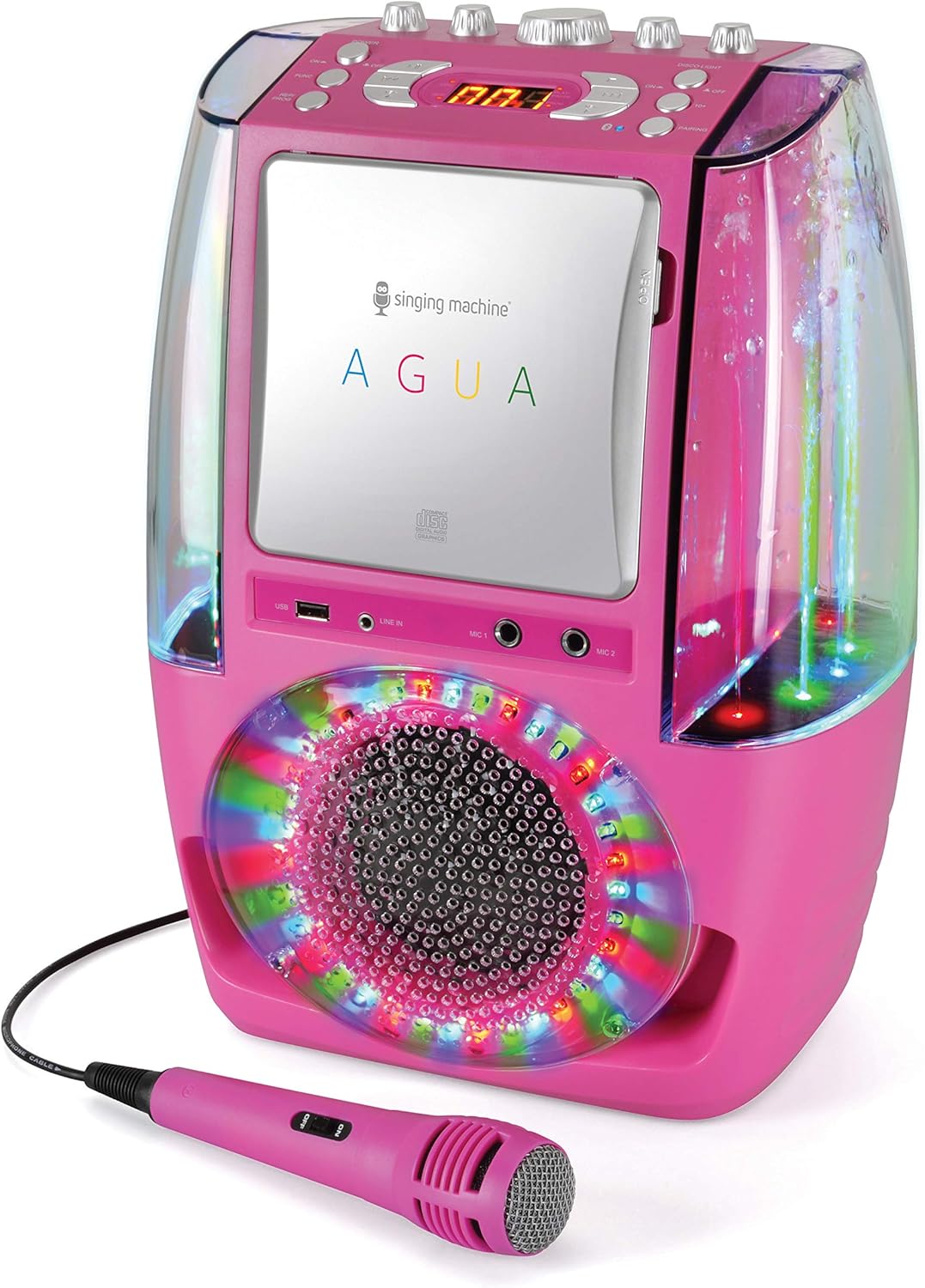
Figure 1: Front view of the Singing Machine SML605P Portable Karaoke System, showing the CD+G player, speaker, dancing water fountain, LED lights, and microphone input ports. A pink wired microphone is also visible.
Front Panel Features:
- CD+G Player: For playing karaoke discs with on-screen lyrics.
- USB Port: For playing MP3+G files from a USB drive.
- MIC IN 1 & MIC IN 2: Connect up to two wired microphones.
- LINE IN: Connect external audio devices.
- Speaker: Integrated audio output.
- Dancing Water Fountain: Water jets that synchronize with music.
- LED Lights: Multi-color lights that synchronize with music.

Figure 2: Top panel controls of the Singing Machine SML605P, including power, function selection, playback controls, volume, balance, echo, and light controls.
Top Panel Controls:
- POWER Button: Turns the unit ON or OFF.
- FUNC (Function) Button: Selects between CD+G, Bluetooth, USB, and Line-in modes.
- PLAY/PAUSE Button: Starts or pauses playback.
- STOP Button: Stops playback.
- SKIP Buttons (<< / >>): Skips to the previous or next track.
- REP/PROG (Repeat/Program) Button: Repeats a track or programs a playlist.
- KEY- / KEY+ Buttons: Adjusts the musical key (for CD+G and MP3+G).
- 3-Digit LED Display: Shows track number, mode, or other indicators.
- MIC VOL (Microphone Volume) Knob: Adjusts the volume of the connected microphones.
- ECHO Knob: Adds an echo effect to the microphone sound.
- MASTER VOLUME Knob: Adjusts the overall system volume.
- BALANCE Knob: Adjusts the balance between the vocal track and music on multiplex CD+G discs.
- AUTO VOICE CONTROL (AVC) Knob: Automatically reduces the main vocal on multiplex CD+G tracks when you sing into the microphone.
- DISCO LIGHT ON/OFF Switch: Controls the LED disco lights.
- PAIRING Button: Initiates Bluetooth pairing mode.
- RESTING TABLET CRADLE: A slot on top to hold a tablet or smartphone.
5. Setup
5.1 Power Connection
- Ensure the unit is placed on a stable, flat surface.
- Connect the AC power adapter to the DC IN jack on the back of the unit.
- Plug the AC power adapter into a standard wall outlet (AC 100V-240V, 50/60Hz).
Note: This unit is designed to be portable and can also be powered by batteries (not included). Refer to the battery compartment instructions for battery installation.
5.2 Microphone Connection
- Plug the microphone cable into either the MIC IN 1 or MIC IN 2 jack on the front of the unit.
- If using two microphones, plug the second microphone into the remaining MIC IN jack.
5.3 Connecting to External Devices (Optional)
Line-in Connection:
To play audio from an external device (e.g., smartphone, tablet, MP3 player) via a 3.5mm audio cable (not included):
- Connect one end of the 3.5mm audio cable to the LINE IN jack on the front of the karaoke system.
- Connect the other end to the headphone jack or audio output of your external device.
Connecting to a TV (for CD+G lyrics):
To display lyrics from CD+G discs on your television, connect the unit to your TV using an RCA audio/video cable (not included). Connect the VIDEO OUT jack on the back of the karaoke system to the VIDEO IN jack on your TV. Connect the AUDIO OUT (L/R) jacks to the corresponding AUDIO IN (L/R) jacks on your TV or home audio system.
6. Operation
6.1 Powering On/Off
Press the POWER button on the top panel to turn the unit ON. Press it again to turn the unit OFF.
6.2 Selecting a Source (Function Mode)
Press the FUNC button repeatedly to cycle through the available modes: CD+G, Bluetooth, USB, and Line-in. The selected mode will be indicated on the LED display.
6.3 CD+G Playback
- Open the CD compartment door and carefully place a CD+G disc onto the spindle with the label side facing up. Close the door.
- Press the FUNC button to select CD+G mode.
- Press the PLAY/PAUSE button to start playback. The track number will appear on the LED display.
- Use the SKIP buttons (<< / >>) to navigate between tracks.
- Press the STOP button to stop playback.
- To repeat a track or the entire disc, press the REP/PROG button.
- To program a sequence of tracks, press REP/PROG when playback is stopped, then use the SKIP buttons to select tracks and REP/PROG to confirm.
6.4 Bluetooth Pairing and Playback
- Press the FUNC button to select Bluetooth mode. The LED display will show "BT" and flash, indicating it's in pairing mode.
- On your Bluetooth-enabled device (e.g., smartphone, tablet), enable Bluetooth and search for available devices.
- Select "Singing Machine" from the list of devices. Once paired, the "BT" indicator on the LED display will stop flashing and remain solid.
- Start playing music on your connected device. The audio will stream through the karaoke system.
- Adjust the volume using the MASTER VOLUME knob on the unit and/or the volume controls on your connected device.
Note: The unit features a Resting Tablet Cradle on top for convenient placement of your device.
6.5 USB MP3+G Playback
- Insert a USB flash drive containing MP3+G files into the USB port on the front of the unit.
- Press the FUNC button to select USB mode. The LED display will show "USB".
- The unit will automatically begin playing the first compatible track.
- Use the PLAY/PAUSE, STOP, and SKIP buttons to control playback as with CD+G.
6.6 Microphone and Vocal Effects
- MIC VOL: Rotate the MIC VOL knob to adjust the volume of your voice through the microphones.
- ECHO: Rotate the ECHO knob to add an echo effect to your singing.
- AUTO VOICE CONTROL (AVC): Rotate the AVC knob to activate and adjust the Auto Voice Control feature. When active, the original vocals on multiplex CD+G tracks will be reduced when you sing into the microphone.
- BALANCE: Rotate the BALANCE knob to adjust the balance between the pre-recorded vocals and the music on multiplex CD+G tracks.
- KEY- / KEY+: Use the KEY- and KEY+ buttons to adjust the musical key of the song to better suit your vocal range.
6.7 Light Effects and Water Fountain
- DISCO LIGHT: Flip the DISCO LIGHT ON/OFF switch to activate or deactivate the multi-color LED lights on the speaker grille. These lights synchronize with the music.
- Dancing Water Fountain: The built-in water fountain automatically activates and synchronizes its jets with the music, creating a dynamic visual effect. Ensure the water reservoir is adequately filled (refer to maintenance section).
7. Maintenance
7.1 Cleaning the Unit
- Always unplug the unit from the power outlet before cleaning.
- Use a soft, dry cloth to wipe the exterior surfaces of the unit.
- Do not use abrasive cleaners, waxes, or solvents as they may damage the finish.
7.2 CD Player Care
- Handle discs by their edges to avoid fingerprints on the playing surface.
- Keep the CD compartment clean and free of dust.
- If the lens needs cleaning, use a commercially available CD lens cleaner.
7.3 Water Fountain Care
- The water fountain operates with a sealed system. Do not attempt to open or refill the water reservoir unless specifically instructed by the manufacturer.
- If you notice a significant reduction in water flow or clarity, contact customer support.
- Avoid tilting or shaking the unit excessively when the water fountain is active to prevent spills.
8. Troubleshooting
| Problem | Possible Cause | Solution |
|---|---|---|
| No power | Power adapter not connected properly; unit not turned on; batteries depleted (if applicable). | Ensure AC adapter is securely plugged into the unit and wall outlet. Press the POWER button. Replace batteries if using battery power. |
| No sound from speaker | Master Volume too low; incorrect function mode selected; external device volume too low. | Increase MASTER VOLUME. Press FUNC to select the correct source (CD+G, Bluetooth, USB, Line-in). Increase volume on connected Bluetooth/Line-in device. |
| No sound from microphone | Microphone not plugged in; MIC VOL too low; microphone switch OFF. | Ensure microphone is securely plugged into MIC IN jack. Increase MIC VOL. Ensure microphone's ON/OFF switch is in the ON position. |
| CD+G disc not playing / lyrics not displaying | Disc inserted incorrectly; disc dirty or scratched; incorrect function mode; TV not connected or wrong input selected. | Re-insert disc correctly (label side up). Clean disc with a soft cloth. Select CD+G mode. Ensure unit is connected to TV via RCA cables and TV is on the correct input. |
| Bluetooth device not pairing | Unit not in Bluetooth pairing mode; Bluetooth disabled on device; device too far away. | Press FUNC to select Bluetooth mode (LED flashes "BT"). Ensure Bluetooth is enabled on your device. Move device closer to the unit (within 30 feet). |
| Water fountain not working or weak | Low water level (unlikely for sealed unit); obstruction; unit malfunction. | Ensure unit is on a level surface. If issue persists, contact customer support. Do not attempt to open the water reservoir. |
9. Specifications
- Model: SML605P
- Dimensions (W x H x D): Approximately 18 x 12 x 9 inches (45.7 x 30.5 x 22.9 cm)
- Weight: Approximately 8.4 pounds (3.8 kg)
- Power Source: AC 100V-240V, 50/60Hz (via AC adapter) / Battery Powered (batteries not included)
- Connectivity: Bluetooth, USB, Line-in
- Disc Compatibility: CD, CD+G
- Microphone Inputs: 2 x 6.3mm (1/4") jacks
- Special Features: 3-Digit LED Display, Auto Voice Control, Balance Control, Built-in Speaker, Dancing Water Fountain, Echo Control, LED lights, MP3+G/USB Playback, Music Synchronized 3D Lighting Effects, Resting Tablet Cradle
10. Warranty and Support
Singing Machine products are designed and manufactured to the highest quality standards. For information regarding warranty coverage, technical support, or service inquiries, please refer to the warranty card included with your product or visit the official Singing Machine website. Do not attempt to repair the unit yourself, as this may void your warranty.
For further assistance, please contact Singing Machine Customer Service.


