1. Introduction
This manual provides comprehensive instructions for the RCECAOSHAN replacement remote control, designed for various COMFORT-AIRE air conditioner models. It covers setup, operation, and troubleshooting to ensure optimal use of your air conditioning unit.
This remote is a direct replacement for original COMFORT-AIRE remote control models 6711A20128L, 6711A20128K, and 6711A20128V.
2. Product Overview
The RCECAOSHAN replacement remote control features a clear LCD display and ergonomically designed buttons for easy operation of your COMFORT-AIRE air conditioner.

Figure 1: Front view of the remote control with main display and buttons.
Key Features:
- Clear LCD display for temperature and mode settings.
- Dedicated buttons for power, mode, fan speed, and temperature adjustment.
- Hidden panel for advanced functions such as Plasma, Auto Clean, and Timer settings.
- Supports both Celsius and Fahrenheit temperature display.
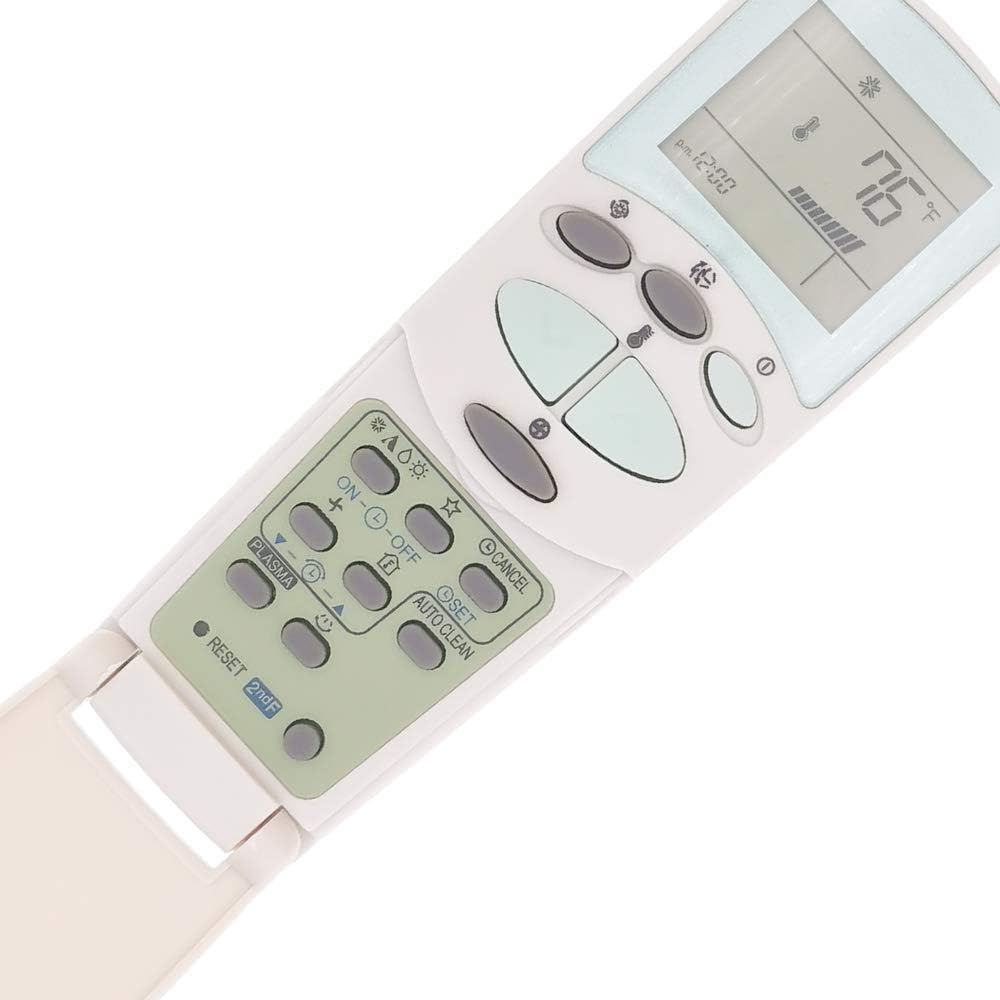
Figure 2: Remote control with the advanced function panel visible.

Figure 3: Detailed view of advanced function buttons.
3. Setup: Battery Installation
The remote control requires two AAA batteries (not included). Follow these steps to install them:
- Locate the battery compartment cover on the back of the remote control.
- Slide the cover downwards or press the latch to open it.
- Insert two new AAA alkaline batteries, ensuring the positive (+) and negative (-) terminals match the diagrams inside the compartment.
- Slide the battery compartment cover back into place until it clicks securely.
Important: Ensure correct battery polarity. Remove batteries if the remote will not be used for an extended period to prevent leakage.
4. Operating Instructions
4.1 Basic Functions
- Power On/Off: Press the Power button (usually marked with ⓘ or a power symbol) to turn the air conditioner on or off.
- Temperature Adjustment: Use the Up (▲) and Down (▼) arrow buttons to increase or decrease the desired temperature.
- Mode Selection: Press the Mode button (often depicted with a snowflake, water drop, fan, or sun icon) to cycle through modes like Cool, Dry, Fan, Heat, and Auto.
- Fan Speed: Press the Fan button (often depicted with a fan icon) to adjust the fan speed (e.g., Low, Medium, High, Auto).
4.2 Advanced Functions (Under Sliding Panel)
Slide down the front panel of the remote to access additional functions:
- Timer ON/OFF: Use the ON-ⓘ-OFF buttons to set a timer for the unit to turn on or off automatically. Refer to your air conditioner's main manual for specific timer programming details.
- SET: This button is typically used to confirm timer settings or other programmable features.
- AUTO CLEAN: Activates the self-cleaning function of the indoor unit, if available.
- PLASMA: Engages the Plasma or air purification function, if your AC unit supports it.
- RESET 2ndF: Used for resetting certain settings or accessing secondary functions. Consult your AC unit's manual for specific applications.
4.3 Temperature Display (Celsius/Fahrenheit)
This remote control supports displaying temperature in both Celsius and Fahrenheit. The method to switch between these units may vary:
- Some models may have a dedicated button (e.g., "C/F" or "Temp Unit").
- Others may require pressing and holding the "Mode" or "Temp Up/Down" buttons simultaneously for a few seconds.
- Refer to your specific air conditioner model's manual or experiment with button combinations if a dedicated switch is not apparent.

Figure 4: Remote control highlighting Celsius and Fahrenheit display capability.
5. Compatible COMFORT-AIRE Air Conditioner Models
This replacement remote control is compatible with the following COMFORT-AIRE air conditioner models, replacing original remote models 6711A20128L, 6711A20128K, and 6711A20128V:
- A2-H183GA0
- ASNH2435GA0
- B-DMH09SB
- B-DMH09SB-0
- B-DMH12SB
- B-DMH12SB-0
- B-DMH18SB-1
- B-DMH24SB
- DMC24DB-1
- DMH09SB-0
- DMH12SB-0
- DMH18DB-1
- DMH18SB-1
- DMH24DB-1
- DMH24SB-1
- DMH36TB-1
- A2NC123GHA0
- B-DMC09SB
- B-DMC09SB-0
- B-DMC12SB
- B-DMC12SB-0
- B-DMC18SB
- B-DMC18SB-1
- B-DMC24DB-1
- B-DMC24SB
- B-MMC12FA-1
- DMC09SB-0
- DMC12SB-0
- DMC18SB-1
- DMC24DB-1
- DMC-24SB-1
- DMC36TB-1
- MMC12FA-1
- B-VMC09SB
- B-VMC12SB
- B-VMC18SB
- B-VMC24SB
- B-VMC30SB
If your specific model is not listed, please compare your original remote with the images provided or contact support for compatibility verification.
6. Troubleshooting
| Problem | Possible Cause | Solution |
|---|---|---|
| Remote not responding / AC not turning on. |
|
|
| Display is dim or blank. |
|
|
| AC unit responds intermittently. |
|
|
7. Specifications
- Brand: RCECAOSHAN
- Model Numbers: 6711A20128L, 6711A20128K, 6711A20128V
- Compatible Devices: COMFORT-AIRE Air Conditioners
- Power Source: 2 x AAA Batteries (not included)
- Item Weight: Approximately 2.64 ounces (75 grams)
- Special Feature: Ergonomic design, Celsius/Fahrenheit display
- Manufacturer: Home Appliances Inc Of ShenZhen
8. Support and Contact Information
For any questions regarding compatibility, operation, or troubleshooting not covered in this manual, please contact the seller or manufacturer directly.
We are professional in remote control for AC, TV, DVD, projector, and other devices. Your satisfaction is our priority.
Please refer to your purchase documentation for specific contact details or visit the product page on the retailer's website.