
Robinair 34288NI
Robinair 34288NI R-134A Recover, Recycle, Recharge Machine User Manual
Model: 34288NI
Introduction
The Robinair 34288NI is an advanced R-134a mobile A/C system service machine designed for efficient and accurate refrigerant recovery, recycling, evacuation, and recharging. This unit is engineered to meet and exceed current SAE J-2788 standards, ensuring high performance and reliability in automotive air conditioning maintenance.
Key features include an automatic oil drain, automatic air purge, and a programmable vacuum function, all managed through a user-friendly 4.3-inch full-color graphics display. The machine is capable of recovering over 95% of refrigerant from a vehicle's A/C system and charging with an accuracy of better than +/- 1/2 oz.

Figure 1: Front view of the Robinair 34288NI R-134A Recover, Recycle, Recharge Machine.
Setup and Installation
Before operating the Robinair 34288NI machine, ensure proper setup and environmental conditions are met. This machine is designed for indoor use. Do not use in open air in case of rain or high humidity to prevent damage and ensure safe operation.
- Unpacking: Carefully remove the machine from its packaging. Inspect for any shipping damage.
- Placement: Position the machine on a stable, level surface. Ensure adequate ventilation around the unit.
- Power Connection: Connect the machine to a standard 115V, 60 Hz power outlet. Verify the power supply matches the machine's requirements.
- Operating Environment: The optimal operating temperature range is 10°C to 50°C (50°F to 122°F). Avoid extreme temperatures or environments with excessive moisture.
- Hose Connections: Connect the high-side and low-side service hoses to their respective ports on the machine. Ensure connections are secure to prevent leaks.

Figure 2: Front view of the machine, highlighting hose connection points and the control panel.
Operating Instructions
The Robinair 34288NI simplifies R-134a A/C system servicing with its automated functions. Follow these general steps for typical operations:
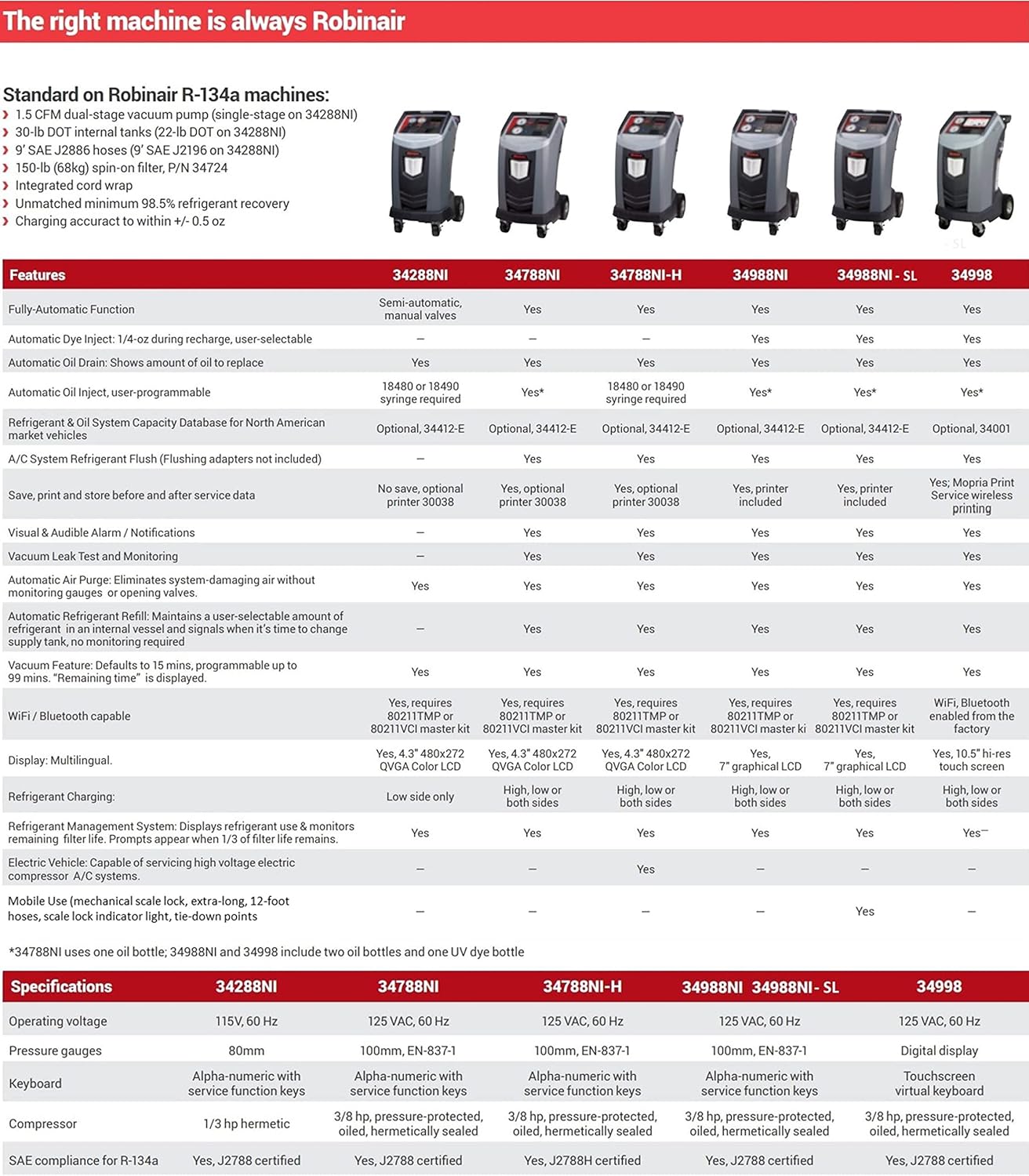
Figure 3: Diagram illustrating key features and components of the Robinair 34288NI machine.
- Power On: Turn on the machine using the main power switch. The 4.3-inch full-color graphics display will illuminate.
- Vehicle Connection: Connect the high-side and low-side service hoses to the vehicle's A/C system ports.
- Select Operation: Use the control panel and display to select the desired operation:
- Recovery: The machine will recover refrigerant from the vehicle's A/C system. It recovers more than 95% of the refrigerant.
- Recycle: The recovered refrigerant is processed and cleaned for reuse.
- Evacuate: A vacuum function removes air and moisture from the system. The default vacuum time is 15 minutes, programmable up to 99 minutes. The display shows "remaining time."
- Recharge: The machine accurately recharges the system with refrigerant to within +/- 1/2 oz. of the programmed charge amount.
- Automatic Oil Drain: During recovery, oil is automatically drained into a graduated container (355 ml / 12 oz capacity), indicating the amount to be reinjected.
- Automatic Air Purge: The system automatically purges damaging air, eliminating the need for manual monitoring or valve operation.
- Monitor Progress: Follow the prompts on the display and monitor the process. The machine's noise emission is less than 70 dB (A) during operation.
- Disconnect: Once the operation is complete, follow the on-screen instructions to safely disconnect the hoses from the vehicle.

Figure 4: Close-up view of the control panel and display for operation selection and monitoring.
Maintenance
Regular maintenance ensures the longevity and optimal performance of your Robinair 34288NI machine.
- Filter Replacement: The machine's refrigerant management system monitors filter life. Replace filters as indicated by the display to maintain refrigerant purity and system efficiency.
- Oil Drain Bottle: Regularly empty and clean the automatic oil drain bottle (355 ml / 12 oz capacity) to prevent overflow and ensure accurate oil measurement.
- General Cleaning: Keep the exterior of the machine clean and free of dust and debris. Use a soft, damp cloth for cleaning.
- Hose Inspection: Periodically inspect all hoses and connections for signs of wear, cracks, or leaks. Replace damaged components immediately.
- Internal Tank: The machine has an internal tank capacity of 10 kg (22 lb). Monitor refrigerant levels and ensure proper handling of the tank.
Troubleshooting
This section provides general guidance for common issues. For complex problems or issues not listed here, please contact Robinair technical support.
| Problem | Possible Cause | Solution |
|---|---|---|
| Machine does not power on. | No power supply; tripped circuit breaker. | Check power cord connection. Verify power outlet is functional. Reset circuit breaker if tripped. |
| Low recovery efficiency. | Clogged filter; low internal tank capacity; hose leaks. | Check filter life indicator and replace if necessary. Ensure internal tank is not full. Inspect hoses and connections for leaks. |
| Inaccurate charge amount. | Calibration needed; incorrect programming. | Refer to the display for calibration prompts. Verify programmed charge amount. |
| Machine displays an error code. | Internal system fault. | Note the error code and consult the full user guide (PDF link in support section) or contact Robinair technical support. |
Specifications
Detailed technical specifications for the Robinair 34288NI R-134A Recover, Recycle, Recharge Machine:
| Feature | Detail |
|---|---|
| Model Number | 34288NI |
| Refrigerant Type | R-134a |
| Operating Voltage | 115V, 60 Hz |
| Operating Temperature | 10°C to 50°C (50°F to 122°F) |
| Maximum Pressure | 27.3 bar (396 PSI) |
| Internal Tank Capacity | 10 kg (22 lb) |
| Oil Drain Bottle Capacity | 355 ml (12 oz) |
| Display | 4.3 inches (5 × 9 cm) full Color graphics display |
| Noise Emission | <70 dB (A) |
| Item Weight | 206 pounds |
| Product Dimensions (L x W x H) | 36 x 24.5 x 48.6 inches |
| Country of Origin | Mexico |
| SAE Compliance | Outperforms SAE J-2788 standards |
Warranty and Support
For detailed warranty information, please refer to the documentation included with your purchase or contact Robinair customer service. Extended protection plans may be available for purchase separately.
For technical assistance, troubleshooting beyond this manual, or to order replacement parts, please contact Robinair support:
- Official User Guide (PDF): For comprehensive instructions and detailed diagrams, please refer to the User Guide (PDF).
- Robinair Store: Visit the official Robinair Store on Amazon for product information and accessories.
- Customer Support: Contact Robinair customer support for direct assistance. Refer to the contact information provided with your product or on the official Robinair website.
Ask a question about this manual
Ask about setup, troubleshooting, compatibility, parts, safety, or missing instructions. Manuals+ will review the question and use this page’s manual context to help answer it.