
1. Introduction
This manual provides essential information for the safe and effective operation of your Thsinde 18B+ Auto Ranging Digital Multimeter. Please read this manual thoroughly before use and retain it for future reference.
1.1 Safety Information
WARNING:
- Always adhere to local and national safety codes.
- Do not use the multimeter if it appears damaged or if the test leads are compromised.
- Ensure the correct function and range are selected before making measurements.
- Never apply voltage to the meter when the function switch is set to current, resistance, or diode/continuity.
- Use caution when working with voltages above 30V AC RMS, 42V peak, or 60V DC. These voltages pose a shock hazard.
- Replace the battery and fuses only with the specified type and rating.
- Keep fingers behind the probe barriers during measurements.
2. Product Overview
The Thsinde 18B+ is an auto-ranging digital multimeter designed for measuring AC/DC voltage, AC/DC current, resistance, continuity, diode, frequency, and non-contact voltage (NCV). It features a large backlit LCD display and True RMS measurement capability.

Figure 2.1: Thsinde 18B+ Digital Multimeter and Accessories
This image displays the Thsinde 18B+ digital multimeter, its orange protective rubber sleeve, a set of red and black test leads, a pair of red and black alligator clips, and a 9V battery. The multimeter's display shows "0.000" with "TRUE RMS" and "AUTOAPO" indicators. The function dial is set to AC/DC Voltage.
2.1 Components and Display
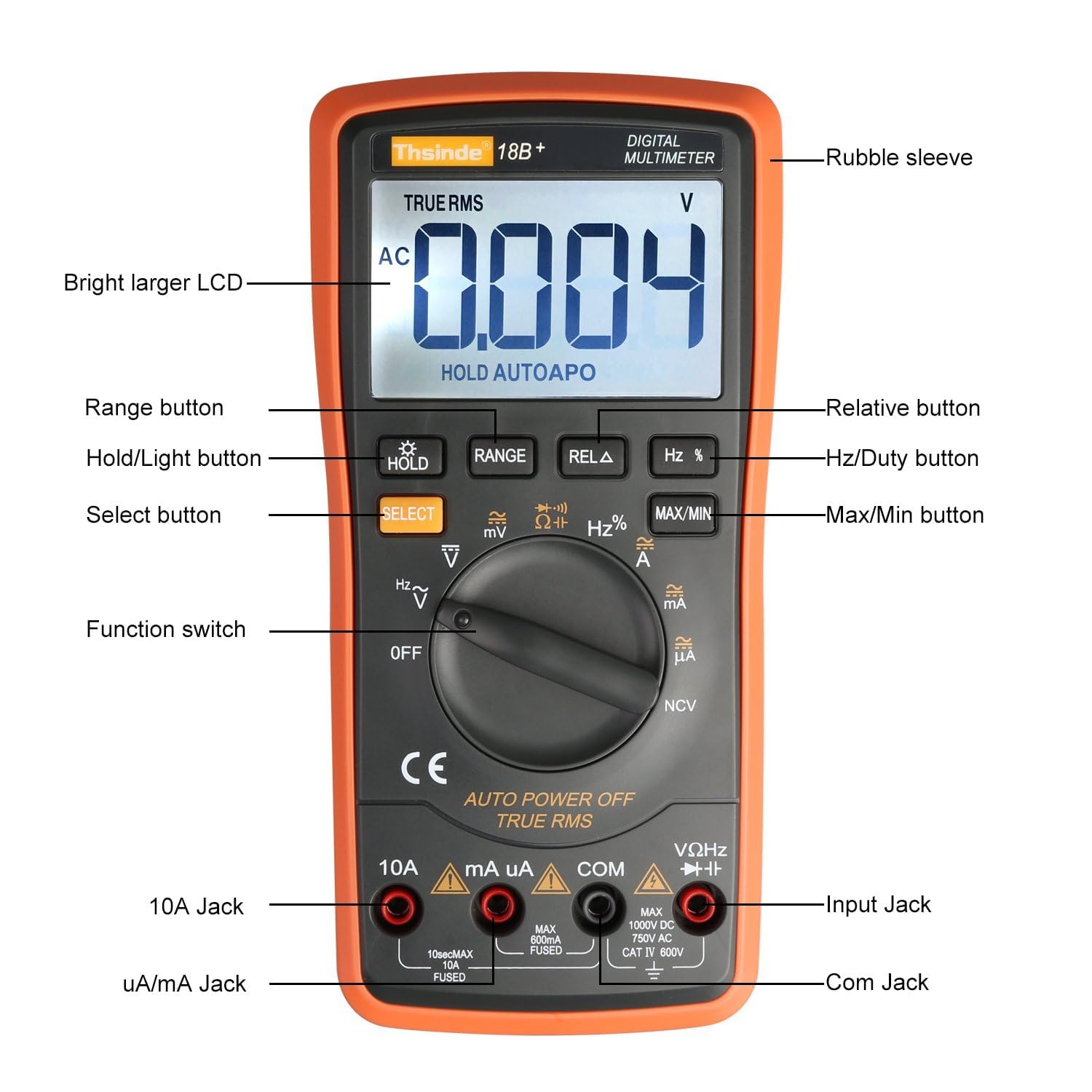
Figure 2.2: Multimeter Components Diagram
This diagram labels the key components of the Thsinde 18B+ multimeter. These include the Rubble sleeve, Bright larger LCD, Range button, Hold/Light button, Select button, Hz/Duty button, Relative button, Max/Min button, Function switch, 10A Jack, uA/mA Jack, Com Jack, and Input Jack.
- Rubble sleeve: Protective outer casing.
- Bright larger LCD: Digital display for readings.
- Buttons: HOLD/Light, RANGE, REL Δ, Hz %, MAX/MIN, SELECT.
- Function switch: Rotary dial to select measurement modes.
- Input Jacks:
- 10A Jack: For high current measurements (up to 10A).
- uA/mA Jack: For microampere and milliampere current measurements.
- COM Jack: Common (negative) input for all measurements.
- VΩHz→→+ Jack: Positive input for voltage, resistance, frequency, diode, and continuity measurements.

Figure 2.3: Display Feature Icons
This image highlights various functions and display indicators of the multimeter, including Diode test, Frequency, Capacitor, AC/DC voltage, AC/DC current, Beeper continuity, NCV (Non-Contact Voltage), Backlight, True RMS, Electric resistance, Max/Min value, Data hold, LCD display, Relative value, Auto Power Off (APO), and Beeper diode ON/OFF.
3. Setup
3.1 Battery Installation
- Ensure the multimeter is turned OFF.
- Locate the battery compartment on the back of the unit.
- Unscrew the retaining screw(s) and remove the battery cover.
- Connect a 9V battery (included) to the battery clips, observing correct polarity (+ and -). The positive terminal is typically on the left when viewing from the rear.
- Place the battery into the compartment, ensuring it fits snugly.
- Replace the battery cover and secure it with the screw(s).
3.2 Connecting Test Leads
- Insert the black test lead into the "COM" (Common) input jack.
- For most measurements (voltage, resistance, frequency, diode, continuity), insert the red test lead into the "VΩHz→→+" input jack.
- For current measurements, insert the red test lead into the "uA/mA" jack for low currents or the "10A" jack for high currents.
4. Operating Instructions
4.1 General Operation
- Power On/Off: Rotate the function switch from "OFF" to any desired measurement function to turn the meter ON. Rotate back to "OFF" to power OFF.
- Auto Ranging: The multimeter automatically selects the appropriate measurement range.
- Data Hold (HOLD): Press the "HOLD" button to freeze the current reading on the display. Press again to release.
- Backlight: Press and hold the "HOLD" button to activate the display backlight. Press and hold again to turn it off. The backlight may have an automatic timeout.
- Auto Shutoff (APO): The meter will automatically power off after approximately 15 minutes of inactivity to conserve battery. To disable APO, press and hold the "SELECT" button while turning the function switch from "OFF" to a measurement mode. "APO" will disappear from the display.

Figure 4.1: Backlit LCD Display in Low Light
This image demonstrates the multimeter's large, backlit LCD display, showing a DC voltage reading of "0.158" in a dimly lit area, highlighting its readability in various lighting conditions.
4.2 Measurement Functions
4.2.1 AC/DC Voltage Measurement (V~ / V↓)
- Set the function switch to V~ (AC Voltage) or V↓ (DC Voltage).
- Connect the red test lead to the VΩHz→→+ jack and the black test lead to the COM jack.
- Touch the test probes to the circuit points where voltage is to be measured.
- The display will show the voltage reading.
4.2.2 AC/DC Current Measurement (A~ / A↓, mA~ / mA↓, µA~ / µA↓)
- Set the function switch to the appropriate current range (A, mA, or µA). Use the "SELECT" button to toggle between AC and DC current if necessary.
- Connect the red test lead to the 10A jack (for up to 10A) or the uA/mA jack (for up to 600mA). Connect the black test lead to the COM jack.
- Open the circuit where current is to be measured and connect the test probes in series with the circuit.
- The display will show the current reading.
- CAUTION: Never connect the meter in parallel with a voltage source when in current mode, as this can blow the fuse or damage the meter.
4.2.3 Resistance Measurement (Ω)
- Set the function switch to Ω.
- Connect the red test lead to the VΩHz→→+ jack and the black test lead to the COM jack.
- Ensure the circuit or component under test is de-energized.
- Touch the test probes across the component to measure its resistance.
- The display will show the resistance reading.
4.2.4 Continuity Test (🔊)
- Set the function switch to Ω and press "SELECT" until the continuity symbol (🔊) appears.
- Connect the red test lead to the VΩHz→→+ jack and the black test lead to the COM jack.
- Ensure the circuit or component under test is de-energized.
- Touch the test probes across the component or circuit path.
- If resistance is below approximately 50Ω, the buzzer will sound, indicating continuity.
4.2.5 Diode Test (→→+)
- Set the function switch to Ω and press "SELECT" until the diode symbol (→→+) appears.
- Connect the red test lead to the VΩHz→→+ jack and the black test lead to the COM jack.
- Ensure the diode is disconnected from the circuit.
- Touch the red probe to the anode and the black probe to the cathode of the diode. The display will show the forward voltage drop.
- Reverse the probes. The display should show "OL" (Open Loop) for a good diode.
4.2.6 Frequency/Duty Cycle Measurement (Hz %)
- Set the function switch to Hz %.
- Connect the red test lead to the VΩHz→→+ jack and the black test lead to the COM jack.
- Touch the test probes to the circuit where frequency or duty cycle is to be measured.
- The display will show the frequency in Hz. Press "SELECT" to toggle to duty cycle measurement (%).
4.2.7 Capacitance Measurement (⊕)
- Set the function switch to ⊕.
- Connect the red test lead to the VΩHz→→+ jack and the black test lead to the COM jack.
- Ensure the capacitor is fully discharged before testing.
- Touch the test probes to the capacitor terminals.
- The display will show the capacitance value in Farads (F), microfarads (µF), or nanofarads (nF).
4.2.8 Non-Contact Voltage (NCV) Detection
- Set the function switch to NCV.
- Move the top front part of the multimeter close to the conductor or outlet you want to test.
- If AC voltage is detected (typically above 700V RMS as per product description, but usually much lower for NCV detection in general use), the meter will beep and the NCV indicator light will illuminate.

Figure 4.2: Non-Contact Voltage (NCV) Detection
This image shows the Thsinde 18B+ multimeter being used to detect non-contact voltage near a power strip. The display shows "APO" and the NCV symbol, indicating the function is active. A wireless signal icon emanates from the meter towards the power strip, illustrating its ability to detect live AC voltage without direct contact.
5. Maintenance
5.1 Battery Replacement
When the battery indicator appears on the display, replace the 9V battery as described in Section 3.1. Always use a fresh 9V battery.
5.2 Fuse Replacement
If the current measurement functions stop working, the fuse(s) may need replacement. This meter uses HRC fuses. Refer to the specifications for correct fuse ratings.
- Ensure the multimeter is turned OFF and test leads are disconnected.
- Unscrew the retaining screws on the back cover and carefully open the casing.
- Locate the blown fuse(s). There are typically two fuses: one for the mA/µA range and one for the 10A range.
- Carefully remove the old fuse(s) and replace with new fuse(s) of the identical type and rating.
- Close the casing and secure with screws.
- WARNING: Never use a fuse with a different rating or bypass a fuse. This can lead to serious injury or damage to the meter.
5.3 Cleaning
Wipe the meter with a damp cloth and mild detergent. Do not use abrasives or solvents. Ensure the meter is completely dry before use.
6. Troubleshooting
- Meter does not power on: Check battery installation and ensure the battery is not depleted.
- No reading or "OL" (Overload) displayed:
- Ensure test leads are correctly inserted and making good contact.
- Verify the function switch is set to the correct measurement mode.
- The measured value may exceed the selected range (if not in auto-ranging) or the meter's maximum capability.
- For resistance/continuity, ensure the circuit is de-energized.
- Current measurement not working: Check the appropriate fuse (mA/µA or 10A) as described in Section 5.2.
- Inaccurate readings:
- Ensure the battery is not low.
- Check for proper test lead connection.
- Verify the correct function and range are selected.
- Environmental factors (temperature, humidity) can affect accuracy.
- Buzzer not sounding during continuity test: The resistance may be above the continuity threshold (typically 50Ω).
7. Specifications
| Measurement Function | Range / Accuracy |
|---|---|
| Display | 6000 Counts, True RMS |
| DC Voltage | Up to 1000V |
| AC Voltage | Up to 750V |
| DC Current | Up to 10A |
| AC Current | Up to 10A |
| Resistance | Yes |
| Capacitance | Up to 20000 µF |
| Frequency | Yes |
| Diode Test | Yes |
| Continuity | Yes (Buzzer) |
| NCV (Non-Contact Voltage) | Yes (with alarm sound) |
| Power Source | 1 x 9V Battery |
| Auto Power Off | Yes (approx. 15 mins, can be disabled) |
| Safety Rating | CAT III 1000V, CAT IV 600V (as marked on device) |
Note: Specifications are subject to change without notice.
8. Warranty and Support
The Thsinde 18B+ Digital Multimeter comes with a 1-year warranty from the date of purchase. This warranty covers manufacturing defects and material faults under normal use.
For warranty claims, technical support, or any questions regarding the product, please contact Thsinde customer service through the retailer where the product was purchased.