
JJC Topfoto RM-S1
JJC Infrared IR Wireless Remote Control User Manual
Brand: JJC | Model: Topfoto RM-S1
1. Introduction
The JJC Topfoto RM-S1 Infrared Wireless Remote Control is designed to provide a convenient way to trigger your Sony camera's shutter and video recording functions wirelessly. This remote is ideal for minimizing camera shake, taking self-portraits, or capturing subjects that are difficult to approach. It operates on infrared (IR) technology and is a direct replacement for original Sony RMT-DSLR1 and RMT-DSLR2 remotes.

Figure 1.1: JJC Infrared IR Wireless Remote Control (Topfoto RM-S1)
2. Key Features
- Operates using Infrared (IR) technology.
- Powered by a single CR-2025 3V battery (included).
- Enables wireless photo capture from up to 10 meters (32.8 feet).
- Features an "S" button for instant shutter release.
- Includes a "2S" button for a 2-second delayed shutter release.
- Equipped with a "START/STOP" button for initiating and ending video recording.
- Minimizes vibrations for close-ups and long exposure shots.
- Ideal for self-portraits and group photos.
- Replaces original Sony RMT-DSLR1 & RMT-DSLR2 remotes.

Figure 2.1: Remote Control Functionality Overview
3. Package Contents
- 1 x JJC Topfoto RM-S1 Infrared Wireless Remote Control
- 1 x CR-2025 3V Battery (pre-installed or included separately)
4. Setup
4.1 Battery Installation
The remote control is powered by a CR-2025 3V battery. If the battery is not pre-installed, or needs replacement, follow these steps:
- Locate the battery compartment on the back of the remote control.
- Slide open the battery tray.
- Insert the CR-2025 battery with the positive (+) side facing up (or as indicated by the diagram inside the compartment).
- Close the battery tray securely.

Figure 4.1: Battery Installation (CR-2025)
4.2 Camera Setup
Important: Ensure your camera has an infrared (IR) sensor before purchasing and using this remote control.
Before using the remote, you must set your camera to remote control mode. The exact steps may vary slightly depending on your Sony camera model. Typically, this setting can be found in the camera's menu system, often under a "Drive Mode" or "Setup" section. Look for an option like "IR Remote Ctrl" or "Remote Commander" and enable it.
For example, on some Sony A6400 models, this setting is found in the "Briefcase" menu, page 4/7, labeled "IR Remote Ctrl".
5. Operating Instructions
Point the infrared transmitter at the top of the remote control directly towards the camera's IR sensor. The operational range is up to 10 meters (approximately 32.8 feet).

Figure 5.1: Working Distance of the Remote Control
5.1 Button Functions
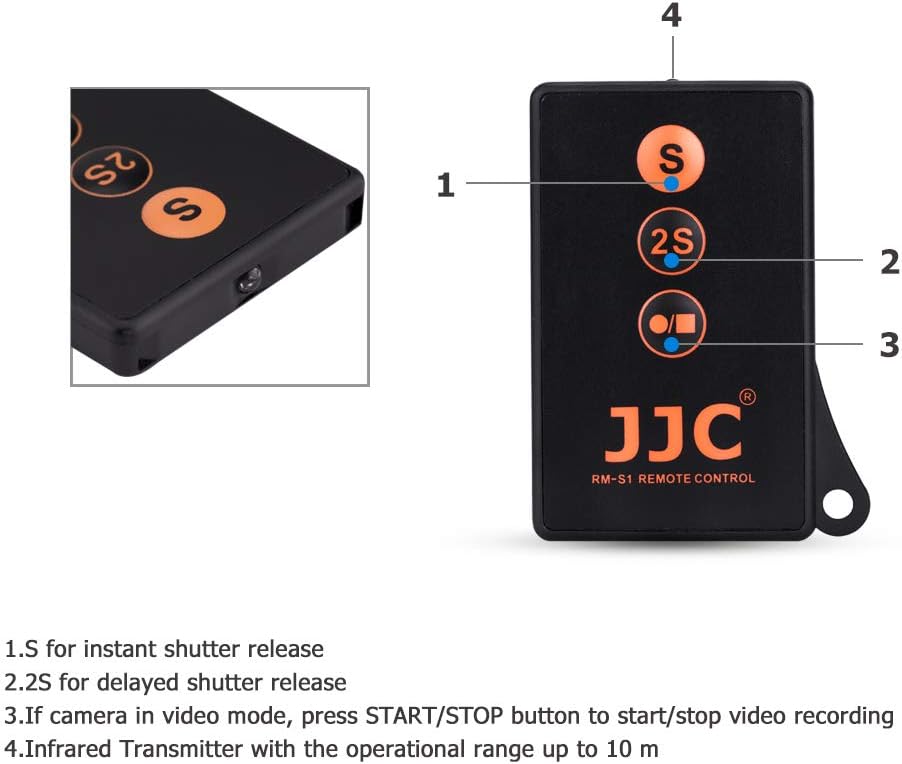
Figure 5.2: Remote Control Button Layout
- "S" Button (Instant Shutter Release): Press this button to immediately trigger the camera's shutter and take a photo.
- "2S" Button (2-Second Delayed Shutter Release): Press this button to activate a 2-second timer before the camera takes a photo. This is useful for self-portraits or to ensure you are ready for the shot.
- "START/STOP" Button (Video Recording): If your camera is set to video mode, press this button once to start video recording. Press it again to stop recording.
Note: The remote control does not change the camera's mode (e.g., from still to video). You must set the desired mode on your camera first.
6. Maintenance
6.1 Cleaning
To clean the remote control, use a soft, dry cloth. Do not use liquid cleaners or solvents, as they may damage the device.
6.2 Battery Replacement
If the remote control stops responding or its range decreases significantly, the CR-2025 battery may need to be replaced. Refer to Section 4.1 for battery installation instructions.
7. Troubleshooting
- Remote not working:
- Ensure the camera's IR remote control setting is enabled in its menu.
- Check if the battery is correctly installed and has sufficient charge. Replace if necessary.
- Make sure the remote is pointed directly at the camera's IR sensor.
- Verify that your camera model is compatible and has an IR sensor.
- Limited range:
- Ensure there are no obstructions between the remote and the camera's IR sensor.
- Replace the battery if it is low.
- Video recording not starting/stopping:
- Confirm that your camera is set to video recording mode. The remote only triggers recording, it does not change the camera's mode.
8. Specifications
| Feature | Detail |
|---|---|
| Product Dimensions | 2.17 x 1.26 x 0.01 inches |
| Item Weight | 0.423 ounces |
| Item Model Number | Topfoto RM-S1 |
| Brand | JJC |
| Special Feature | Ergonomic |
| Color | Sony RMT-DSLR1 Remote Replacement |
| Max Number of Supported Devices | 50 |
| Compatible Devices | Camera (Sony cameras with IR sensor) |
| Power Source | 1 x CR-2025 3V Battery |
| Operational Range | Up to 10 meters (32.8 feet) |
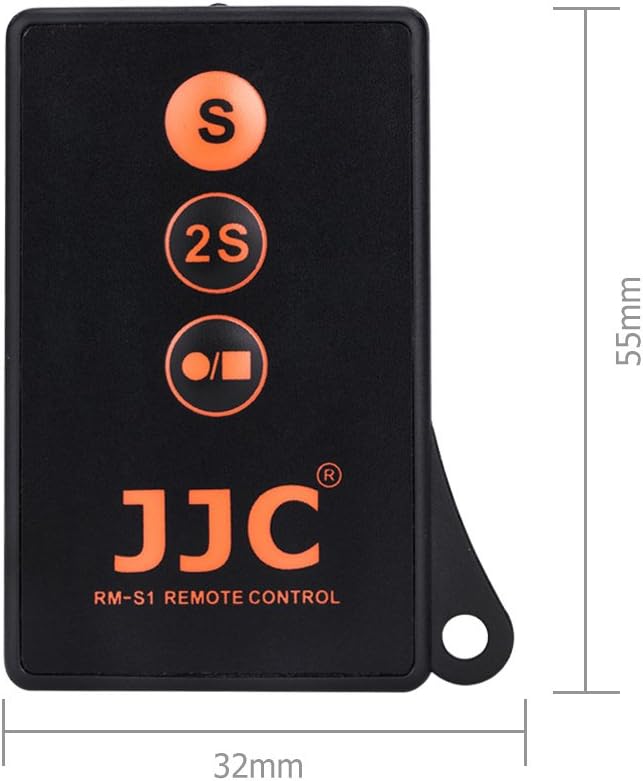
Figure 8.1: Remote Control Dimensions
9. Warranty and Support
JJC products are manufactured to high quality standards. For information regarding warranty coverage, technical support, or service inquiries, please refer to the product packaging or visit the official JJC website. Keep your purchase receipt as proof of purchase for warranty claims.
For further assistance, you may also contact the seller directly through the platform where the product was purchased.
Ask a question about this manual
Ask about setup, troubleshooting, compatibility, parts, safety, or missing instructions. Manuals+ will review the question and use this page’s manual context to help answer it.