
Cosmos TRO-05-M
Cosmos Trocar Sleeve with Trocar Pyramid Tip User Manual
Model: TRO-05-M | Brand: Cosmos
1. Introduction
This user manual provides essential information for the safe and effective use, maintenance, and care of the Cosmos Trocar Sleeve with Trocar Pyramid Tip. This device is designed for professional medical use and should only be handled by trained personnel. Please read this manual thoroughly before initial use.
2. Product Description and Features
The Cosmos Trocar Sleeve with Trocar Pyramid Tip is a precision surgical instrument. Key features include:
- Trocar Sleeve with Trocar Pyramid Tip, 5.5 mm, Multifunction.
- Handle made from plastic, ensuring it is lightweight and autoclavable for sterilization.
- Designed for easy 3-piece dismantling, facilitating thorough cleaning and sterilization.
- Features a rotating and dismantlable design for enhanced usability and maintenance.
- All handles, insulated shafts, and jaw inserts are interchangeable, offering versatility.

Figure 1: Assembled Cosmos Trocar Sleeve with Trocar Pyramid Tip. This image shows the complete instrument, highlighting its sleek design and the pyramid tip.
3. Setup and Assembly
The Cosmos Trocar Sleeve is designed for easy assembly and disassembly for cleaning. Ensure all components are clean and sterilized before assembly.
- Carefully unpack all components: the trocar sleeve, the trocar with pyramid tip, and the handle assembly.
- Inspect all parts for any signs of damage or wear. Do not use if any damage is observed.
- Align the trocar with the pyramid tip into the sleeve.
- Attach the handle assembly to the proximal end of the sleeve, ensuring it clicks securely into place. The rotating mechanism should allow smooth movement.
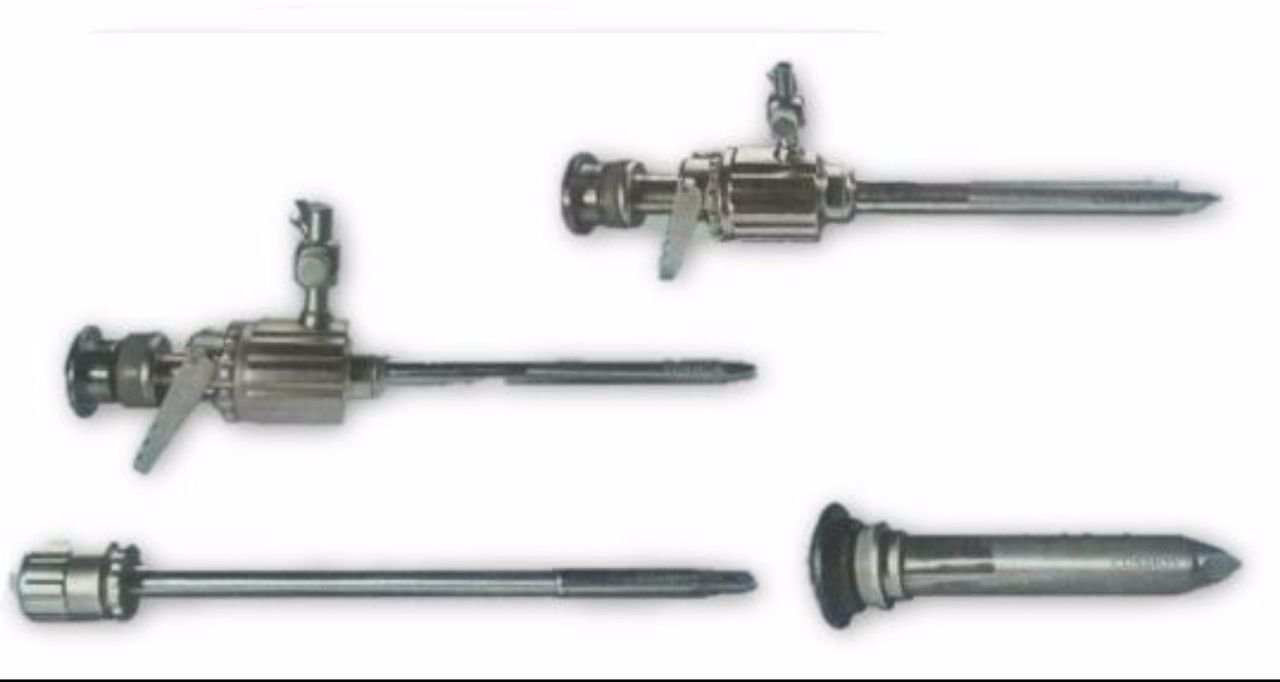
Figure 2: Disassembled and assembled components of the Cosmos Trocar Sleeve. This image illustrates the individual parts of the instrument, demonstrating its modular design for easy cleaning and reassembly.
4. Operating Instructions
This device is intended for use by qualified medical professionals in appropriate clinical settings. Adhere to standard surgical protocols and aseptic techniques.
- Ensure the instrument is properly assembled and sterilized prior to use.
- Handle the instrument with care to prevent damage to the tip or shaft.
- Follow established surgical procedures for trocar insertion and manipulation.
- Utilize the rotating feature of the handle as required by the surgical procedure.
- After use, immediately prepare the instrument for cleaning and sterilization as per the maintenance guidelines.
Safety Precautions:
- Always wear appropriate personal protective equipment (PPE).
- Handle sharp components with extreme caution to prevent accidental injury.
- Do not use the instrument if it appears damaged, dull, or corroded.
- Dispose of contaminated materials according to medical waste regulations.
5. Maintenance and Cleaning
Proper cleaning and sterilization are crucial for the longevity and safe use of the Cosmos Trocar Sleeve. The 3-piece dismantlable design facilitates thorough cleaning.
- Pre-cleaning: Immediately after use, wipe off gross contamination with a damp cloth. Do not allow blood or tissue to dry on the instrument.
- Disassembly: Carefully dismantle the instrument into its three main components: the handle, the sleeve, and the trocar with pyramid tip.
- Cleaning:
- Rinse all components under running water to remove loose debris.
- Clean thoroughly using a neutral pH enzymatic detergent and a soft brush. Pay special attention to crevices and internal lumens.
- Ensure all visible soil is removed.
- Rinsing: Rinse all components thoroughly with purified water to remove all detergent residues.
- Drying: Dry all components completely using a lint-free cloth or medical-grade drying equipment.
- Sterilization: The instrument is autoclavable. Follow validated steam sterilization cycles according to your facility's protocols and relevant standards (e.g., ISO 17665). Ensure proper loading to allow steam penetration.
- Storage: Store sterilized instruments in a clean, dry, and protected environment until ready for use.
6. Troubleshooting
This section addresses common issues that may arise during the use or maintenance of the Cosmos Trocar Sleeve.
| Problem | Possible Cause | Solution |
|---|---|---|
| Difficulty disassembling components. | Residue buildup; improper alignment. | Ensure all locking mechanisms are disengaged. Clean thoroughly to remove any dried residue. If persistent, do not force; contact support. |
| Instrument appears dull or corroded after sterilization. | Improper cleaning; incorrect sterilization parameters; use of harsh chemicals. | Review cleaning protocols, ensuring all detergent is rinsed off. Verify sterilization parameters (temperature, time, steam quality). Do not use abrasive cleaners. Discard if corrosion is significant. |
| Handle rotation is stiff. | Residue in rotating mechanism; lack of lubrication (if applicable). | Thoroughly clean the rotating parts. Ensure no debris is lodged. If lubrication is recommended by manufacturer (check product packaging/specific instructions), apply sparingly. |
If issues persist or if you encounter problems not listed here, please contact Cosmos customer support.
7. Specifications
- Brand: Cosmos
- Manufacturer: Cosmos
- Model Number: TRO-05-M
- ASIN: B06Y33V185
- First Available: 6 April 2017
- Material: Handle made from plastic (other parts likely medical-grade stainless steel, though not explicitly stated, common for such instruments).
- Sterilization Method: Autoclavable
8. Warranty and Support
For information regarding product warranty, repairs, or technical support, please contact Cosmos directly. Keep your purchase records, including the ASIN (B06Y33V185) and model number (TRO-05-M), readily available when contacting support.
Contact information for Cosmos can typically be found on their official website or through your medical supply distributor.
Related Documents - TRO-05-M
 |
Cosmos 3D Printer Resin Parameter Guide Comprehensive guide to Cosmos 3D printer resin parameters, including exposure times, layer thickness, and other settings for various printer models and resin types. |
 |
Políticas de Tratamiento de Datos Personales - CREDITO COSMOS S.A.S Documento que detalla las políticas de tratamiento de datos personales de CREDITO COSMOS S.A.S, abarcando su base legal, definiciones, principios, derechos de los titulares, deberes, procedimientos y medidas de seguridad. |
 |
COSMOS KOC901Lit Rechargeable LED Spotlight Flashlight - 10W+12W COB, 8000mAh Powerbank Detailed overview of the COSMOS KOC901Lit rechargeable LED spotlight flashlight. Features include 10W+12W COB lighting, 8000mAh Li-ion battery, Powerbank functionality, USB-C charging, and indicator lights. Ideal for various lighting needs. |
 |
Aviso de Privacidad - FYC CALZADO S.A.S (COSMOS) Aviso de Privacidad de FYC CALZADO S.A.S (COSMOS) sobre el tratamiento de datos personales conforme a la Ley Estatutaria 1581 de 2012 (LEPD), detallando finalidades, derechos del titular y datos de contacto. |
 |
FYC Calzado S.A.S. - Cláusula de Consentimiento Web y Política de Protección de Datos Cláusula de consentimiento web de FYC Calzado S.A.S. (COSMOS) que detalla el tratamiento de datos personales, finalidades, política de privacidad y derechos del titular. Incluye información sobre datos sensibles y menores de edad. |
 |
NEXT AVAL S.A.S - Políticas de Tratamiento de Datos Personales Políticas de Tratamiento de Datos Personales de NEXT AVAL S.A.S, detallando el marco legal, definiciones, principios de protección de datos, derechos de los titulares, deberes del responsable y encargado, medidas de seguridad, y procedimientos para el manejo de información personal. |
Ask a question about this manual
Ask about setup, troubleshooting, compatibility, parts, safety, or missing instructions. Manuals+ will review the question and use this page’s manual context to help answer it.