
1. Introduction
Thank you for choosing the Synergy Digital Replacement Battery. This Ni-MH 2.4 Volt, 500 mAh battery is designed to provide reliable power for your Vtech LS-6205 and Vtech BT-28443 compatible cordless phones. This manual provides essential information for the safe and efficient use of your new battery, including installation, operation, maintenance, and troubleshooting.
2. Setup and Installation
Follow these steps to properly install your new replacement battery into your cordless phone handset.
- Locate the Battery Compartment: Turn your cordless phone handset over. The battery compartment is typically located on the back or bottom of the handset.
- Remove the Battery Compartment Cover: Slide or lift the cover to open the compartment. You may need a small screwdriver for some models.
- Disconnect Old Battery: Carefully disconnect the old battery's connector from the phone's socket. Note the orientation of the connector.
- Remove Old Battery: Take out the old battery. Dispose of it responsibly according to local regulations.
- Insert New Battery: Place the new Synergy Digital battery into the compartment. Ensure the battery fits snugly.
- Connect New Battery: Connect the new battery's plug to the phone's socket. Ensure the connector is inserted correctly and securely. Do not force it.
- Replace Cover: Close the battery compartment cover until it clicks into place or is securely fastened.
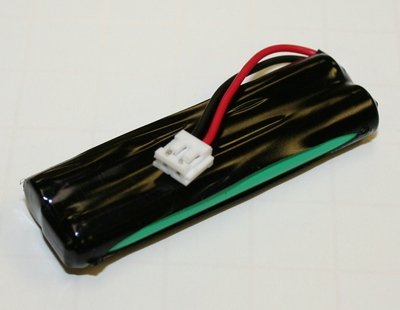
Image: The Synergy Digital Ni-MH 2.4V 500mAh replacement battery, ready for installation into a compatible Vtech cordless phone handset. This image shows the battery pack with its connector, illustrating the product's physical appearance.
3. Operating Instructions
Proper charging is crucial for optimal battery performance and longevity.
- Initial Charge: After installing the new battery, place the handset on its charging cradle for a continuous charge of at least 12-16 hours before its first use. This ensures the battery reaches its full capacity.
- Regular Charging: For daily use, return the handset to the charging cradle when not in use. The battery is designed to be continuously charged without overcharging.
- Battery Life: The actual talk time and standby time will vary based on usage patterns, phone features in use, and environmental factors.
4. Maintenance
To ensure the best performance and extend the life of your battery, follow these maintenance guidelines:
- Storage: If storing the battery for an extended period, charge it fully, then remove it from the phone. Store it in a cool, dry place. Recharge it every 3-6 months to prevent deep discharge.
- Cleaning: Keep the battery contacts and phone charging contacts clean. Use a dry, soft cloth to wipe away any dust or debris.
- Temperature: Avoid exposing the battery to extreme temperatures (hot or cold), as this can reduce its capacity and lifespan.
- Disposal: Do not dispose of batteries in household waste. Ni-MH batteries contain recyclable materials. Please dispose of them at an authorized recycling center.
5. Troubleshooting
If you encounter issues with your battery, refer to the following common problems and solutions:
- Phone Not Turning On After Battery Installation:
- Ensure the battery connector is securely plugged into the phone's socket.
- Verify the battery compartment cover is properly closed.
- Place the handset on the charging cradle for at least 30 minutes to provide an initial charge.
- Battery Not Charging:
- Check that the phone is correctly seated in the charging cradle and the charging indicator light (if any) is on.
- Ensure the charging cradle's power adapter is securely plugged into a working electrical outlet.
- Clean the charging contacts on both the handset and the cradle with a dry, soft cloth.
- Short Battery Life:
- Ensure the initial charge cycle (12-16 hours) was completed.
- Confirm the battery is being regularly returned to the charging cradle when not in use.
- Battery capacity naturally degrades over time and with extensive use. If the battery is old, consider replacing it.
6. Specifications
| Brand | Synergy Digital |
| Battery Type | Nickel-Metal Hydride (Ni-MH) |
| Voltage | 2.4 Volts |
| Capacity | 500 mAh |
| Compatibility | Vtech LS-6205, Vtech BT-28443 |
7. Warranty and Support
Synergy Digital products are manufactured to high-quality standards and come with a manufacturer's warranty. For specific warranty details, please refer to the packaging or the official Synergy Digital website. If you require technical assistance or have questions regarding your battery, please contact Synergy Digital customer support through their official channels.
Please retain this manual for future reference.