
1. Product Overview
This manual provides instructions for the SKMEI Digital Watch, a multifunctional electronic wristwatch designed for outdoor and daily use. It features a digital display, LED backlight, alarm, chronograph, stopwatch, automatic date, and complete calendar functions. The watch is water-resistant and shock-resistant, built with a durable plastic case and a comfortable PU resin band.
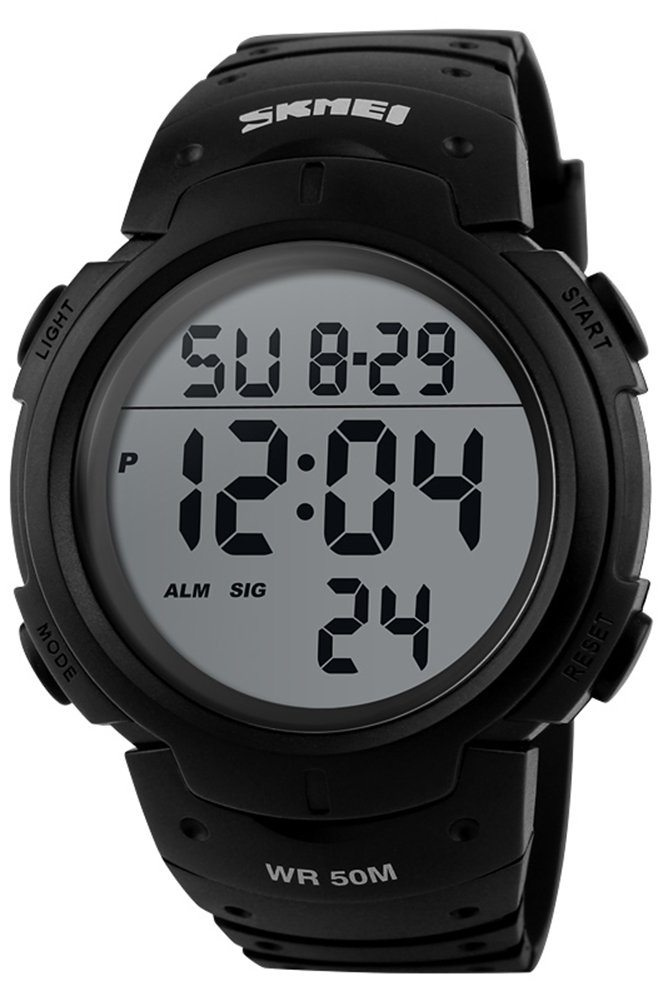
Image: Front view of the SKMEI Digital Watch displaying the time and date.
The watch is constructed with a Taiwan IC chip set for accurate timekeeping, a PC material shell for durability, and highly transparent resin glass for clear visibility and pressure resistance. It also features a stainless steel buckle and a Germany imported PU resin strap for comfort and environmental friendliness.
2. Button Functions
The SKMEI Digital Watch typically features four buttons for operation:
- LIGHT: Activates the LED backlight for visibility in low light conditions.
- MODE: Cycles through different modes (Time, Alarm, Stopwatch, Date).
- START: Used to start/stop functions in Stopwatch mode, or adjust settings in setting mode.
- RESET: Used to reset functions in Stopwatch mode, or select items in setting mode.

Image: Close-up of the watch face and surrounding buttons, indicating their labels.
3. Initial Setup and Time Setting
Follow these steps to set the time and date on your SKMEI Digital Watch:
- From the normal time display, press the MODE button three times to enter the time setting mode. The seconds digits will begin to flash.
- Press the RESET button to select the item you wish to adjust (seconds, hours, minutes, month, date, day of week).
- Use the START button to increase the selected value. Hold START to rapidly advance the digits.
- Once all settings are correct, press the MODE button to exit the setting mode and return to the normal time display.
To switch between 12-hour and 24-hour format, press the RESET button while the hour digits are flashing in time setting mode.
4. Operating Modes
4.1. Alarm Mode
To set the alarm:
- From the normal time display, press the MODE button once to enter Alarm mode.
- Press the RESET button to select hours or minutes.
- Use the START button to adjust the alarm time.
- Press MODE to confirm and exit.
To turn the alarm ON/OFF, press the START button while in Alarm mode. An alarm icon will appear/disappear on the display.
4.2. Stopwatch Mode
To use the stopwatch function:
- From the normal time display, press the MODE button twice to enter Stopwatch mode.
- Press START to begin timing.
- Press START again to pause timing.
- Press RESET to clear the stopwatch to zero.
- Press MODE to exit Stopwatch mode.
5. Maintenance and Care
5.1. Water Resistance
This watch is rated for 50M (5 ATM) water resistance. This means it is suitable for daily use, showering, swimming, and shallow diving. Do not press any buttons while the watch is submerged in water, as this can compromise the water seal and cause damage.

Image: Diagram highlighting the 50M water resistance and highly transparent resin glass features of the watch.
5.2. Cleaning
To clean your watch, wipe it with a soft, damp cloth. Avoid using harsh chemicals or abrasive materials, which can damage the case or band. For the PU resin strap, a mild soap solution can be used if necessary, followed by thorough rinsing and drying.

Image: Diagram highlighting the stainless steel buckle and the Germany imported PU resin strap.
5.3. Battery Replacement
The watch is powered by a standard watch battery (CR2025, as indicated on the back). Battery replacement should ideally be performed by a qualified watch technician to ensure the water resistance seal is properly maintained. If replacing the battery yourself, ensure the gasket is correctly seated before closing the case back.
6. Troubleshooting
- Display is blank or dim: The battery may be low or depleted. Replace the battery.
- Time is inaccurate: The watch may need to be reset or the battery may be weak. Follow the time setting instructions.
- Water inside the watch: If water appears inside the watch, stop using it immediately and have it inspected by a professional. This indicates a compromised water seal.
- Buttons are unresponsive: Ensure the watch is not in a locked mode (if applicable) or that no debris is obstructing the buttons. If the issue persists, a professional inspection may be required.
7. Specifications
| Feature | Specification |
|---|---|
| Movement Type | Digital |
| Case Material | Plastic |
| Watch Window Material | HD Acrylic / Highly Transparent Resin Glass |
| Band Material | PU Resin Plastic |
| Clasp Type | Buckle (Stainless Steel) |
| Case Diameter | 47 mm (1.85 inches) |
| Case Thickness | 14 mm (0.56 inches) |
| Band Width | 24 mm (0.94 inches) |
| Band Length | 25 cm (9.84 inches) |
| Water Resistance Depth | 50 Meters (5 ATM) |
| Power Source | Battery Powered (CR2025) |
| Functions | LED Backlight, Alarm, Chronograph, Stopwatch, Automatic Date, Complete Calendar |
| Net Weight | 60 g (2.11 oz) |

Image: Diagram highlighting the internal chip set and the durable PC material shell.
8. Warranty and Support
This product comes with a standard manufacturer's warranty. For specific warranty details, please refer to the documentation included with your purchase or contact SKMEI customer support. If you encounter any issues not covered in this manual, please reach out to the retailer or manufacturer for assistance.
Contact Information: Please refer to the packaging or the official SKMEI website for the most current customer support contact details.

Image: The SKMEI Digital Watch packaging, including the watch, box, and manual.