
1. Introduction
The Mitutoyo 500-709-20 Digital Caliper is a precision measuring instrument designed for accurate dimensional measurements. Featuring IP67 protection, it is dust-tight and resistant to water immersion, making it suitable for various industrial environments. This manual provides essential information for the safe and effective operation, maintenance, and care of your digital caliper.
2. Safety Information
- Always handle the caliper with care to maintain its accuracy. Avoid dropping or subjecting the instrument to impact.
- Do not attempt to disassemble the caliper, as this may void the warranty and damage internal components.
- Keep the caliper clean and dry when not in use, especially the measuring surfaces.
- Store the caliper in its protective case to prevent damage.
- Dispose of used batteries according to local regulations.
3. Product Overview
The Mitutoyo 500-709-20 Digital Caliper features an Absolute Digimatic system, ensuring reliable measurements. Its IP67 rating provides excellent protection against dust and water, making it suitable for use in harsh conditions.
Key Components:
- Measuring Jaws: For external and internal measurements.
- Digital Display: Shows measurement readings.
- ORIGIN Button: Sets the origin point for absolute measurement.
- ON/OFF Button: Powers the unit on or off.
- ZERO/ABS Button: Sets the display to zero at any position for incremental measurement, or switches between absolute and incremental modes.
- Depth Bar: For depth measurements.

The image displays the Mitutoyo 500-709-20 Digital Caliper partially submerged in water, highlighting its IP67 rating for dust and water resistance. This feature allows for reliable operation in challenging industrial conditions.

A detailed technical drawing of the Mitutoyo 500-709-20 Digital Caliper, illustrating its overall length of 233mm and jaw dimensions. This diagram is useful for understanding the physical characteristics and clearances of the instrument.
4. Setup
4.1 Battery Installation
- Locate the battery compartment cover on the back of the display unit.
- Use a small screwdriver or coin to open the cover.
- Insert one LR44 battery with the positive (+) side facing up.
- Replace the battery compartment cover securely.
4.2 Initial Power-On and Zero Setting
- Press the ON/OFF button to power on the caliper.
- Close the measuring jaws completely.
- Press the ORIGIN button. The display should show '0.00'. This sets the absolute origin point.
- Alternatively, press the ZERO/ABS button to set the display to zero at any desired position for incremental measurements.
5. Operating Instructions
5.1 External Measurement
- Ensure the caliper is clean and the jaws are free of debris.
- Open the external measuring jaws wider than the object to be measured.
- Place the object between the jaws and gently close them until they make firm contact with the object.
- Read the measurement directly from the digital display.
5.2 Internal Measurement
- Insert the internal measuring jaws into the opening of the object.
- Open the jaws until they make firm contact with the internal surfaces.
- Read the measurement from the digital display.
5.3 Depth Measurement
- Place the end face of the main scale on the top surface of the object.
- Extend the depth bar into the hole or recess until it touches the bottom.
- Read the measurement from the digital display.
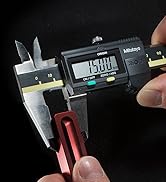
This image shows a user holding the Mitutoyo digital caliper, actively measuring the external dimension of a small component. The digital display shows a measurement reading.
6. Maintenance
6.1 Cleaning
- Wipe the caliper clean with a soft, dry cloth after each use.
- For stubborn dirt, use a cloth lightly dampened with isopropyl alcohol. Avoid harsh chemicals or abrasive cleaners.
- Ensure no liquid enters the display or battery compartment.
6.2 Battery Replacement
When the display becomes dim or shows an error, replace the LR44 battery as described in Section 4.1. Always use a fresh, high-quality battery.
6.3 Storage
Store the caliper in its original protective case in a dry, temperature-controlled environment. Avoid exposure to direct sunlight, extreme temperatures, or high humidity.
7. Troubleshooting
- Display not working: Check battery installation. Replace battery if necessary.
- Inaccurate readings: Clean measuring surfaces. Ensure jaws are fully closed when setting origin. Avoid excessive force during measurement.
- Display flickering or erratic: Replace battery. Ensure the caliper is not exposed to strong electromagnetic fields.
- Jaws not moving smoothly: Clean the sliding surfaces. Apply a very small amount of light machine oil if necessary, wiping off any excess.
8. Specifications
| Feature | Specification |
|---|---|
| Model Number | 500-709-20 |
| Measurement Range | 0-150 mm |
| Accuracy | +/- 0.01 mm |
| Resolution | 0.01 mm |
| IP Rating | IP67 (Dust-tight, resistant to water immersion) |
| Material | Stainless Steel |
| Battery Type | 1 x LR44 (included) |
| Product Dimensions (L x W x H) | 23.3 x 7.3 x 1.6 cm |
| Weight | 400 grams |
| Origin of Manufacture | Japan |
9. Warranty and Support
For detailed warranty information, technical support, and service inquiries, please refer to the official Mitutoyo website or contact your local authorized Mitutoyo distributor. Keep your purchase receipt as proof of purchase for warranty claims.


