
Introduction
This manual provides detailed instructions for the safe and proper installation, operation, and maintenance of your Insignia NS-HTVMT1702-C Tilting TV Wall Mount. Please read all instructions carefully before beginning installation to ensure correct setup and to prevent damage to the product or injury.
The Insignia NS-HTVMT1702-C is designed to securely mount flat panel televisions ranging from 33 to 46 inches in size, with a maximum weight capacity of 55 kg (121 lbs). Its tilting feature allows for optimal viewing angle adjustment and easier access to TV ports.
Safety Information
WARNING: Improper installation or use of this product can result in serious injury or property damage. If you do not understand these instructions or have doubts about the safety of the installation, consult a qualified professional installer.
- Ensure the mounting surface can safely support the combined weight of the mount and the television.
- Do not exceed the maximum weight capacity of 55 kg (121 lbs).
- This product is intended for indoor use only.
- Use only the hardware provided or specified by the manufacturer.
- Always have at least two people for installation to prevent injury or damage.
- Verify that there are no hidden electrical wires, plumbing, or gas lines in the wall before drilling.
Package Contents
Carefully unpack the box and ensure all components are present and undamaged. If any parts are missing or damaged, do not attempt to install the mount. Contact customer service for assistance.

Image: Front view of the Insignia NS-HTVMT1702-C Tilting TV Wall Mount, showing the wall plate and two vertical TV brackets with pull cords.
The package typically includes:
- Wall Plate (main horizontal bar for wall attachment)
- TV Brackets (two vertical bars that attach to the TV)
- Mounting Hardware (various screws, washers, spacers for wall and TV attachment)
- Instruction Manual (this document)
Specifications
| Feature | Specification |
|---|---|
| Model Number | NS-HTVMT1702-C |
| TV Size Compatibility | 33" - 46" flat panel TVs |
| Maximum Weight Capacity | 55 kg (121 lbs) |
| VESA Mounting Patterns | 200x200, 400x200, 400x300, 400x400, 600x400 |
| Mount Type | Tilting Wall Mount |
| Tilt Range | Adjustable (specific degrees not provided, but generally up/down) |
Setup and Installation
Tools Required (Not Included):
- Stud finder
- Drill with appropriate drill bits
- Level
- Phillips head screwdriver
- Socket wrench
- Pencil
- Measuring tape
Step 1: Prepare the TV Brackets
- Carefully place your TV face-down on a soft, clean surface to prevent screen damage.
- Identify the VESA mounting holes on the back of your TV.
- Select the correct screws, washers, and spacers from the provided hardware that fit your TV's mounting holes. Ensure the screws are not too long, which could damage internal components.
- Attach the two vertical TV brackets to the back of your TV using the selected hardware. Ensure they are securely fastened and evenly spaced. The pull cords should hang freely below the TV.
Step 2: Mount the Wall Plate
- Determine the desired height for your TV. Mark the center of where the TV will be.
- Use a stud finder to locate two adjacent wooden studs in your wall. Mark their centers. The wall plate must be mounted to at least two studs for secure installation.
- Hold the wall plate against the wall at the desired height, aligning its center with your TV's desired center, and ensuring the mounting holes align with the marked stud centers. Use a level to ensure the wall plate is perfectly horizontal.
- Mark the drill points through the wall plate's holes onto the wall.
- Drill pilot holes into the studs at the marked locations. The size of the drill bit should match the lag bolts provided.
- Secure the wall plate to the wall using the lag bolts and washers. Tighten them firmly with a socket wrench, but do not overtighten.
Step 3: Hang the TV
- With assistance, carefully lift the TV with the attached brackets.
- Hook the TV brackets onto the top edge of the wall plate. Ensure both brackets are securely seated on the wall plate.
- Gently lower the TV until the brackets engage with the wall plate. The automatic safety lock mechanism will secure the TV in place. You should hear a click or feel it lock.
- Pull the release cords (hanging below the TV) to ensure they are functional and can disengage the lock if needed. Release the cords to re-engage the lock.
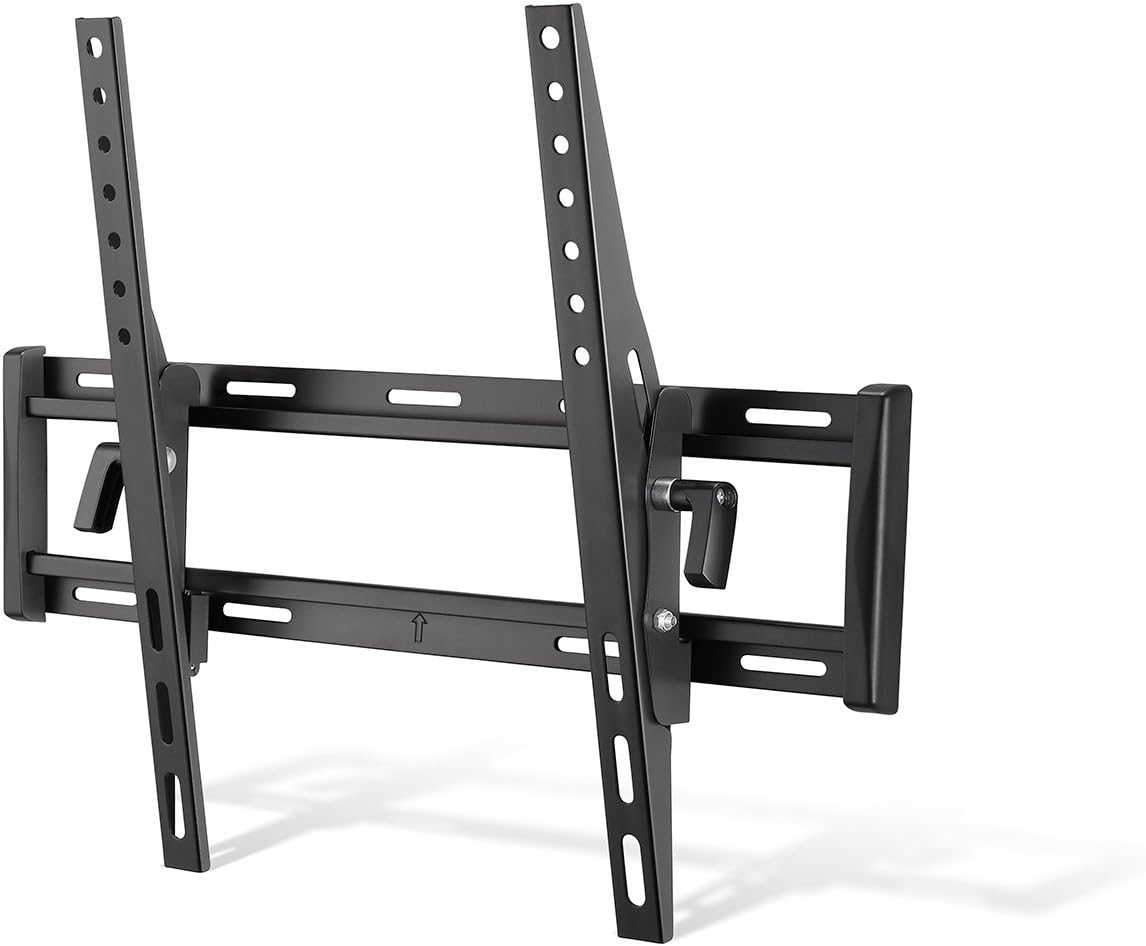
Image: Angled view of the mounted TV brackets on the wall plate, illustrating how the TV hooks onto the mount and the tilting pivot point.
Operating the Tilting Feature
The Insignia NS-HTVMT1702-C mount allows you to adjust the vertical viewing angle of your TV without tools.
- To tilt the TV, simply grasp the top or bottom edge of the TV and gently push or pull to achieve the desired angle.
- The friction-based tilting mechanism will hold the TV in position once released.
- This feature is particularly useful for reducing glare or optimizing viewing from different seating positions, especially if the TV is mounted higher on the wall.

Image: Side profile of the TV wall mount, demonstrating the downward tilt capability of the television.
Lateral Adjustment:
After installation, the TV can be adjusted laterally (left or right) along the wall plate to fine-tune its horizontal position. Simply slide the TV gently along the wall plate until it is centered as desired.
Maintenance
- Cleaning: Wipe the mount with a soft, dry cloth. Do not use abrasive cleaners or solvents.
- Periodic Checks: Periodically check all screws and bolts to ensure they remain tight and secure. Over time, vibrations or movement can cause fasteners to loosen.
- Damage: If any part of the mount becomes damaged, discontinue use and contact customer support.
Troubleshooting
Problem: TV is not level.
Solution: Ensure the wall plate was installed perfectly level. If the wall plate is level, some mounts allow for minor post-installation leveling adjustments on the TV brackets. Refer to the specific design of your TV brackets for this possibility. If not, the wall plate may need to be re-adjusted.
Problem: TV does not tilt smoothly or stays in position.
Solution: The tilting mechanism is friction-based. Ensure no cables are obstructing the movement. If the tilt is too loose or too stiff, check if there are any adjustable tension bolts on the tilting arms (refer to the physical mount for specific adjustment points, if any). This model is designed for tool-free adjustment, so excessive force should not be required.
Problem: TV cannot be removed from the wall plate.
Solution: Ensure the safety release cords are fully pulled downwards to disengage the locking mechanism. If the cords are stuck, gently wiggle the TV while pulling the cords. Do not force the TV off the mount.
Warranty and Support
For warranty information and customer support, please refer to the warranty card included with your product or visit the official Insignia website. Keep your purchase receipt as proof of purchase for any warranty claims.
For technical assistance or inquiries, please contact Insignia customer service.