1. Introduction
Thank you for purchasing the S.M.S.L M8A Digital-to-Analog Converter (DAC). The M8A is an advanced audio device designed to convert digital audio signals into high-fidelity analog sound. Featuring the ES9028Q2M DAC chipset and XMOS-XCroe 200 Xu208 USB receiver, it supports high-resolution audio formats including PCM up to 768 kHz and native DSD512. This manual provides detailed instructions for the proper setup, operation, and maintenance of your M8A DAC to ensure optimal performance and longevity.
2. Safety Information
- Read all instructions carefully before operating the device.
- Do not expose the device to water, moisture, or extreme temperatures.
- Ensure proper ventilation around the unit to prevent overheating.
- Use only the specified power adapter.
- Do not attempt to disassemble or repair the unit yourself. Refer all servicing to qualified personnel.
- Keep the device away from strong magnetic fields.
- Unplug the device during lightning storms or when unused for long periods.
3. Package Contents
Please check the package carefully for the following items:
- S.M.S.L M8A DAC Unit (x1)
- USB Cable (x1) (Assumed, common for DACs)
- Power Adapter (x1) (Assumed, common for DACs)
- User Manual (x1)

Image: S.M.S.L M8A product packaging box, indicating the contents are securely packed.
4. Product Overview
4.1 Front Panel

Image: Front view of the S.M.S.L M8A DAC, showing the power button, display screen, and input/menu button.
- Power Button: Located on the left, press to turn the unit on or off.
- Display Screen: Central display showing current input, sampling rate, and other operational information.
- Input/Menu Button: Located on the right, press to cycle through inputs or navigate menu options.
4.2 Rear Panel
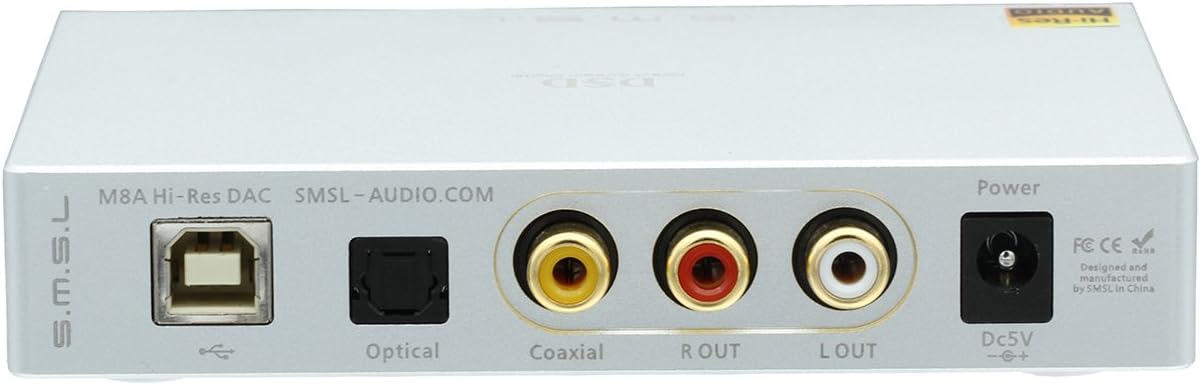
Image: Rear view of the S.M.S.L M8A DAC, showing all input and output ports.
- USB Input: For connecting to a computer or other USB audio source.
- Optical Input: For connecting digital audio sources via optical cable.
- Coaxial Input: For connecting digital audio sources via coaxial cable.
- RCA Analog Output (L/R): For connecting to an amplifier, preamplifier, or active speakers.
- DC 5V Power Input: For connecting the external power adapter.
4.3 Internal Components

Image: Internal view of the S.M.S.L M8A DAC circuit board, highlighting the XMOS and ESS components.
The S.M.S.L M8A features an advanced internal design for high-fidelity audio reproduction. Key components include the ESS ES9028Q2M DAC chip for precise digital-to-analog conversion and the XMOS-XCroe 200 Xu208 USB receiver for robust USB audio processing. An ultra-low clock jitter independent clock system with ultra-low phase noise crystal ensures accurate timing for audio signals. The power supply design incorporates ultra-low noise LDOs for optimal performance.
5. Setup
- Power Connection: Connect the provided power adapter to the DC 5V input on the rear panel of the M8A, then plug the adapter into a suitable power outlet.
- Analog Output Connection: Connect the RCA analog outputs (L/R) of the M8A to the analog inputs of your amplifier, preamplifier, or active speakers using high-quality RCA cables. Ensure correct left and right channel connections.
- Digital Input Connection: Choose one of the following digital input methods:
- USB: Connect a USB cable from your computer's USB port to the USB input on the M8A. For Windows users, a customized driver may be required for optimal performance and DSD playback. Please visit the S.M.S.L official website for driver downloads.
- Optical: Connect an optical cable from your digital audio source (e.g., CD player, TV, game console) to the Optical input on the M8A.
- Coaxial: Connect a coaxial cable from your digital audio source to the Coaxial input on the M8A.
- Power On: Press the power button on the front panel of the M8A. The display will illuminate.
6. Operating
- Input Selection: Press the Input/Menu button on the front panel to cycle through the available digital inputs: USB, Optical, and Coaxial. The selected input will be displayed on the screen.
- Playback: Start playing audio from your connected digital source. The M8A will automatically detect the incoming signal and display the sampling rate on its screen.
- Digital Filter Settings: The M8A allows for selection of different digital filter modes to fine-tune the sound characteristics. To access these settings, press and hold the Input/Menu button until the menu appears. Use the same button to navigate through options and select your preferred filter. The device will automatically remember your setting.
- Power Off: Press the power button to turn off the unit when not in use.
7. Maintenance
- Cleaning: Use a soft, dry cloth to clean the exterior of the unit. Do not use liquid cleaners or abrasive materials.
- Storage: If storing the unit for an extended period, disconnect it from power and store it in a cool, dry place away from direct sunlight.
- Ventilation: Ensure that the ventilation openings are not blocked to prevent overheating.
8. Troubleshooting
| Problem | Possible Cause | Solution |
|---|---|---|
| No power | Power adapter not connected or faulty; power outlet issue. | Check power connections. Try a different power outlet. Ensure the power button is pressed. |
| No sound output | Incorrect input selected; cables not connected properly; amplifier/speakers off or muted; driver issue (USB). | Verify the correct input is selected on the M8A. Check all cable connections. Ensure your amplifier/speakers are on and not muted. Reinstall USB drivers if using USB input. |
| Distorted sound | Incorrect sampling rate setting; faulty cable; source issue. | Check the sampling rate on your source device. Try replacing audio cables. Test with a different audio source. |
| Unit gets hot | Insufficient ventilation. | Ensure adequate airflow around the unit. Do not place it in an enclosed space. |
9. Specifications
| Feature | Detail |
|---|---|
| Model | M8A (Item Model Number: 4331040488) |
| DAC Chipset | ESS ES9028Q2M |
| USB Receiver | XMOS-XCroe 200 Xu208 |
| Inputs | USB, Optical, Coaxial |
| Output | RCA Analog Output |
| PCM Sampling Rate | Up to 768 kHz |
| DSD Support | DSD512 (Native DSD) |
| Optical/Coaxial Sampling Rate | 44.1 / 48 / 88.2 / 96 / 176.4 / 192 kHz |
| Dynamic Range | 125 dB |
| SNR (Signal-to-Noise Ratio) | 117 dB |
| THD + N (Total Harmonic Distortion + Noise) | <0.0004% |
| Dimensions (L x W x H) | 4.72 x 3.86 x 0.87 inches (120 x 98 x 22 mm) |
| Item Weight | 1 pound (0.45 kg) |
| Manufacturer | Shenzhen Shuangmusanlin Electronic Co.,Ltd |
10. Warranty and Support
For warranty information and technical support, please refer to the warranty card included with your product or contact your authorized S.M.S.L dealer or the manufacturer directly.
Manufacturer: Shenzhen Shuangmusanlin Electronic Co.,Ltd
For the latest drivers and product information, please visit the official S.M.S.L website.