
Technical Precision ABR 2600
Technical Precision Replacement Light Bulb for Bell & Howell ABR 2600 User Manual
Model: ABR 2600
Introduction
This manual provides essential information for the safe and effective use of your Technical Precision replacement light bulb for the Bell & Howell ABR 2600 projector. Please read this manual thoroughly before installation and operation.
Safety Information
- Always disconnect power to the device before attempting to replace the bulb.
- Allow the old bulb to cool completely before handling to prevent burns.
- Avoid touching the new bulb's glass surface with bare hands. Oils from skin can create hot spots and reduce bulb life. Use a clean cloth or gloves.
- Dispose of old bulbs according to local regulations.
- Ensure the replacement bulb matches the specifications of the original bulb to prevent damage to the projector.
Product Overview
The Technical Precision replacement light bulb is an incandescent bulb designed for compatibility with the Bell & Howell ABR 2600 projector. It operates at 150 watts and features a 'T' shape size.
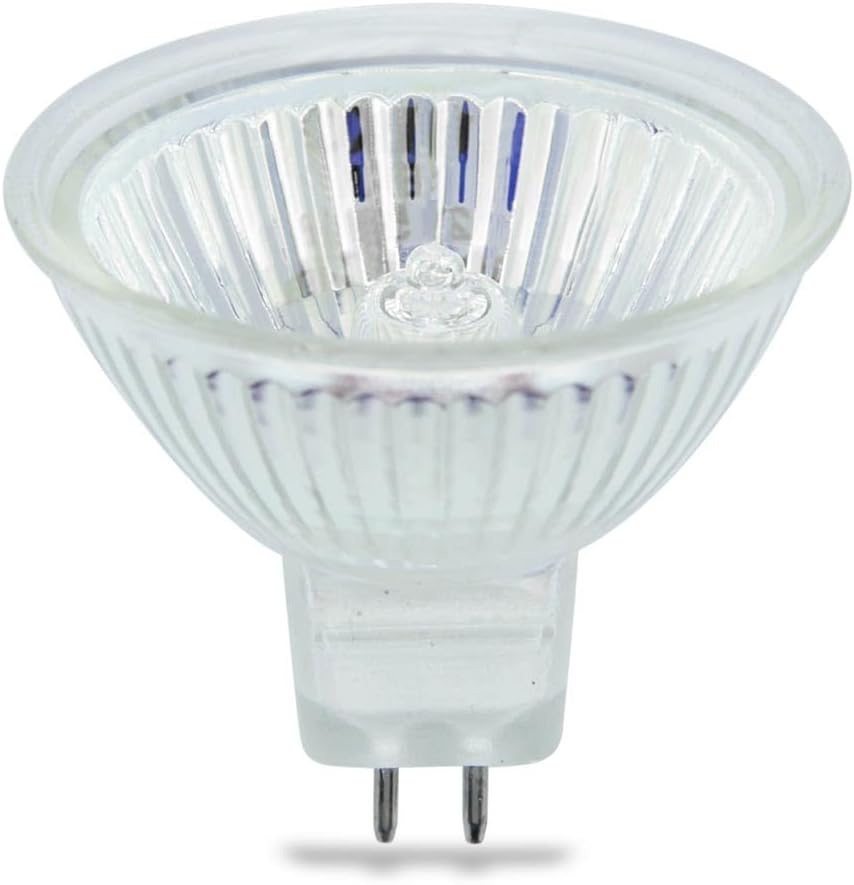
Figure 1: Front view of the Technical Precision replacement light bulb. This image shows the clear glass bulb with a ribbed reflector and two metal pins extending from the base for electrical connection.
Setup and Installation
- Power Disconnection: Ensure the Bell & Howell ABR 2600 projector is turned off and unplugged from the power source.
- Cool Down: Allow the projector and the old bulb to cool down completely. This may take several minutes.
- Access Bulb Compartment: Refer to your Bell & Howell ABR 2600 projector's original manual for instructions on how to safely open the bulb compartment. This usually involves unscrewing a panel or opening a latch.
- Remove Old Bulb: Carefully grasp the old bulb (using a cloth or gloves if still warm) and gently pull it straight out from its socket. Avoid twisting or forcing it.
- Install New Bulb: Holding the new Technical Precision bulb by its base or with a clean cloth/gloves, align the two pins with the corresponding holes in the projector's socket. Gently push the bulb straight in until it is firmly seated. Do not force the bulb.
- Secure Compartment: Close and secure the bulb compartment cover according to your projector's instructions.
- Power Connection: Plug the projector back into the power source.

Figure 2: Side view of the replacement light bulb. This angle highlights the compact design and the two-pin base, crucial for proper insertion into the projector socket.
Operating Instructions
Once the replacement bulb is installed, operate your Bell & Howell ABR 2600 projector as per its original operating manual. The Technical Precision bulb is designed to function as a direct replacement, providing the necessary illumination for your projector.
- Turn on the projector using its power button.
- Allow a few moments for the bulb to reach full brightness.
- When finished, turn off the projector and allow it to cool down before moving or storing.
Maintenance
- Cleaning: If the bulb's glass surface becomes dusty, gently wipe it with a clean, dry, lint-free cloth. Avoid using liquid cleaners.
- Handling: Always handle the bulb by its base or with a clean cloth/gloves to prevent oil transfer from skin, which can shorten bulb life.
- Storage: If storing a spare bulb, keep it in its original protective packaging in a cool, dry place.
Troubleshooting
| Problem | Possible Cause | Solution |
|---|---|---|
| Bulb does not light up. | Bulb not properly seated; projector not receiving power; bulb is faulty. | Ensure projector is plugged in and powered on. Re-seat the bulb firmly in its socket. If problem persists, the bulb may be faulty and require replacement. |
| Dim or flickering light. | Bulb nearing end of life; poor connection; dust accumulation. | Check bulb seating. Clean any dust from the bulb and projector's ventilation. If the issue persists, the bulb may need replacement. |
| Projector overheats. | Blocked ventilation; incorrect bulb wattage. | Ensure projector ventilation is clear. Verify that the installed bulb is 150 watts, matching the projector's requirement. |
Specifications
- Brand: Technical Precision
- Model Compatibility: Bell & Howell ABR 2600
- Light Type: Incandescent
- Wattage: 150 watts
- Bulb Shape Size: T
- Special Feature: Energy Efficient

Figure 3: Top-down view of the replacement light bulb. This perspective shows the circular reflector and the central filament, which is the light-emitting component.
Warranty and Support
For information regarding warranty coverage or technical support for your Technical Precision replacement light bulb, please contact Technical Precision directly through their official website or the retailer where the product was purchased.
Contact Information:
- Brand Store: Technical Precision Amazon Store
- Refer to your purchase documentation for specific warranty terms.